
- What Is the REST API in WordPress?
- Why You Need to Secure the REST API
- How wp-json and the REST API Are Connected
- How to Secure the REST API with WP Ghost
- What Happens After You Secure the REST API
- Troubleshooting
- Frequently Asked Questions
- Will disabling the REST API break the block editor?
- Does this work with WooCommerce?
- Do I still need XML-RPC? When should I NOT disable it?
- What is the rest_route parameter and why should I disable it?
- What’s the difference between the REST API and admin-ajax.php?
- Will this affect SEO?
- Does WP Ghost modify WordPress core files?
- Related Tutorials
Secure the WordPress REST API by changing the wp-json path, disabling unauthenticated access, blocking the rest_route parameter, disabling XML-RPC, and removing the RSD endpoint with WP Ghost. The REST API is WordPress’s modern communication layer. It’s also one of the most exploited endpoints – from user enumeration through /wp-json/wp/v2/users to content injection to brute force authentication. WP Ghost gives you eight protections to lock it down.
What Is the REST API in WordPress?

The WordPress REST API (Representational State Transfer Application Programming Interface) is the system that lets external applications communicate with your WordPress site. It’s how mobile apps fetch your posts, how headless frontends render your content, and how third-party tools create, edit, and delete data on your site programmatically.
By default, the REST API is accessible at: https://yourdomain.com/wp-json/
Visit that URL on any default WordPress site and you’ll see a JSON response listing every available API namespace and endpoint. That includes endpoints for posts, pages, users, comments, taxonomies, and media. The block editor (Gutenberg) relies on these endpoints for its entire editing experience. Many plugins use them for AJAX-like functionality. And any third-party app that connects to your site – from Zapier to mobile apps to analytics dashboards – communicates through this API.
The problem? The same endpoints that power legitimate functionality are also open to unauthenticated requests by default. That means bots, scanners, and attackers can query your REST API without logging in.
Why You Need to Secure the REST API
The REST API is one of the largest attack surfaces in modern WordPress. Unlike admin-ajax.php (which handles older-style AJAX requests), the REST API is designed to expose structured data – and by default, it exposes too much. Here’s why securing it is critical for your hack prevention strategy:
It exposes your entire user list by default. The endpoint /wp-json/wp/v2/users returns a JSON array of all authors on your site, including their usernames (slugs), display names, and user IDs. This is user enumeration on a silver platter. No guessing needed, no brute force required – one unauthenticated GET request returns everything. Combined with hiding author IDs, securing the REST API shuts down the most common username discovery methods.
Content injection has been exploited at scale. In 2017, a critical REST API vulnerability in WordPress 4.7.0 and 4.7.1 allowed unauthenticated attackers to modify the content of any post or page by sending crafted requests to the REST API. The WordPress security team patched it silently, but within days of the disclosure, over 1.5 million pages were defaced across tens of thousands of sites. The attack was trivial – a single HTTP request. Changing the wp-json path makes these exploit scripts target a URL that doesn’t exist on your site.
It confirms WordPress to every scanner. The /wp-json/ path is a WordPress identifier as strong as /wp-admin/ or /wp-includes/. Any response from this path confirms WordPress as your CMS and reveals your API structure. Bots check this endpoint early in their reconnaissance process.
XML-RPC is a parallel API with the same risks. Before the REST API existed, WordPress used XML-RPC (xmlrpc.php) for remote publishing, pingbacks, and third-party communication. It’s still active by default and is heavily abused for brute force attacks (sending hundreds of password guesses in a single request) and DDoS amplification through pingback abuse. Most sites don’t need it at all, and disabling it removes a major attack vector.
How wp-json and the REST API Are Connected
wp-json is the URL path. The REST API is the system. They’re two sides of the same coin.
The default base route for the WordPress REST API is /wp-json/. Every API endpoint starts with this base: /wp-json/wp/v2/posts retrieves posts, /wp-json/wp/v2/users lists users, /wp-json/wp/v2/comments returns comments. Plugins add their own endpoints under custom namespaces too – WooCommerce uses /wp-json/wc/v3/, Yoast uses /wp-json/yoast/v1/.
When you change the wp-json path in WP Ghost, you’re changing the REST API base route. All endpoints update to use the new path. The old /wp-json/ URL can then be hidden or blocked entirely.
WordPress also supports an alternative access method through the rest_route query parameter (e.g., yourdomain.com/?rest_route=/wp/v2/users). This is a fallback for servers that don’t support custom URL structures. Attackers know about this backdoor. WP Ghost lets you disable it separately.
How to Secure the REST API with WP Ghost
WP Ghost offers eight protections under the API Security tab. Each addresses a different attack vector. For maximum protection, configure all of them.
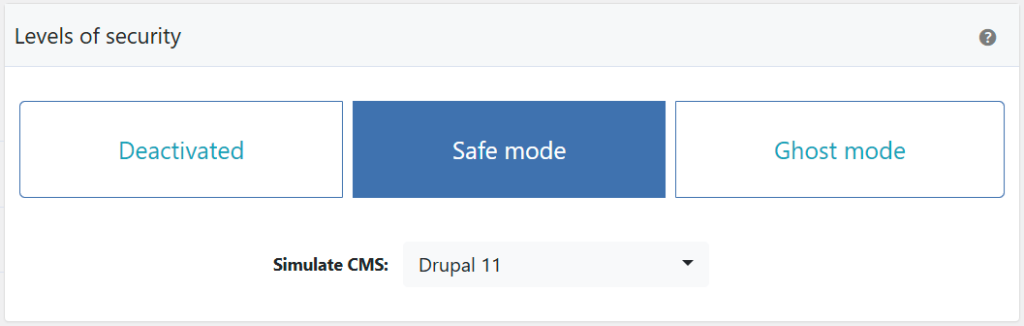
Activate Safe Mode or Ghost Mode
Before you can change any paths, one of WP Ghost’s security levels must be active.
- Go to WP Ghost > Change Paths > Level of Security.
- Select Safe Mode or Ghost Mode.
- Click Save to apply.
Need help choosing? Check the Safe Mode vs Ghost Mode comparison.
Change the wp-json Path
This replaces the /wp-json/ base route with a custom name. All REST API endpoints update automatically – plugin namespaces, core endpoints, and any custom endpoints all use the new base. The old /wp-json/ URL can then be blocked.
- Go to WP Ghost > Change Paths > API Security.
- Find the Custom wp-json Path field.
- Enter a different name or keep the predefined one.
- Click Save to apply.

Good to know: WP Ghost doesn’t physically change any files. The REST API handler stays in the same location. WP Ghost uses rewrite rules to create the custom path. Deactivating WP Ghost restores the default /wp-json/ path instantly.
Update the Permalink Settings
After changing the wp-json path, WordPress may need a moment to register the new route. To force the update:
- Go to Settings > Permalinks.
- Click Save Changes (you don’t need to change anything – just re-save).
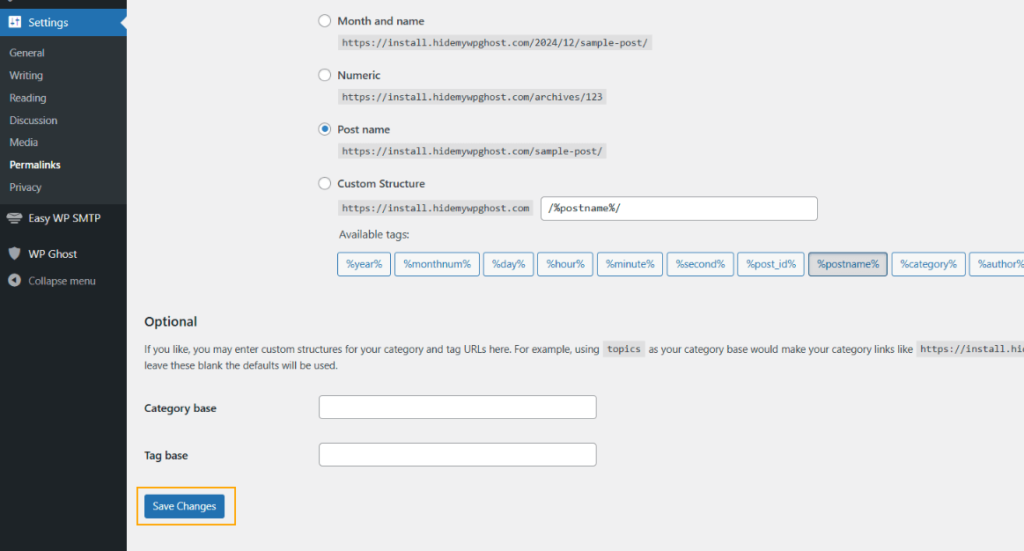
This flushes the rewrite rules and ensures WordPress recognizes the new API path. Do this immediately after changing the wp-json path.
Hide the REST API URL Link
By default, WordPress advertises the REST API URL in your site’s HTML header as a <link> tag. This tells bots exactly where your API lives – even if you’ve changed the path. This option removes that header tag.
- Go to WP Ghost > Change Paths > API Security.
- Switch on Hide REST API URL Link.
- Click Save to apply.

This hides the URL but doesn’t block API access. If you want to block unauthenticated access entirely, use the next option.
Disable REST API Access
This blocks non-logged-in users from accessing the REST API entirely. Bots and visitors get a 404. Logged-in users (administrators, editors, etc.) can still use the API normally, so the block editor and admin functions are unaffected.
- Go to WP Ghost > Change Paths > API Security.
- Switch on Disable REST API Access.
- Click Save to apply.


Important: If you use third-party services that connect to your site’s REST API (analytics tools, marketing platforms, mobile apps, Zapier, etc.), you’ll need to whitelist their IP addresses. Go to WP Ghost > Firewall > Whitelist, add the service’s IP addresses, and click Save. This ensures trusted services can still access the API while blocking everyone else.
Disable rest_route Parameter Access
WordPress supports a backdoor to the REST API through the rest_route query parameter. Even if you change the wp-json path, someone can access the API through yourdomain.com/?rest_route=/wp/v2/users. This option blocks that fallback.
- Go to WP Ghost > Change Paths > API Security.
- Switch on Disable rest_route Parameter Access.
- Click Save to apply.

With both the wp-json path changed and the rest_route parameter disabled, there’s no way for unauthenticated users to reach your REST API through default WordPress methods.
Disable XML-RPC Access
XML-RPC (xmlrpc.php) is WordPress’s legacy remote communication protocol. It predates the REST API and is rarely needed by modern sites. However, it’s one of the most abused endpoints in WordPress – used for brute force attacks (the system.multicall method lets attackers send hundreds of login attempts in a single request) and DDoS amplification through pingback abuse.
- Go to WP Ghost > Change Paths > API Security.
- Switch on Disable XML-RPC Access.
- Click Save to apply.


For a deeper dive into XML-RPC risks and configuration, see the Disable XML-RPC Access tutorial.
Disable the RSD Endpoint
RSD (Really Simple Discovery) is a protocol that advertises your site’s XML-RPC endpoint in the HTML header. Theme detectors and scanners use this header to confirm WordPress and locate the XML-RPC file. Disabling it removes the RSD META link and the rsd_link header from your page source.
- Go to WP Ghost > Change Paths > API Security.
- Switch on Disable RSD Endpoint from XML-RPC.
- Click Save to apply.

Verify with a Security Check
After configuring all API security settings, run a scan to confirm everything works.
- Go to WP Ghost > Security Check.
- Click Start Scan.
- If everything is working, the security tasks are marked complete.
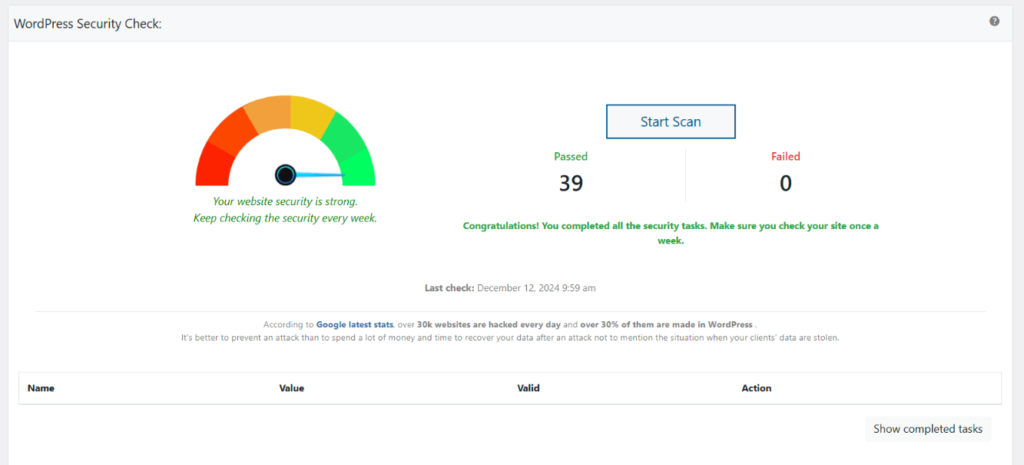
Quick manual check: open a private browser window and visit yourdomain.com/wp-json/. If you get a 404 or an empty response, the protection is working. For everything the scanner checks, see the Security Check tutorial.
What Happens After You Secure the REST API
Save your settings and the protections activate immediately:
The block editor continues working normally. Gutenberg relies heavily on the REST API, but it runs in the context of a logged-in user. Since WP Ghost only blocks unauthenticated API access, the editor is completely unaffected. Posts save, blocks render, media uploads work.
User enumeration through the REST API stops. The /wp-json/wp/v2/users endpoint no longer returns your user list to anonymous visitors. Combined with hiding author IDs and hiding user enumeration, this closes all major username discovery channels.
XML-RPC brute force attacks get a 404. The xmlrpc.php file no longer responds to requests. The multicall amplification method that lets attackers send hundreds of password guesses in one request stops working entirely.
CMS detection through API endpoints fails. Scanners that check /wp-json/ for WordPress confirmation get nothing back. The RSD header that advertises XML-RPC is gone. The REST API URL link tag in your HTML header is removed. Multiple detection signals vanish simultaneously.
Third-party integrations may need whitelisting. If you use services like Zapier, Jetpack, mobile apps, or marketing tools that connect through the REST API, whitelist their IP addresses in WP Ghost > Firewall > Whitelist so they maintain access.
Troubleshooting
REST API Not Working After Custom Path Change
If you get errors accessing the REST API after changing the wp-json path in WP Ghost (404 errors, “rest_no_route” responses, or plugins that depend on the API stop working), the custom path isn’t resolving correctly on your server.
Clear all caches
Cached pages and API responses may still reference the old wp-json path. Clear your WordPress cache plugin, CDN cache, and browser cache. Test the new API path directly in your browser: yourdomain.com/your-custom-api-path/. You should see a JSON response, not a 404.
Run the Frontend Test
Go to WP Ghost > Change Paths and click the Frontend Test button. This checks whether your server’s rewrite rules are correctly handling all custom paths, including the REST API path. If the test fails, follow the configuration instructions shown.

Flush permalink settings
Go to Settings > Permalinks and click Save Changes without modifying anything. This regenerates WordPress’s rewrite rules, which often fixes REST API routing issues after a path change.
Log out and log back in
After changing core paths, your session cookies are tied to the old paths. Log out of WordPress and log back in so WP Ghost creates fresh session cookies on the new paths. This is especially important if the REST API works for logged-out visitors but fails in the admin dashboard.
Revert to the default wp-json path
Some hosting providers restrict JSON requests to the default /wp-json/ path only, blocking custom API paths at the server level. Go to WP Ghost > Change Paths > API Security and set the path back to wp-json. If the REST API works with the default path, your host doesn’t allow custom API paths. Contact your hosting provider or keep the default path and use WP Ghost’s other security features to protect the API (Disable REST API access for non-authenticated users, firewall rules).

If you’ve lost access to the admin dashboard, see the emergency disable guide.
Connection Issues With Third-Party Apps
Third-party apps (mobile apps, payment gateways, CRM integrations, email marketing tools, etc.) can lose connection to your site when WP Ghost changes the REST API path, modifies AJAX paths, or enforces security headers that block their requests. Work through these checks to identify which setting is causing the conflict.
Check REST API path
Most third-party apps connect through the WordPress REST API at /wp-json/. If WP Ghost renamed this path, the app can’t find it.
- Go to WP Ghost > Change Paths > API Security.
- Check what the REST API path is set to. If it’s a custom name, either configure your third-party app to use the new path, or temporarily set it back to
wp-jsonto test. - Make sure Disable REST API access is switched off. When enabled, all REST API requests are blocked, which breaks any app that depends on the API.
Check security headers
Security headers like Content-Security-Policy and X-Frame-Options can block cross-origin requests from third-party services.
- Go to WP Ghost > Firewall > Header Security.
- Temporarily switch off Add Security Headers.
- Test the third-party app. If it works with headers off, re-enable headers and adjust the specific header that’s blocking the connection (usually CSP or X-Frame-Options). See Content-Security-Policy (CSP) for adding allowed domains.
Check custom AJAX path
Some plugins and apps use admin-ajax.php for communication instead of the REST API.
- Go to WP Ghost > Change Paths > Ajax Security.
- If the AJAX path is customized, try reverting it to
admin-ajax.php. - Switch off Hide wp-admin from Ajax path if enabled.
- Test the third-party app again.
Whitelist the app’s IPs or paths
If you’ve identified which path the app uses, whitelist it so WP Ghost doesn’t apply security restrictions to those requests.
- Go to WP Ghost > Change Paths > Whitelist Paths and add the paths the app uses (for example,
/wp-json/my-app/v1/). - If the app connects from a known IP address or range, go to WP Ghost > Firewall > Whitelist and add the IP.
Test after each change
Change one setting at a time and test the third-party app after each change. Clear your site’s cache between tests. This isolates which specific setting caused the conflict, so you can keep the rest of your security configuration intact.
If you’ve lost access to the admin dashboard, see the emergency disable guide.
If you’ve lost access or something broke, check the emergency disable guide, use the rollback settings, or add a constant in wp-config.php to disable WP Ghost temporarily.
Frequently Asked Questions
Will disabling the REST API break the block editor?
No. The Disable REST API Access option only blocks unauthenticated requests. The block editor (Gutenberg) runs as a logged-in user, so it has full access to the API. All editor functionality, block rendering, and content saving continue working normally.
Does this work with WooCommerce?
Yes, with one consideration. WooCommerce uses the REST API extensively (/wp-json/wc/v3/ endpoints). If you disable REST API access for non-logged-in users, features that use the API on the frontend (like live cart updates or certain payment gateway callbacks) may need the API accessible. WP Ghost’s IP whitelist feature lets you allow specific services while blocking general access. WP Ghost is fully compatible with WooCommerce.
Do I still need XML-RPC? When should I NOT disable it?
Most modern WordPress sites don’t need XML-RPC at all. The REST API has replaced it for nearly every use case. The main exceptions are: the Jetpack plugin (which uses XML-RPC for some features), the WordPress mobile app (older versions), and some third-party publishing tools. If you use any of these, test after disabling XML-RPC. If something breaks, re-enable it. Otherwise, keep it disabled.
What is the rest_route parameter and why should I disable it?
It’s a fallback method to access the REST API when pretty permalinks aren’t available. Instead of /wp-json/wp/v2/users, an attacker can use /?rest_route=/wp/v2/users and get the same data. If you change the wp-json path but leave rest_route active, attackers have a backdoor. Disable both for complete protection.
What’s the difference between the REST API and admin-ajax.php?
They’re two different systems for server communication. The REST API (wp-json) is the modern, structured approach that returns JSON data and supports full CRUD operations. Admin-ajax.php is the older method that handles arbitrary AJAX requests through action hooks. Many plugins use both. For complete API protection, secure both: the REST API here and admin-ajax.php in its own tutorial.
Will this affect SEO?
No. The REST API is not used by search engines for crawling or indexing. Google doesn’t access your site through /wp-json/. Disabling or changing the API path has zero impact on your search rankings, sitemaps, or page indexing.
Does WP Ghost modify WordPress core files?
No. WP Ghost never touches, moves, or renames any WordPress file. API path changes and access restrictions are handled through URL rewrite rules and WordPress filters. The xmlrpc.php file stays on your server – WP Ghost just blocks access to it. Deactivating the plugin restores all defaults instantly.
Related Tutorials
Complete your WordPress API and communication security:
- Change the admin-ajax.php Path – Secure the other major API endpoint that plugin exploits target.
- Disable XML-RPC Access (Detailed Guide) – Full tutorial on XML-RPC risks and configuration.
- Brute Force Attack Protection – Add rate limiting and CAPTCHA to login forms.
- Two-Factor Authentication (2FA) – Make compromised credentials useless.
- Firewall Security (7G/8G) – Block SQL injection and script injection at the server level.
- Hide from WordPress Theme Detectors – Remove all CMS detection signals.