
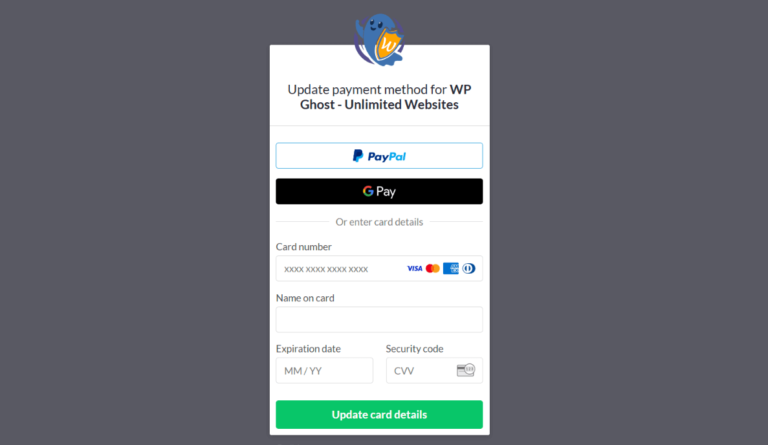
You can update the credit card or payment method for your WP Ghost subscription at any time through the WP Ghost Dashboard. The payment update is handled by Paddle (WP Ghost’s payment platform). Updated payment details apply to the next billing cycle. Keeping your payment information current prevents subscription lapses that could interrupt access to premium features and updates.
Update Your Payment Details
- Log in to your WP Ghost Dashboard.
- Go to the Orders/Licenses section.
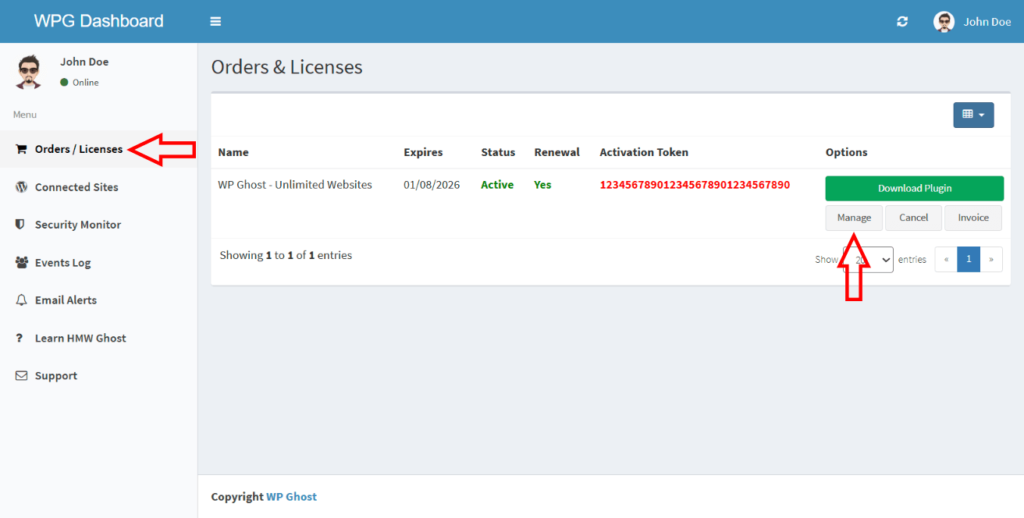
- You’re redirected to the Paddle subscription management page.
- Update your payment information with the new credit card details.
- Save the changes. The new payment method applies to the next billing cycle.

Update before your card expires. If your card on file expires before the next renewal date, the renewal payment fails and your subscription lapses. Update your payment details before the expiration date to avoid any interruption to premium features and updates.
Frequently Asked Questions
What happens if my renewal payment fails?
Paddle retries failed payments automatically. If the payment continues to fail, your subscription eventually lapses. The WP Ghost plugin stays installed and continues working at the last version, but you lose access to future updates and priority support. Update your payment details and contact WP Ghost support if your subscription lapsed due to a payment issue.
Can I switch from credit card to PayPal or vice versa?
Payment method changes are managed through Paddle. The Manage button in your WP Ghost Dashboard takes you to Paddle where you can update or change your payment method. Available payment options depend on your region and what Paddle supports.
I have multiple subscriptions. Do I update each one separately?
Yes. Each subscription has its own Manage button in the Orders/Licenses section. Click Manage next to each subscription you want to update. If all subscriptions are under the same Paddle account, updating the payment method on one may apply to others, but verify each one individually.
Is my payment information stored securely?
WP Ghost does not store your payment details. All payment processing is handled by Paddle, a PCI-compliant payment platform. Your credit card information is stored and processed by Paddle, not by WP Ghost.
Does WP Ghost modify WordPress core files?
No. Payment and subscription management is handled entirely through the WP Ghost Dashboard and Paddle. WP Ghost uses rewrite rules and WordPress hooks for security features. No core files are modified.
Related Tutorials
Subscription and billing management:
- Cancel Your Subscription – Stop future renewals.
- Payment Refund – Refund policy and how to request one.
- Activate WP Ghost on a New Website – License activation and management.
- Disconnect a Website – Remove a site from your license.