
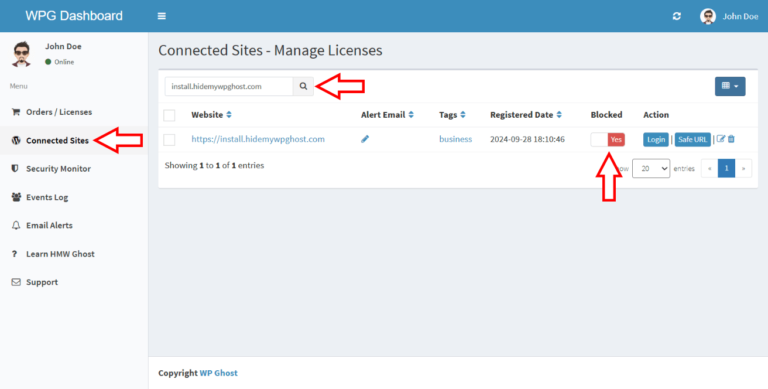
You can disconnect (block) a website from your WP Ghost Dashboard to revoke its access to your premium license. This is useful when a client leaves your service, you move a site to a different license, or you need to free up a license slot. Disconnecting a site doesn’t affect the site’s WordPress functionality or break anything. The WP Ghost plugin on that site simply shows the activation prompt again.
How to Disconnect a Website
- Log in to your WP Ghost Dashboard with the email address associated with your subscription.
- Go to the Connected Sites section.
- Find the website you want to disconnect.
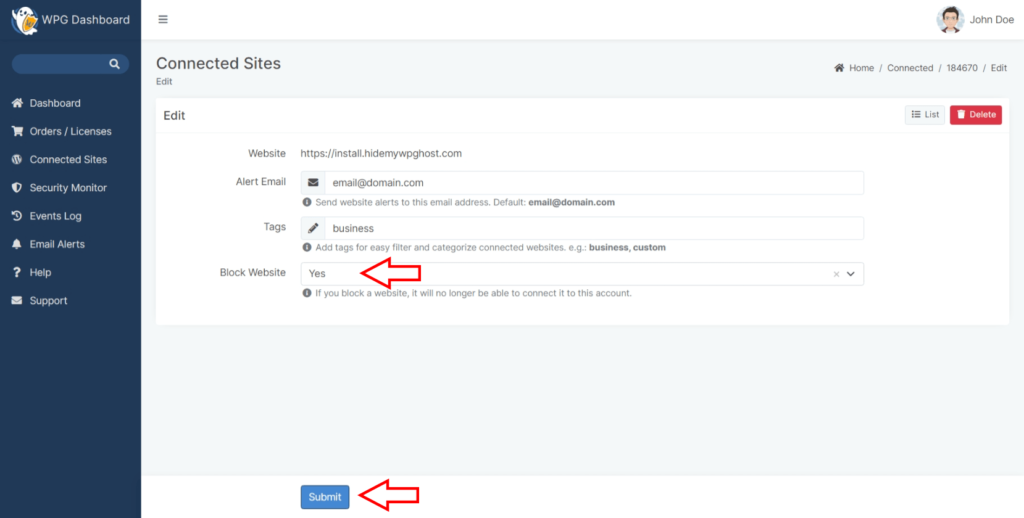
- Click the Edit icon next to the website.
- Find the Block Website option and select Yes.
- Click Submit.

What Happens After Disconnecting
Disconnecting (blocking) a website revokes its access to your WP Ghost Dashboard and activation token. Here is what does and doesn’t change:
What changes: The website can no longer connect to the WP Ghost Dashboard using your account or activation token. The WP Ghost plugin on that site shows the activation prompt, asking for a valid token to re-activate premium features.
What doesn’t change: The WordPress site itself continues to work normally. WordPress login, admin access, and all site functionality remain unaffected. The WP Ghost plugin stays installed but loses access to premium features until re-activated with a valid token.
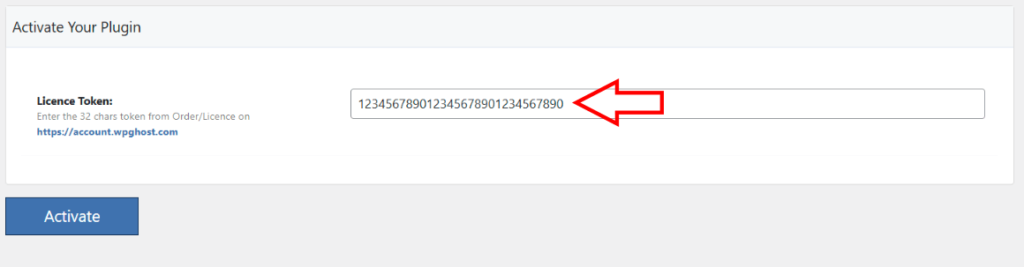
Disconnecting is not the same as deactivating the plugin. The WP Ghost plugin remains installed and active on the website. Only the premium license connection is revoked. The site administrator can still see the WP Ghost settings and re-activate with a different token if they have one.
Frequently Asked Questions
Can I reconnect a blocked website?
Yes. Go back to Connected Sites, click Edit on the website, change Block Website to No, and click Submit. The site can then be re-activated with your token.
Will disconnecting break the website?
No. Disconnecting only revokes the premium license connection. The WordPress site, its login, and all functionality remain completely unaffected. The WP Ghost plugin stays installed but premium features become inactive.
What if a client leaves my service?
Disconnect their website to free up the license slot. They will see the activation prompt in WP Ghost and won’t be able to use premium features with your token. They can purchase their own license to continue using WP Ghost Premium independently.
Related Tutorials
WP Ghost Dashboard and license management:
- WP Ghost White Label – Customize the plugin branding for clients.