
(Usually both, and here’s the honest reason)
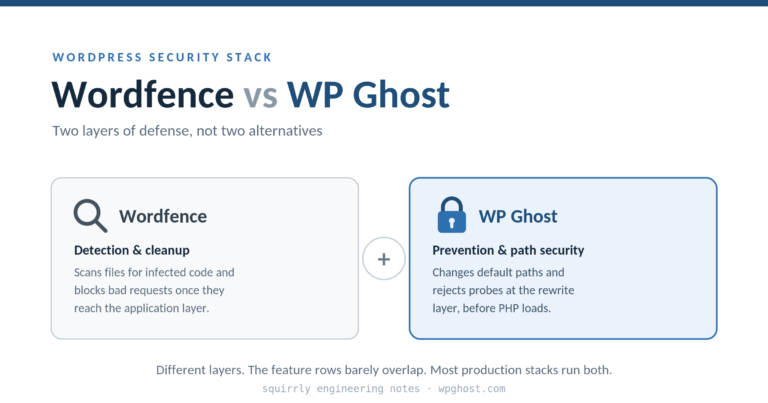
Wordfence and WP Ghost are not the same kind of tool, so “vs” is the wrong word for most sites. Wordfence is a scanner and an in-application firewall: it watches what reaches your WordPress install, flags infected files, and blocks bad requests once they arrive at PHP. WP Ghost works one layer earlier: it changes the default paths and removes the WordPress fingerprint so the automated probe returns 404 before PHP ever loads. One detects and cleans. The other reduces what gets to the door in the first place. Most of the agency stacks I’ve seen run both, and the reason is architectural, not marketing.
I’m the CTO of Squirrly. We run a portfolio of WordPress properties, and I’ve spent more hours than I’d like reading login logs at 1am. This is the comparison I wish someone had handed me three years ago, written without a rigged table.
What Wordfence is genuinely great at
Wordfence is the tool I’d reach for the moment I suspect a site is already compromised. Its malware scanner compares your files against known-good WordPress core, plugin, and theme signatures and flags anything that doesn’t match or contains a known bad pattern. File integrity monitoring catches the silent edit to a theme footer that injects spam links. The Wordfence Premium threat-intelligence feed pushes new firewall rules as fresh CVEs are disclosed, which matters when WPMayor’s reporting puts the average gap between disclosure and active exploitation at roughly five hours. The live traffic view is the best free real-time window into who is hitting your site that I know of in the WordPress space.
If you can’t credibly say good things about the other tool, you shouldn’t be writing the comparison. So to be clear: for detection, cleanup, and forensic visibility, Wordfence is excellent and WP Ghost does not replace it.
Where each tool sits in the stack
The clearest way to think about this is by layer. A request to your site passes through several of them on the way in, and different products guard different layers.
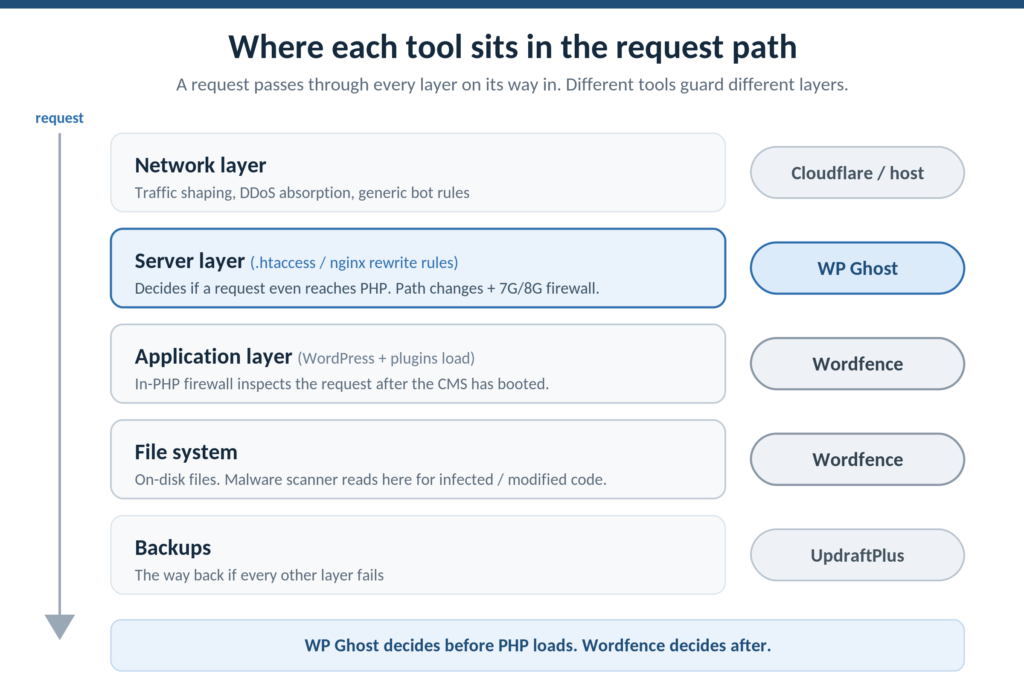
At the network layer, Cloudflare or a host firewall shapes traffic and absorbs volumetric noise before it reaches your server. At the server layer, rewrite rules in .htaccess or nginx config decide whether a request even gets handed to PHP. At the application layer, WordPress boots, plugins initialize, and an in-PHP firewall like Wordfence’s endpoint firewall inspects the request. At the file-system layer, a scanner checks what’s actually on disk. And underneath all of it, a backup tool gives you a way back if everything else fails.
Wordfence operates mostly at the application and file-system layers. It runs as PHP code inside WordPress, so a request has already loaded the CMS by the time Wordfence inspects it. WP Ghost operates at the server layer, as rewrite directives that execute before PHP starts. That single difference in position is the whole story of why they complement rather than compete.
The gap each tool leaves
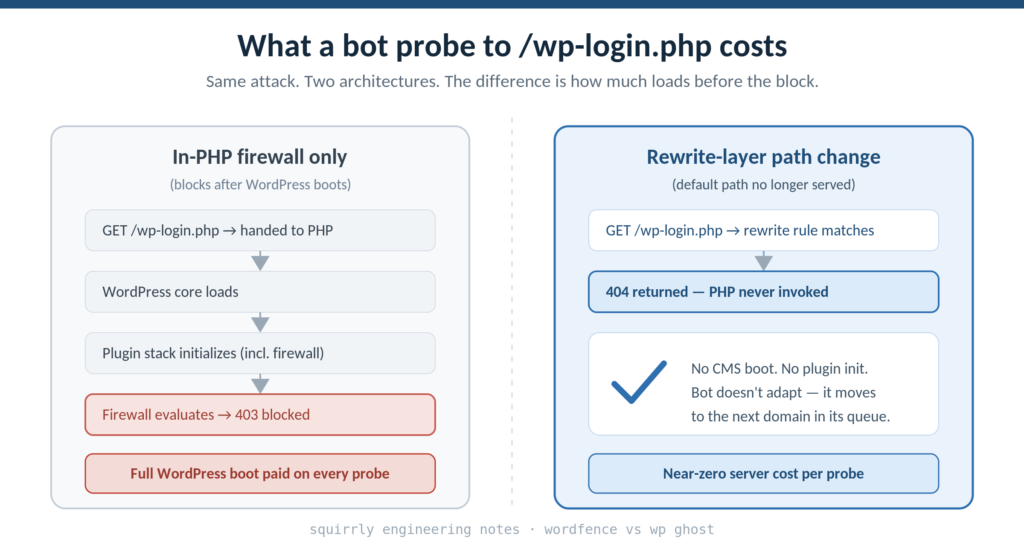
Here is the gap Wordfence leaves, stated plainly. Wordfence does not change wp-login.php, wp-admin, plugin paths, or the WordPress identity signals in your HTML. So a bot scripted to brute-force the default login path keeps hitting /wp-login.php. Wordfence will rate-limit and eventually block it, but every one of those requests still loaded WordPress, still initialized the plugin stack, still cost you CPU and bandwidth before being turned away. On a bot-heavy day that’s a real load floor you can’t get under, because the firewall doing the blocking lives behind the thing the bots are pounding on.
Here is the gap WP Ghost leaves, stated just as plainly. WP Ghost does not scan your files. If something already slipped through, or was planted before you hardened the site, WP Ghost will not find it for you. It changes paths and rejects malformed requests at the rewrite layer; it has no opinion about whether wp-content/themes/yourtheme/footer.php contains a line of injected base64. That’s the scanner’s job, and the scanner is Wordfence or MalCare.
Put the two gaps next to each other and the companionship is obvious. WP Ghost lowers the volume of attacks that reach the application by changing the default paths so the scripted probe returns 404. Wordfence catches and cleans the threats that do get through, plus anything that was already resident. Neither one does the other’s job well, and that’s fine.
The architectural detail worth understanding
The reason the rewrite-layer position matters is more than tidiness. WP Ghost’s 7G and 8G firewall rules run as server-level rewrite directives. A SQL-injection pattern, a directory-traversal attempt, or a file-inclusion payload is rejected before PHP starts and before any plugin or theme code executes. That removes an entire attack class from the threat model: anything that depends on exploiting a PHP-level race condition or a vulnerable plugin’s request handler never gets the chance, because the request is rejected at the rewrite layer and PHP is never invoked.
This is the claim I’d stake the comparison on, because it’s the one that survives a skeptical read. An in-PHP firewall, by definition, has already paid the cost of loading WordPress before it makes its decision. A rewrite-layer firewall makes the decision first. For a site absorbing tens of thousands of bot probes a month, that’s the difference between blocking at the application and never being touched at the application at all.
The same logic covers fingerprinting. WP Ghost removes the WordPress identity signals from page output: the generator meta tag, version strings in asset URLs, the RSD header, the /wp-json/ link. A Wappalyzer-style classifier reading that page returns “unidentified CMS” instead of “WordPress, version X, running these plugins.” The reconnaissance step that decides whether your site lands on a CVE-specific target list returns nothing usable. That’s relevant context given Patchstack’s 2026 report counted 11,334 WordPress vulnerabilities disclosed in 2025, a 42% year-over-year jump, with 91% of them living in plugins rather than core. Most of those exploits begin with a scan that confirms the plugin is present.
The honest overlap
Both tools do some of the same things, and pretending otherwise would be the rigged-table move this comparison is trying to avoid.
Both offer 2FA. Both offer brute-force rate limiting. Both do a set of basic hardening toggles. Where I’d give the nod to WP Ghost on authentication specifically: passkeys (Face ID, Touch ID, Windows Hello, hardware keys) are in its free tier, and passkeys are phishing-resistant in a way TOTP codes aren’t, because the cryptographic challenge is bound to the originating domain and a stolen credential can’t be replayed. If passkey support is the deciding factor for you, that’s a real edge. For everything else in the overlap, run whichever tool you’ve already configured; doubling up on rate limiting buys you nothing.
| Capability | Wordfence | WP Ghost |
|---|---|---|
| Malware / file scanning | Yes (core strength) | No |
| File integrity monitoring | Yes | No |
| Live traffic / threat log | Yes (strong) | Premium |
| Threat-intel rule feed | Yes (Premium) | Partial |
| In-PHP firewall | Yes | n/a |
| Rewrite-layer firewall (before PHP) | No | Yes (7G/8G, free) |
| Change default paths | No | Yes (30+ paths) |
| Remove WordPress fingerprint | No | Yes |
| AI-crawler blocking | No | Yes |
| Passkey 2FA | TOTP codes | Yes (free tier) |
| Brute-force rate limiting | Yes | Yes |
Wordfence wins the top of that table on its own terms. WP Ghost wins the prevention rows. The point of the table isn’t a score; it’s that the rows barely overlap.
Skip the agonizing if your situation is one of these
If your site is infected right now, stop reading and run a Wordfence or MalCare scan first. Prevention tooling doesn’t help once the attacker is already in the file system; you clean first, then harden so it doesn’t recur. If you need backups, neither tool is your answer; that’s UpdraftPlus or your host’s snapshots. If your problem is raw DDoS volume, that’s a network-layer job for Cloudflare or your host, above where either of these tools operates.
If you’re starting from a clean site and deciding where to begin, either tool is a reasonable entry point, and adding the other within the same week is the configuration I’d actually recommend. Wordfence for the eyes, WP Ghost for the locked-and-relocated doors.
FAQ
Can I run Wordfence and WP Ghost on the same site?
Yes. They occupy different layers and are tested compatible. Wordfence runs as PHP inside WordPress; WP Ghost runs as rewrite rules in front of it. We run both across our Squirrly properties without conflict. The one thing to watch is that if you change paths with WP Ghost, you confirm Wordfence’s own login-related features still point at the new login URL, which they do automatically in current versions.
Is WP Ghost just security through obscurity?
No. Obscurity assumes a single human attacker who eventually finds the renamed path. The real threat model is scripted bots hitting predictable paths across tens of thousands of domains. Change the path and the script returns 404 before authentication code runs, then moves to the next domain. The cryptographic password check, rate limiting, and 2FA all still do their work. The path change reduces the request volume that ever reaches them.
If WP Ghost prevents attacks, why do I still need a scanner?
Because prevention is never total, and because plenty of sites were compromised before they were hardened. A scanner finds what’s already on disk and what slipped through any gap. Hostinger and Sophos reporting put roughly 13,000 WordPress sites hacked per day, and 87.8% of WordPress-targeted exploits past standard hosting firewalls. You want detection in the stack regardless of how good prevention is.
Does WP Ghost slow my site down?
The firewall rules run at the rewrite layer, so legitimate requests pass through rule evaluation that’s cheaper than loading WordPress would be. On bot-heavy sites the net effect is usually a load reduction, because rejected probes never reach PHP. It’s tested compatible with WP Rocket, LiteSpeed Cache, and Cloudflare.
I already pay for Wordfence Premium. Is WP Ghost redundant?
No. Wordfence Premium upgrades your detection and rule feed; it still doesn’t change paths or operate before PHP loads. The free tier of WP Ghost adds the prevention layer Wordfence doesn’t cover, so the combination is additive rather than overlapping.
What about Solid Security or All In One WP Security instead?
Both are fine hardening suites and both can rename the login URL. Neither restructures the full set of WordPress paths, plugin paths, and fingerprints the way WP Ghost does, and their firewalls are application-layer rather than rewrite-layer. If you already run one and want the prevention layer, the tools coexist.
Soft close
If you want to test the prevention layer alongside the Wordfence you’re probably already running, WP Ghost has a free version on wordpress.org. Put it on staging, change the paths, and watch a week of bot-traffic logs before deciding whether the load drop is worth it on your sites.