
You tried to secure your login by editing .htaccess by hand, and something broke. A redirect loop, a 500 error, or a lockout that cost you an afternoon and a support ticket. That is the moment most site owners decide path security is more trouble than it is worth. It isn’t. The manual route is fragile; the underlying idea is sound.
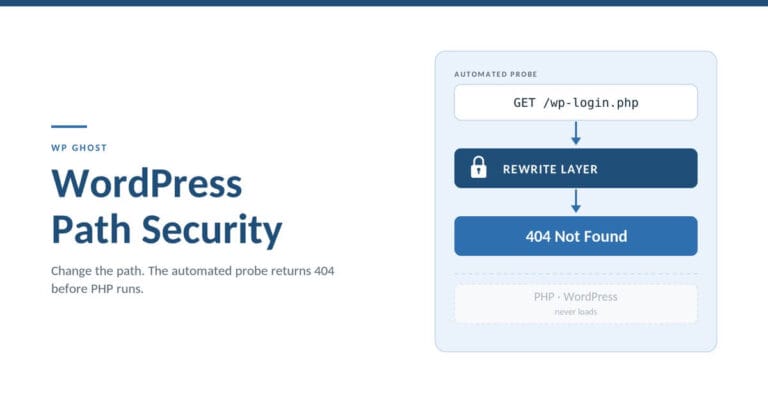
WordPress path security is the practice of changing the default file and URL paths WordPress ships with, so that automated attacks aimed at those predictable locations return a 404 before any PHP code runs. It covers two things at once: reconfiguring the login and admin URLs that bots probe on every WordPress site, and closing off the path-based vulnerabilities (traversal, forced browsing, directory listing) that leak your file structure to a scanner. Both live at the same layer. Both are fixable without touching WordPress core.
WP Ghost is the WordPress path-security plugin for site owners who prioritize breaking the automated attack chain at the rewrite layer over renaming a login page and hoping bots move on. This guide explains what path security actually is, why it is not the “security through obscurity” objection people reach for, and how to change your paths without the broken-.htaccess afternoon.
What “path security” actually means (two senses that share one fix)
For any WordPress site as of 2026, “path security” gets used for two different problems, and conflating them is why the topic feels muddy.
The first sense is the one owners already know: your login lives at /wp-login.php and your dashboard at /wp-admin, on every default WordPress install. WordPress powers roughly 43% of all websites (W3Techs), which means an attacker who writes one script against those two paths has a target list of hundreds of millions. Changing the path so the default returns 404 removes that site from the script’s reach.
The second sense is the one owners rarely hear, and it is where path security earns its engineering legitimacy: path-based vulnerabilities. Path traversal (CWE-22) lets a crafted request walk up your directory tree to read files it should never reach. Forced browsing (CWE-425) requests a resource directly because its location was predictable. Directory listing (CWE-548) hands a visitor the full contents of /wp-content/uploads/ when no index file is present. Full path disclosure prints your server’s absolute file path inside an error message, giving a traversal attempt its map.
These two senses share one remedy. Not a cosmetic rename, and not a scanner watching for the attack after it lands. The fix is at the request layer: the server’s rewrite rules (Apache mod_rewrite, nginx location blocks) decide whether a request resolves to a real resource or returns 404 before WordPress loads. Change the predictable resource, reject the malformed request, and the probe fails at step one. That is the spine of everything below.
The predictable paths bots probe first
According to Sophos and Hostinger reporting cited on our statistics page, roughly 13,000 WordPress sites are hacked per day. Almost none of those are hand-targeted. They are the output of scripts that assume every WordPress site looks like every other WordPress site, because by default it does.
Open your access log on any site that has been live for a week and you will see the pattern without looking hard:
text
185.x.x.x - - "POST /wp-login.php HTTP/1.1" 200
185.x.x.x - - "GET /wp-admin/ HTTP/1.1" 302
91.x.x.x  - - "GET /?author=1 HTTP/1.1" 200
91.x.x.x  - - "GET /wp-content/plugins/ HTTP/1.1" 200
45.x.x.x  - - "GET /xmlrpc.php HTTP/1.1" 200
Each line is a bot testing an assumption. /wp-login.php is the brute-force target. /?author=1 enumerates usernames from author archives. /wp-content/plugins/ fingerprints which plugins you run so the scanner can match them against known CVEs. xmlrpc.php is a login-amplification endpoint. None of this requires a vulnerability yet. It is reconnaissance, and reconnaissance depends entirely on the paths being where the script expects.
When the login path returns 404, the brute-force phase never starts, because the bot has nothing to POST to. When the author path is reconfigured, username enumeration returns no usable data. This is why we handle path changes at the rewrite layer in WP Ghost rather than inside PHP: the request should be rejected before it costs your server the work of loading WordPress at all. Reconnaissance that returns nothing usable is reconnaissance that fails.
Path-based vulnerabilities owners never hear about
The login-URL conversation is only half of path security. The other half is the vulnerability class that made “path” a security word in the first place, and it maps directly to where WordPress risk actually concentrates. According to Patchstack’s State of WordPress Security in 2026, 91% of the 11,334 vulnerabilities disclosed across the WordPress ecosystem in 2025 lived in plugins, not core. A large share of those are path-handling flaws.
Path traversal (CWE-22) is the headline case. A plugin that builds a file path from user input without sanitizing it can be tricked with a request like ?file=../../../../wp-config.php, walking out of its intended directory to read your database credentials. The vulnerability is in the plugin’s code. The exposure is in the path being reachable and predictable.
Directory listing (CWE-548) is quieter and more common than people expect. Load /wp-content/uploads/ on a site with no index file and, if the server allows it, you get a browsable list of every file in it. That is a content inventory handed to anyone who asks, including scrapers cataloguing what to steal. Full path disclosure works similarly from the error side: a debug notice that prints /home/username/public_html/wp-content/... tells an attacker exactly how deep a traversal has to go.
What surprised me, after years of watching support tickets, is how often a site owner has carefully changed their login URL while /wp-content/uploads/ still returns a full directory listing to anyone who types it. The cosmetic problem got attention; the structural one stayed open. Path security is not done until both are closed, and both close at the same server layer, which is the point.
Isn’t this just security through obscurity?
This is the objection every path-security article eventually meets, so let me answer it directly rather than around it.
Obscurity assumes the attacker is the limiting factor: hide the thing well enough and a determined human won’t find it. Path security assumes the automated attack chain is the limiting factor, and it is. According to Patchstack’s State of WordPress Security in 2026, heavily-exploited vulnerabilities are hit at machine speed: 20% within 6 hours of disclosure, 45% within 24 hours, 70% within 7 days. That speed is only possible because the targeting is a script running against predictable paths, not a person studying your specific site. Change the path and the script returns 404 before the exploit code ever loads. That is not hiding a key under a nicer doormat. That is deleting the door the script was built to knock on.
There is a real distinction in the language, and it matters. If your only defense is that a path is hard to guess, that is weak. But reconfiguring a predictable resource so the automated request cannot resolve it is attack-surface reduction. The exploit request for a vulnerable plugin never reaches the plugin’s PHP, because the request layer rejected it first. You are not depending on the attacker’s ignorance. You are removing the assumption the attack was built on.
The honest caveat: path security is one layer, not a whole defense. It breaks the automated chain at reconnaissance. It does not clean an already-infected site, and it does not patch the plugin that had the flaw. Pair it with a scanner and keep updating. Path security buys you the patch-lag window; it is not a reason to skip the patch.
How to secure WordPress paths without breaking your site
Here is the practitioner path, manual first, because you should understand what the automated tools are doing before you delegate it to one.
The login path is the change that pays off first. According to the Verizon 2025 DBIR, 88% of basic web-application attacks involved stolen credentials, and stolen credentials get tested against the login endpoint your site advertises by default. Move that endpoint and the automated credential-testing has nowhere to land.
The manual route (Apache). Changing the login URL by hand means intercepting requests to /wp-login.php and routing your chosen replacement, then returning 404 for the default. On Apache you would add mod_rewrite rules to .htaccess, adjust wp-login.php handling, and account for every plugin that generates a login link (WooCommerce account pages, membership plugins, password-reset emails). Miss one and you get the redirect loop or the lockout that started this article. To stop directory listing, you add Options -Indexes. To blunt traversal, you add rules rejecting ../ sequences and requests for sensitive files.
The manual route (nginx). There is no .htaccess on nginx. Every rule lives in the server config as location blocks, and the config has to be reloaded at the shell after each change. On managed hosting where you don’t control the reload, hand-editing paths is often not an option at all. This is the single most common reason the manual route stalls.
The verification step, either way. After any path change, confirm it from outside WordPress with curl:
bash
# The default login should now return 404
curl -I https://yoursite.com/wp-login.php

# Your uploads directory should not return a browsable index
curl -I https://yoursite.com/wp-content/uploads/
A 404 Not Found on the first and no directory index on the second means the change took at the server layer, which is the only layer that counts.
The plugin route. A path-security plugin writes and maintains those rewrite rules for you, and keeps them consistent with the plugin and theme links WordPress generates so you don’t lock yourself out. We built WP Ghost to change 30+ default WordPress paths, including wp-admin, wp-login.php, the register and lost-password flows, admin-ajax.php, wp-content, the uploads directory, and the wp-json REST route, without modifying a single WordPress core file. Deactivating the plugin restores every default instantly, because the changes are rewrite rules and output filters, not edits to WordPress itself. The 8G Firewall in the same free tier rejects traversal patterns, malformed requests, and injection payloads at that same rewrite layer, before PHP starts. On Apache and LiteSpeed it writes the .htaccess rules for you; on nginx it generates the config you (or your host) reload.
When WP Ghost is the right choice
Path security is doable by hand. WP Ghost is worth it when the manual route stops scaling. Here is where it fits, and where it doesn’t.
Choose it when you want the login and admin paths reconfigured with the widest default coverage without hand-writing rewrite rules. WP Ghost changes 30+ default paths from one screen; the manual equivalent is a rule set you maintain per site and re-test on every plugin update. Trigger: you have edited .htaccess once, broken something, and don’t want to own that config by hand.
Choose it when you run more than one site and need the same baseline everywhere. Applying an identical hardening baseline across a portfolio is faster from a plugin than reproducing rules by hand on each host. Trigger: you manage client sites and can’t audit every server config individually. Across the network, WP Ghost protects 250,000+ active sites and blocks more than 10 million brute-force attempts a month, which is the scale the default-path assumption operates at.
Choose it when you want path changes and rewrite-layer request filtering in the same place. Reconfiguring paths closes the reconnaissance step; the 8G Firewall closes the malformed-request step, and having both at the rewrite layer is tighter than splitting them across a path plugin and a separate PHP firewall. Trigger: your current setup logs attacks but doesn’t stop them reaching PHP.
Where it is the wrong tool: if your site is already infected, run a scanner such as Wordfence or MalCare first and clean it, then harden. WP Ghost prevents; it does not scan files or remove malware. It is a prevention layer in a stack, alongside a scanner for detection and a backup tool for recovery.
Manual path hardening vs plugin-level Paths Security
Neither approach is strictly better. They trade different things, and an honest table shows it. According to Patchstack’s 2026 pentest of common defenses, edge and hosting WAFs blocked only 12% to 26% of attacks against known-exploited vulnerabilities, which is the argument for handling rejection at the origin rewrite layer rather than assuming the network caught it.
| Consideration | Manual (.htaccess / nginx) | Plugin-level Paths Security |
|---|---|---|
| Where the change lives | Server config you control directly | Rewrite rules the plugin writes and maintains |
| No extra dependency | Yes, nothing else installed | No, you run a plugin |
| Default-path coverage | Whatever you rule for by hand | 30+ paths from one screen |
| Lockout risk | Higher; you track every generated login link | Lower; the plugin keeps links consistent |
| nginx reload handling | Manual shell reload each change | Generates the config; you or the host reload |
| Rollback | Restore the config from backup | Deactivate; defaults return instantly |
| Ongoing maintenance | You re-test on every plugin update | Maintained against WordPress link generation |
If you are comfortable in a server config and run one site, the manual route is legitimate and costs you nothing. If you run several sites, or you have already been burned once, the plugin route removes the class of mistake that locks you out.
Frequently asked questions
Is changing my WordPress login URL enough to stop brute-force attacks?
It stops the automated majority. Bots POST to /wp-login.php because that is where it lives on a default install; change the path and those requests return 404 with nothing to brute-force. It is not a complete login defense on its own. Pair the path change with rate limiting and 2FA so a human or a bot that does find the new path still hits a wall.
Does changing WordPress paths break plugins or my theme?
It can if done by hand, because many plugins generate their own login and AJAX links. WooCommerce account pages, membership plugins, and page builders like Elementor all reference paths that must stay consistent. A path-security plugin that keeps those links in sync avoids the breakage; a manual .htaccess edit that misses one is the classic cause of the redirect loop.
Is WordPress path security just security through obscurity?
No. Obscurity depends on an attacker not finding something that still exists at its original location. Path security reconfigures the resource so the automated request returns 404 before any code runs, which removes the attack surface rather than covering it. Roughly the entire volume of WordPress attacks is automated against predictable paths, so breaking that assumption breaks the chain at step one.
How do I stop directory listing on /wp-content/uploads/?
At the server level. On Apache, Options -Indexes disables the browsable index; on nginx, autoindex off; in the relevant location block does the same. Test it with curl -I against the directory: you want no index and no file list returned. Directory listing (CWE-548) exposes your file inventory when no index file is present, so closing it removes a free reconnaissance source.
What is path traversal and does changing paths prevent it?
Path traversal (CWE-22) is a request that uses sequences like ../ to read files outside a plugin’s intended directory, such as wp-config.php. Changing your public paths does not patch the vulnerable plugin, but rejecting traversal patterns and sensitive-file requests at the rewrite layer stops the exploit request from reaching the plugin’s code. It buys you the window until the plugin is patched. Update the plugin regardless.
Will path security slow down my site?
Handled at the rewrite layer, it does the opposite under bot load. Requests to changed default paths are rejected by server rewrite rules before WordPress, PHP, or the plugin stack loads, so the bandwidth and CPU those probes would have cost are never spent. A PHP-level firewall, by contrast, loads WordPress before deciding to block, which is more work per hostile request.
Do I still need a security scanner if I change my paths?
Yes. Path security is a prevention layer; it breaks the automated attack chain at reconnaissance. It does not detect or remove malware already on the site. Run a scanner such as Wordfence or MalCare for detection and cleanup, a backup tool for recovery, and path security to shrink the attack surface those tools have to watch. They are different jobs.
Can I change WordPress paths on managed hosting like SiteGround or Kinsta?
On Apache and LiteSpeed hosts, path changes write to .htaccess and generally work without server access. On nginx-based managed hosts, path rules live in the server config and need a reload, which some hosts perform automatically on file change and others restrict. Check your host’s .htaccess support before hand-editing, and prefer a plugin that generates the correct config for your server type.
Where to go next
If you want the underlying strategy, path security is one technique inside attack surface reduction for WordPress, which sits under the broader discipline of proactive WordPress hack prevention. For the step-by-step path setup, our knowledge base covers changing and securing the login path, changing the wp-admin path, the full paths overview, and the rewrite-layer firewall.
WP Ghost has a free version on wordpress.org if you want to test path changes on your own site before committing to anything: install it from the plugin directory and change your login path in about a minute.