
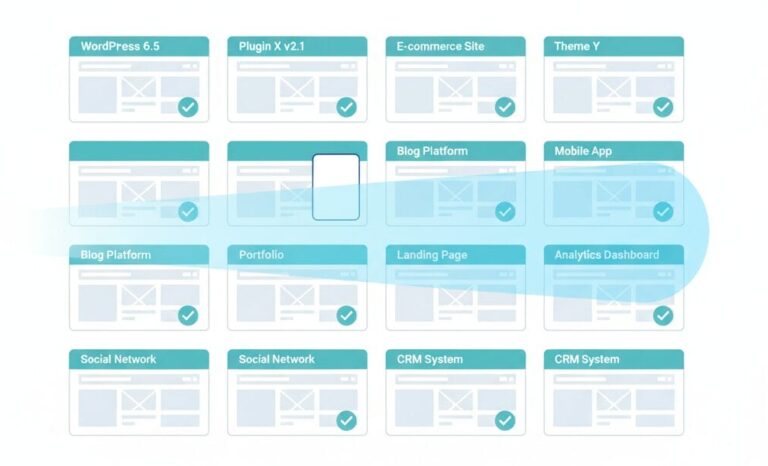
Attackers don’t choose your site. Their scanner does, and it chooses on a fingerprint your site hands over for free. Automated and AI-assisted scanning runs as a two-step pipeline: first classify the target (what CMS, what version, which plugins, which of them are vulnerable), then route the matching exploit. Almost every security tool people install acts in the second step, reacting once a probe arrives. The cheaper place to win is the first step. If a scanner can’t classify your site as “WordPress running plugin X version N,” it can’t pre-select you as a known-vulnerable target, and an unclassifiable site is a worse use of its time than the millions of sites that answer cleanly.
The pipeline, not the boogeyman
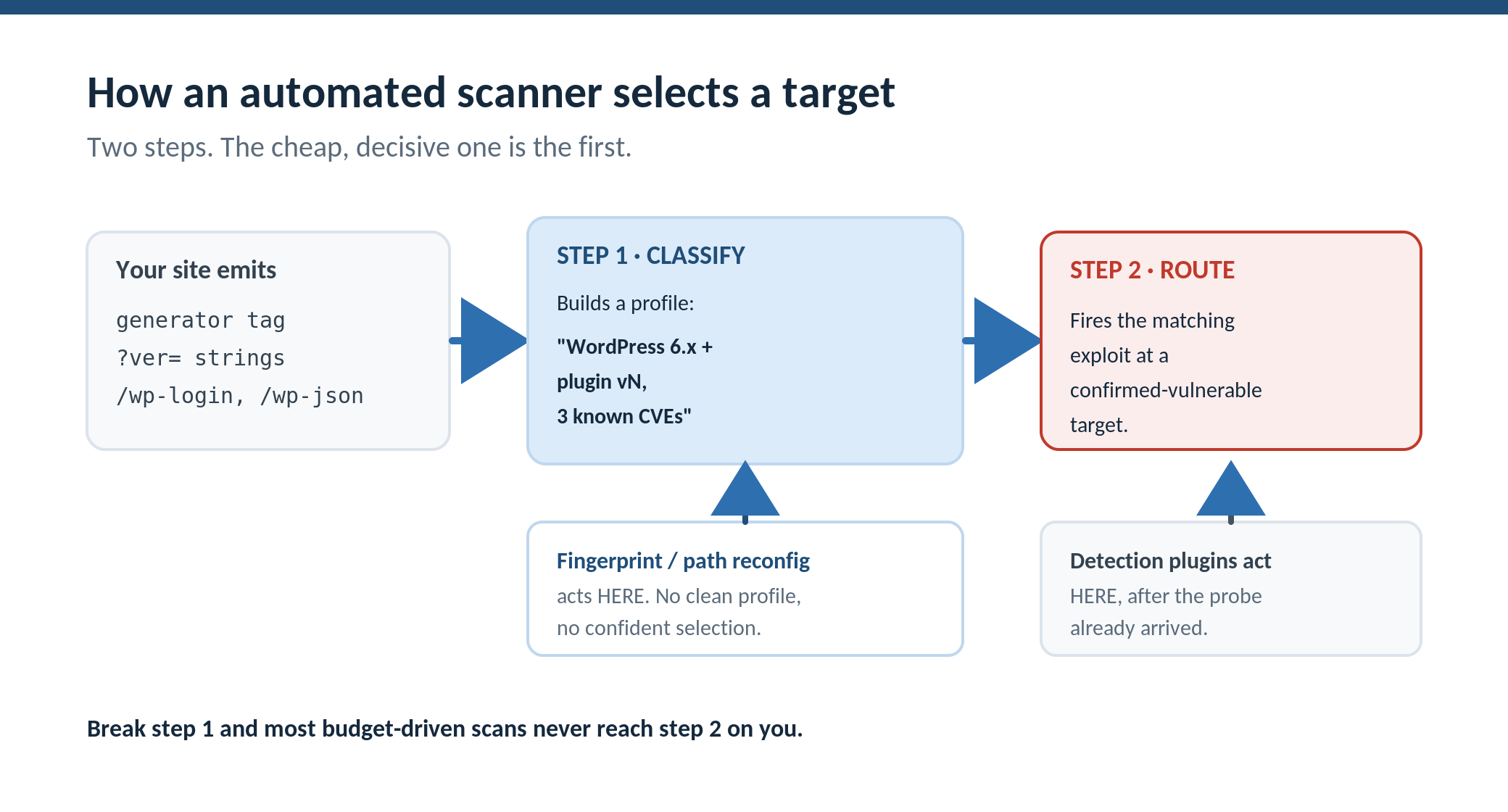
Let me describe what these scanners actually do, because the mechanics matter more than the “AI” label.
Step one is classification. A scanner requests a handful of cheap, reliable signals and reads what comes back: the generator tag in the page head, version strings on script and style URLs, the presence of standard paths like /wp-login.php and the REST routes, the plugin and theme directories named in the HTML. From those, it assembles a profile. Not “this might be WordPress,” but “this is WordPress, these are the plugins, these are the versions, and three of them have public vulnerabilities.” That profile is built from data the default install volunteers on every page load.
Step two is routing. Given a profile, the scanner fires the exploit that matches the most promising vulnerability, or queues the target for a kit that will. This is the step that costs something. Sending the right exploit, handling the response, retrying, and moving on all consume time and bandwidth, and operators running scans across millions of hosts care about that budget.
What automation and AI-assisted tooling changed is mostly the speed and breadth of step one, not the existence of step two. Triage that used to be semi-manual is now continuous and instant across huge swaths of the web. That is the real “increase” people feel: more targets classified, faster, so more of them reach the routing step. It is worth being calm about this. The scanner is not clever in some unstoppable way. It is fast, and it is cheap, and it depends entirely on getting a clean classification in step one. That dependency is the opening.
Detection tools live in step two
Here is the part that reframes how most people spend their security effort. A scan-and-alert plugin, a malware scanner, a firewall that inspects requests, are all step-two defenses. They do useful work, but they do it after the scanner has already classified your site and sent the probe. The probe still arrives. The site has already been selected. You are now reacting to a decision that was made several steps earlier, on the basis of a fingerprint you served up willingly.
That is not an argument against detection. You want it. It is an argument that detection is the wrong layer to select-proof a site, because selection happens before detection can act. To stop being chosen, you have to interfere with step one.
How to fail the classifier
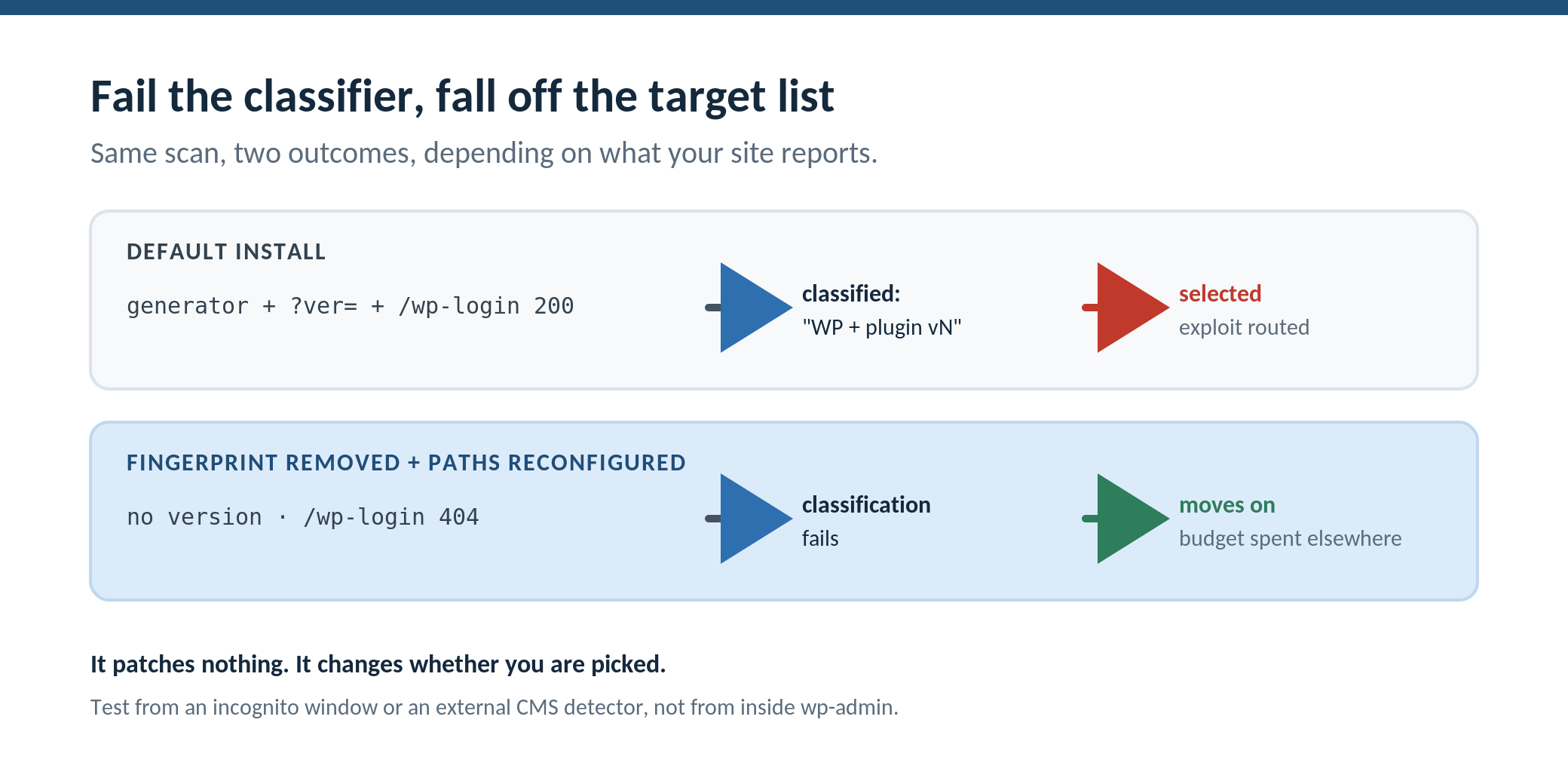
Falling out of pre-classification does not mean hiding, in the sense of putting a secret on the site that a determined human couldn’t find. It means removing the signals the automated classifier reads, so the cheap, confident profile it needs cannot be assembled. A scanner that can’t confirm “WordPress 6.x plus this plugin at this version” has three options, all worse for it than a clean hit: guess and waste exploit budget on probes that return 404, fall back to slow brute-force discovery that most operators won’t spend on a low-value target, or move on to one of the millions of sites that answered the classification request cleanly. On a budget-driven mass scan, “move on” wins most of the time.
Concretely, failing the classifier means removing the generator and version signals from page output, and reconfiguring the default paths so probes to the standard WordPress endpoints return 404 at the rewrite layer before any application code runs. When the version strings are gone, the CVE match in step one can’t be made. When the default paths don’t answer, the path-based fingerprint comes back empty. On the sites we run at Squirrly, this is the job WP Ghost’s Paths Security and fingerprint removal does, along with stripping the signatures theme and plugin detectors key on. I want to be exact about what that does and does not achieve, because the honest version is more persuasive than the marketing one: it does not patch a single vulnerability. If a scanner blindly fires an exploit and your plugin is genuinely vulnerable, removing the fingerprint did not fix the bug. What it changes is the probability you are selected for that exploit in the first place, by breaking the cheap classification the whole pipeline runs on.
Where this fits with everything else
Treat this as the discovery-phase layer, sitting in front of the layers you already know about. You still patch, because a targeted attacker who reaches step two anyway needs to find the bug already fixed. You still run a scanner, because prevention is never total and you need to detect what slips through, and roughly 13,000 WordPress sites are compromised per day in the Sophos and Hostinger reporting, which is not a number that says “prevention alone is enough.” You still keep backups. Breaking the classifier doesn’t replace any of that. It removes you from the cheap, automated target list that produces most of the volume, so the rest of your stack has far less to handle.
There is a measurement gotcha worth flagging, because people test this and get confused. If you check your own fingerprint while logged into wp-admin, you will still see WordPress signals, because the admin screens emit them and can’t be stripped. Test from a clean incognito session, or with an external CMS detector, to see what an anonymous scanner actually sees.
The reframe
The instinct, when automated attacks feel like they’re rising, is to add another tool that reacts faster. That keeps you firmly in step two, getting better at handling probes you could have avoided receiving. The higher-impact move is to stop answering the classification request cleanly, so a large share of those probes are never aimed at you at all. Your site is on the target list because it told the scanner exactly what it is. Stop volunteering that, and you stop being the obvious pick.
Go look at what your site reports to an anonymous request: the generator tag, the ?ver= strings, whether /wp-login.php and the REST routes answer. That is your classification profile. Every signal on it is a reason a scanner selected you before a human was ever involved.
FAQ
Does removing my WordPress fingerprint actually stop attacks?
It doesn’t stop a determined, targeted attacker, and it doesn’t patch anything. What it changes is automated target selection. Mass scanners classify sites by reading version and path signals, then route exploits at confirmed-vulnerable targets. Remove those signals and the cheap classification fails, so most budget-driven scans skip you rather than spend an exploit on an unclassifiable host.
Isn’t this just security through obscurity?
Obscurity assumes a human attacker who eventually finds what you concealed. The threat here is automated pre-classification running across millions of hosts on a fixed budget. Breaking the signals the classifier depends on isn’t hiding a key, it’s removing the data the automated pipeline needs to select you, which changes the economics of whether you’re targeted at all. Patching, 2FA, and scanning all still do their jobs.
Do AI-driven scanners change the defense?
Not fundamentally. AI-assisted tooling mainly makes step-one classification faster and broader, so more sites get triaged and routed to exploits. The dependency on a clean fingerprint is unchanged, which is why interfering with classification still works. Treat it as architecture, not magic.
If the scanner can’t fingerprint me, why do I still need to patch?
Because fingerprint removal lowers the odds of automated selection, it doesn’t eliminate every path to your site. A targeted attacker, a referral from a leaked list, or a lucky blind probe can still reach a vulnerable plugin. Removing the fingerprint reduces volume; patching makes sure that the attempts which do land find nothing to exploit.
How do I see what scanners see?
Request your site in a clean incognito window or run it through an external CMS detector, not from inside wp-admin, since admin screens emit signals you can’t strip. Look for the generator meta tag, version strings on assets, and whether the default login and REST paths respond. That is the profile a scanner builds in step one.
If you want to see the before-and-after, WP Ghost has a free version on wordpress.org that removes the fingerprint signals and reconfigures the default paths, so you can compare what an anonymous request returns with it off and on.