
Why does hiding WordPress paths break some sites?
Path hiding is an agreement between two parties. WP Ghost writes the rewrite rules. Your web server is supposed to honour them. When it does not, the renamed paths return 404 and the site visibly falls apart.
The server refuses for reasons that have nothing to do with WordPress:
- Nginx never reads
.htaccess. The rules exist in a file the server ignores. - Apache ignores
.htaccesswithoutAllowOverride All. The rules are there; permission to read them is not. - Windows IIS needs the URL Rewrite module installed before
web.configrules mean anything. - The config file is not writable. Some managed hosts lock it, so the rules were never written at all.
From the site owner’s chair this looks like one thing: the plugin broke my website. The stylesheet is gone. The page builder will not save. The homepage renders as unstyled text. The usual response: deactivate, panic, leave a one-star review, throws away the protection without ever discovering the actual cause.
Ghost Doctor exists to close that gap.
What is Ghost Doctor in WP Ghost?
Ghost Doctor is a diagnostic and repair tool inside WP Ghost that reproduces the breakage from within WordPress, applies only the repairs a plugin is allowed to make, and measures whether each one actually worked.
It runs in three stages:
- Probe – fetch the site as a visitor would. Loopback HTTP requests to the homepage, the AJAX endpoint, the REST root, the admin path and theme assets. A 404, 301 or 302 counts as a failure.
- Plan – match repairs to the specific failures found, ordered cheapest and safest first.
- Repair – apply one step, re-probe the live site, then keep it or put it back.
That third stage is the part worth understanding, because it is what separates Ghost Doctor from every “fix it” button you have clicked before.
How does Ghost Doctor test the site?
The entire feature rests on one number: how many checks are currently failing. That number comes from a frontend probe that makes real HTTP requests back to your own site with cookies disabled, so it sees what an anonymous visitor sees not what a logged-in administrator sees.
The critical detail is the bypass token. Every URL is fetched with a one-time secret parameter appended, which switches off WP Ghost’s own PHP fallback handler for that request. Without it, the plugin would quietly serve the file through WordPress, return a healthy 200, and the probe would conclude the rewrites work when they do not.
The token forces your server configuration to answer on its own. The probe tests the server, not the plugin’s safety net.
What Ghost Doctor checks
| Check | What is fetched | Why it matters |
|---|---|---|
| Home | Homepage | Baseline. Its HTML is also parsed to discover theme assets. |
| Logo | Site logo, or the plugin’s own SVG | A real static file living under a renamed directory. |
| Ajax | The renamed admin-ajax.php | Page builders and editors save through this. Breaks first, complained about loudest. |
| REST | The renamed wp-json root | A refusal counts as correct when Disable REST API Access is on. |
| Admin | The renamed admin path, with cookies | Only probed when the admin path was actually changed. |
| Assets | Up to 4 same-host CSS/JS files from the homepage | Catches the 200-but-unstyled case: page loads, layout is gone. |
| Render | Homepage HTML body | Only when Text Mapping is on, a renamed CSS class can break a theme silently. |
How does Ghost Doctor repair a broken site without making it worse?
By refusing to guess. Ghost Doctor applies one repair, clears caches, re-runs the entire probe, and compares the new failure count to the old one. There are exactly three outcomes:
- Solved – nothing fails any more. The change is kept and the run stops immediately.
- Improved – fewer failures than before. The change is kept and the run continues.
- No change – the same number of failures, or more. The change is undone on the spot.
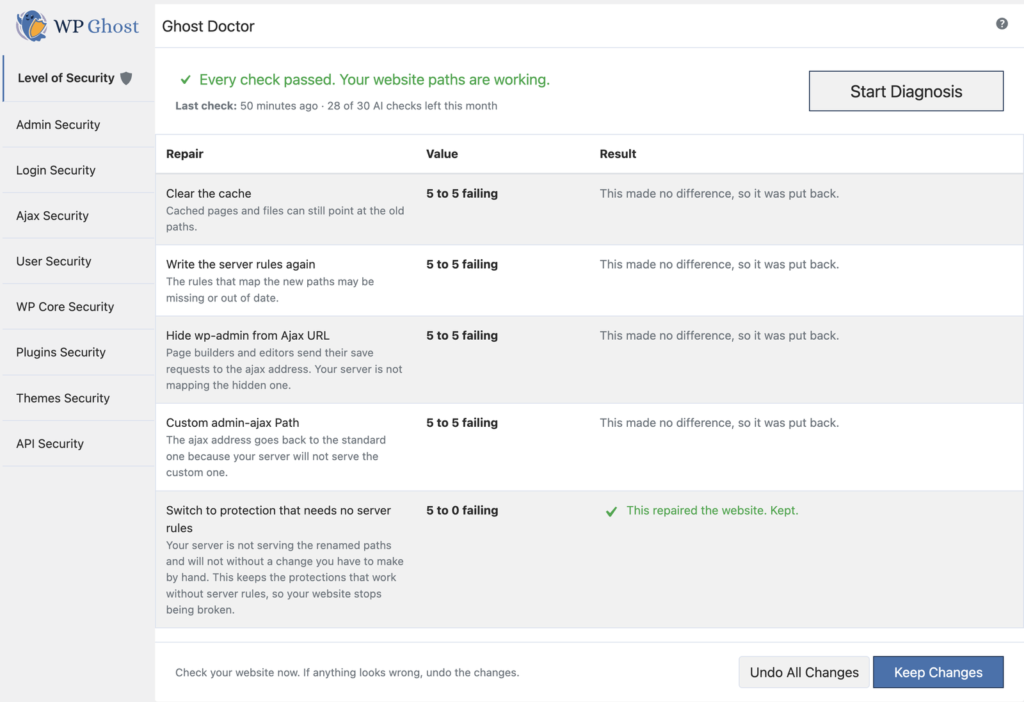
A run therefore never leaves a setting changed for nothing. Every row on the final report either demonstrably helped, or was reverted before you ever saw it. The interface says so in as many words: “This made no difference, so it was put back.”
That single rule is what makes an automated repair tool defensible on a production site. Plenty of security plugins have a repair button. Very few apply a change, re-test the live site, and roll the change back when it did not help.
What repairs will Ghost Doctor try, and in what order?
The repair catalogue is an ordered ladder, and the order is the design. It runs from the cheapest, most reversible action to the ones that trade some protection for a working site. Because the loop stops the moment the site is fixed, the expensive repairs at the bottom are usually never reached, they exist for sites where every cheap one changed nothing.
| # | Repair | What it addresses | Risk |
|---|---|---|---|
| 1 | Clear the cache | Cached pages and files still pointing at the old paths | Low |
| 2 | Write the server rules again | Rules missing or out of date in the config file | Low |
| 3 | Change Paths in Cached Files | Cache plugin saved files containing old paths | Low |
| 4 | Prevent Broken Website Layout | Serves theme files through WordPress so the layout survives, correct, but slower | Medium |
| 5 | Change Paths for Logged Users (off) | Cache plugin needs real paths while it works; visitors still get hidden ones | Low |
| 6 | Load the plugin later | Lets the cache plugin handle files before WP Ghost rewrites paths | Medium |
| 7 | Hide wp-admin from Ajax URL (off) | Editors post to the AJAX address and the server is not mapping the hidden one | Medium |
| 8 | Custom admin-ajax.php path reverted | The server will not serve the custom AJAX address | Reduces protection |
| 9 | Custom REST API path reverted | Some hosts only serve the REST API on its standard address | Reduces protection |
| 10 | Switch to protection that needs no server rules | Last resort. Keeps every protection that works without rewrites, drops the ones that do not | Reduces protection |
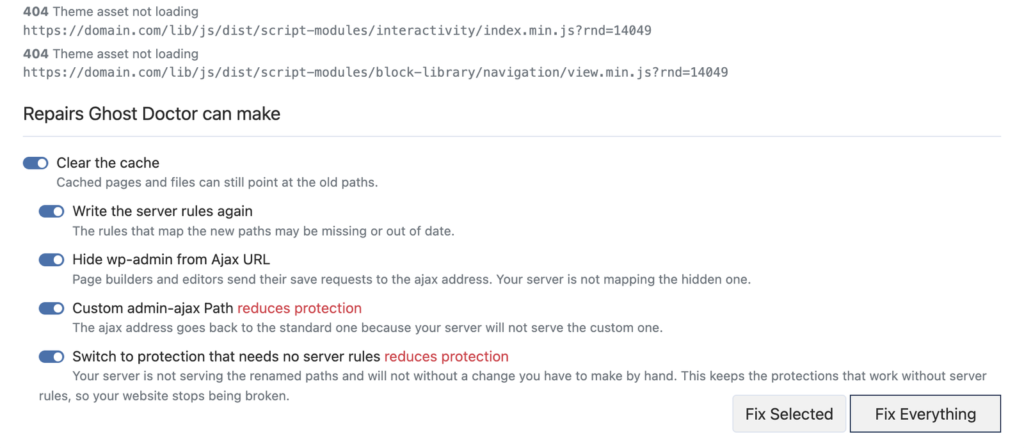
A repair is skipped entirely when it depends on a cache plugin you do not have, or when the setting is already at the value it would write. Repairs that reduce protection are labelled in red before you run them, nothing is downgraded quietly.
The catalogue is also the whole permission surface. Ghost Doctor refuses to write any setting that is not on this list. Nothing else in the plugin can be modified by this feature.
What will Ghost Doctor never change?
Your admin path and your login path. Neither appears in the repair catalogue.
These are the two settings capable of locking an owner out of their own dashboard, so the feature has no authority over them at all. Not “asks first.” Not “warns you.” It simply cannot write them.
The most useful thing to know about an automatic repair tool is usually what it refuses to do.
When is the problem not something a plugin can fix?
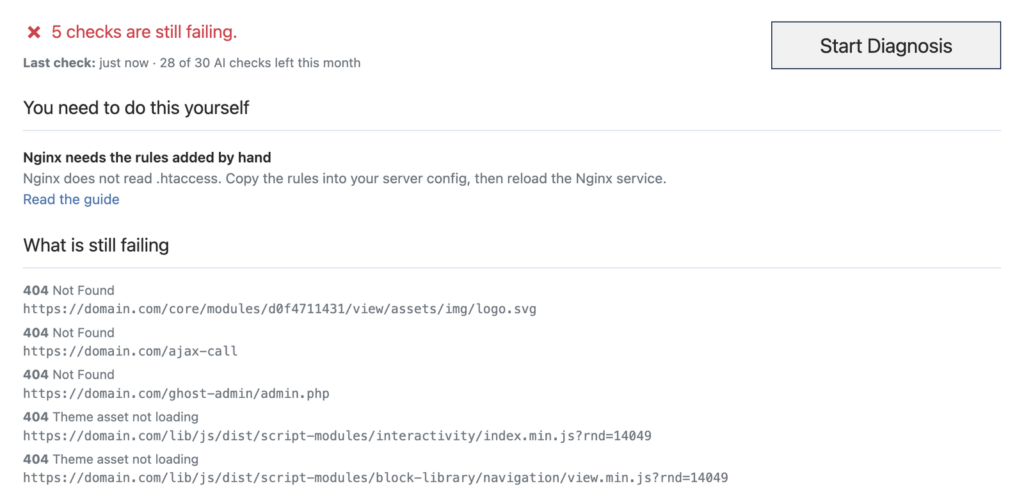
Some causes are unreachable from PHP. Rather than toggle settings that cannot possibly help, Ghost Doctor names the cause and links you to the matching guide:
| Condition detected | What you are told |
|---|---|
| Config file not writable | The rules live in that file. Until it can be written, the renamed paths cannot work. |
| Nginx or CloudPanel | Nginx does not read .htaccess. Copy the rules into your server config and reload the service. |
| Windows IIS | Rules go into web.config, and the URL Rewrite module has to be installed. |
| Writable, but rules absent from the config | Apache is ignoring .htaccess, ask your host to set AllowOverride All. |
For the two most common cases, WP Ghost has step-by-step tutorials: Setup WP Ghost on Nginx Server and How to Set AllowOverride All. If you cannot edit the server config at all, Use WP Ghost on Nginx Without Config Changes lists the protections that still work without rewrite rules.
Ghost Doctor closes with one of three honest messages: the site works again; some progress was made and the rest needs a server change; or nothing worked and every setting it touched has been put back.
Can I undo what Ghost Doctor changed?
Yes, completely. Before the first repair of a run, the full option set is snapshotted. Two details make that a real safety net rather than a decorative one:
- The snapshot is written to its own storage key, it does not consume the existing WP Ghost rollback point you already had. Using Ghost Doctor never spends your other safety net.
- It is taken once per pending session, so three consecutive runs still undo all the way back to your starting state, not to the state two runs ago.
Afterwards the panel holds the decision open: Check your website now. If anything looks wrong, undo the changes.
- Keep Changes discards the snapshot and commits the repairs.
- Undo All Changes restores every option, rewrites the server rules, clears caches and wipes the report.
This works alongside the existing Rollback Settings and, in a genuine lockout, the Emergency Disable guide.
What does the AI layer add, and do I need it?
You do not need it. That is the honest framing, and it is the right one.
Diagnosis and repair are complete without any AI. Separately and optionally, findings can be sent to the WP Ghost account API for an explanation written against your specific configuration rather than a generic help-page paragraph.
What is sent is deliberately narrow. For each finding: an ID, severity, source, title and plain-text detail, plus a small state object, server type, whether the config is writable, whether the rules are present, whether a cache plugin exists, the security mode label, and a count of file mappings. No page content. No user data. No credentials.
The returned wording is stored against the finding ID, so an explanation can only ever appear next to the finding it was written for. The model’s own severity assessment is used to re-rank the list, which lets urgency be judged against your actual configuration in a way a static rule set cannot. Where no explanation exists, the built-in wording stays, a row is never blank.
Every failure mode degrades quietly:
- The monthly quota is cached with a short timeout, so drawing the page never waits on the network.
- If the account server is unreachable, the panel simply says nothing about AI.
- If the monthly allowance is exhausted, it says so, and adds that the diagnosis and repairs still work.
That is the point worth repeating: the AI is commentary on top of a feature that is fully functional without it. AI explanations require an active subscription and consume a monthly allowance, shown as a counter in the panel.
Where does Ghost Doctor appear in the WP Ghost dashboard?
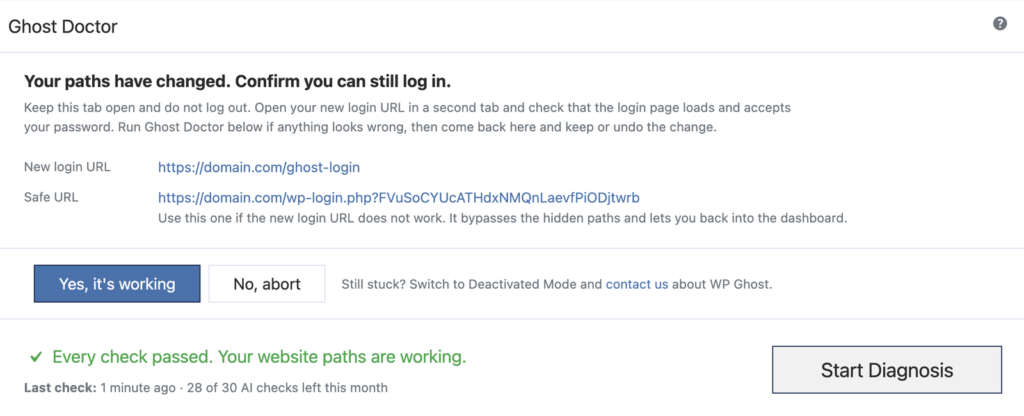
The panel sits on WP Ghost > Change Paths > Level of Security, directly beneath the frontend login check. It is normally confined to that one tab because the card is tall, with one exception: while a path change is awaiting your confirmation, it stays pinned across every tab, because a keep-or-abort decision has to be reachable from wherever you saved.
The Security Check page pulls the same report into its prioritised list. A failing site appears there as a critical item above every hardening suggestion, on the straightforward reasoning that a broken website outranks a missing security header.
Show Image What a healthy configuration looks like. Every renamed path is being served by the server itself, not by a PHP fallback.
Frequently asked questions
Does Ghost Doctor change my login or admin URL?
No. Those two settings are deliberately excluded from the repair catalogue because they are the settings capable of locking you out. Ghost Doctor has no ability to write them at all.
Will Ghost Doctor weaken my security to fix my site?
Only as a last resort, and only visibly. The repair ladder runs cheapest-first and stops the moment the site is fixed, so most sites never reach the protection-reducing steps. The three repairs that do reduce protection are labelled in red before you run them, and can be switched off individually.
Does Ghost Doctor work on Nginx?
It diagnoses Nginx perfectly and will tell you exactly what is failing. It cannot write your Nginx configuration, because Nginx does not read .htaccess and PHP has no access to the server config. In that case Ghost Doctor names Nginx as the blocker and links to the Nginx setup guide.
Is Ghost Doctor available in the free version of WP Ghost?
Ghost Doctor is a WP Ghost Premium feature, available from version 9.0.13.
How do I undo everything Ghost Doctor did?
Click Undo All Changes in the panel after a run. It restores every option from the snapshot taken before the first repair, rewrites the server rules, clears caches and deletes the report. Your existing rollback point is untouched, because Ghost Doctor stores its snapshot separately.
Does the AI feature send my website content anywhere?
No. Only the findings themselves, IDs, severities, titles and plain-text descriptions, plus a small configuration summary such as server type and whether the config file is writable. No page content, no user data, no credentials.
Why does my site show 404 errors after WP Ghost changed the paths?
Because your web server is not honouring the rewrite rules WP Ghost wrote. The four usual causes are Nginx (which ignores .htaccess), Apache without AllowOverride All, IIS without the URL Rewrite module, or a config file the host has made read-only. Run Ghost Doctor and it will name which one applies to you.