
Use WP Ghost’s {blank} and {rand} replacement patterns to remove or randomize WordPress class names in your page source. The standard Text Mapping feature lets you replace one class name with another specific name. Advanced patterns go further: {blank} removes the class name entirely, and {rand} replaces it with a random string that changes on every page load. These patterns are the fastest way to strip WordPress fingerprints from your HTML without choosing custom names for each class.
What Are Advanced Text Mapping Patterns?

In WP Ghost’s Text Mapping, the replacement field (right side) normally accepts a custom string. Advanced patterns are special keywords that tell WP Ghost to perform a specific action instead of a simple find-and-replace. Two patterns are available: {blank} removes the matched text, and {rand} replaces it with a randomly generated string.
Both patterns are entered in the replacement field (right side) of any Text Mapping rule in WP Ghost > Mapping > Text Mapping. They work in HTML output and, when Text Mapping in CSS and JS files is enabled, in stylesheets and scripts too.
The {blank} Pattern – Hide a Class Entirely
Use {blank} when you want to remove a class name without replacing it. The class attribute stays on the HTML element, but the specific name disappears.
wp-caption => {blank}Before: <div class="caption aligncenter">
After: <div class=" aligncenter">

When to use {blank}: For class names that are purely identifiers with no styling attached. If the class is used by CSS for layout or visual styling, removing it will break the design. Use {blank} for classes that only serve as WordPress identifiers – like wp-caption on elements that already have a separate styling class.
The {rand} Pattern – Randomize a Class Name
Use {rand} when you want to replace a class name with a randomly generated string that changes on every page load. This provides maximum hiding – scanners can’t build a pattern from random strings.
wp-block => {rand}Before: <div class="ghost-image">
After: <div class="x7k2m-image"> (random string changes each load)

When to use {rand}: For class names where you want the hiding to be unpredictable. A fixed replacement like wp-block => site-block is consistent – once a scanner learns your replacement, it can track it. With {rand}, the replacement is different every time, making pattern recognition impossible.
Important: If you use {rand}, you must enable Text Mapping in CSS and JS files so the random string is consistent across HTML, CSS, and JavaScript within the same page load. Without CSS/JS mapping, the HTML has a random name but the CSS still targets the original – breaking styles.
Which Classes to Map First
The most detectable WordPress classes are those with the wp- prefix. These are unique to WordPress and are the first thing theme detectors look for. Here’s what to prioritize for your hack prevention strategy:
WordPress core classes: wp-block, wp-image, wp-caption, wp-embed, wp-element, wp-container. These appear on virtually every WordPress page and are the primary CMS fingerprint in the HTML markup.
Plugin-specific classes: woocommerce, elementor, wpforms, cf7, yoast. These identify specific plugins. For guidance on hiding major plugin class names, see the Hide Plugins Like WooCommerce and Elementor tutorial.
Check your source code first. Open your site in a private browser, view the page source, and search for wp-. Every match is a potential mapping candidate. WP Ghost also provides a predefined list of common WordPress classes that you can add with one click.
Always verify the frontend after adding each rule. Some themes use WordPress class names in their JavaScript for DOM targeting and event handling. If a mapped class breaks layout or functionality, remove that specific rule. Add rules one at a time and test after each one.
Demo: Recommended Text Mapping Configuration
Here is the Text Mapping configuration WP Ghost uses on its own WordPress sites. WP Ghost includes these as predefined classes that you can add with one click in the Text Mapping settings. Even with this list, you must test the frontend to ensure no plugin is actively using a mapped class for functionality.
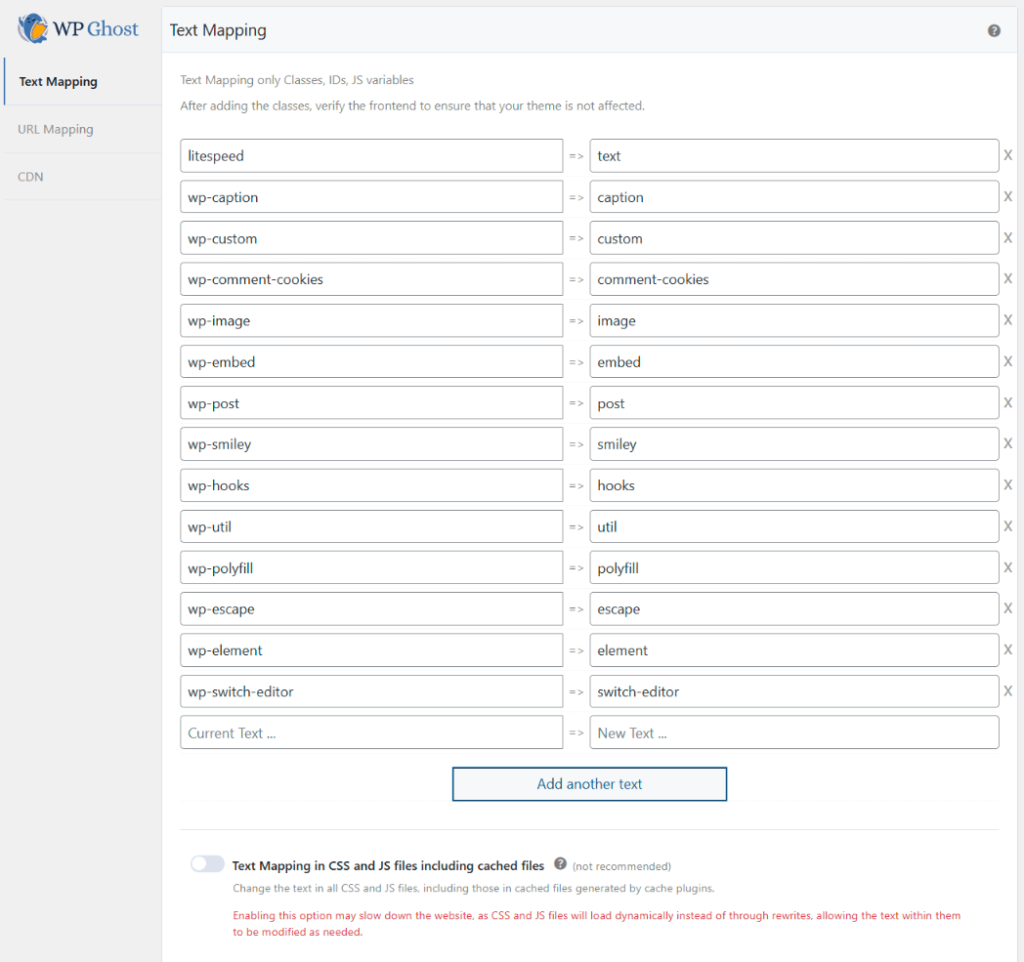
Click any class in the predefined list to add it to your mapping rules. Once added, the class disappears from the predefined list so you can track which ones you’ve already configured.
Frequently Asked Questions
When should I use {blank} vs {rand}?
Use {blank} for classes that serve only as identifiers with no CSS styling attached – removing them has no visual impact. Use {rand} for classes that have CSS styling and need a replacement name. Use a fixed custom name (like wp-block => site-block) when you want predictable, consistent replacements. Use {rand} when you want maximum unpredictability.
Does {rand} work with CSS styling?
Yes, but only if Text Mapping in CSS and JS files is enabled. WP Ghost generates the same random string for both the HTML class attribute and the CSS selector within a single page load. Without CSS/JS mapping, the HTML and CSS would have different names, breaking styles.
Does {rand} work with caching?
With caching enabled, the random string is generated once when the cache is built and stays the same until the cache is cleared. This means the replacement is consistent for cached pages but changes whenever the cache regenerates. For full randomization on every load, you’d need to exclude specific pages from caching – which isn’t practical for most sites. In practice, cached randomization still provides effective hiding since scanners can’t predict the string.
What if a mapping breaks my site?
Remove the problematic rule from the Text Mapping list, clear all caches, and test again. If you can’t access the admin, use the emergency disable guide, the rollback settings, or a wp-config.php constant to disable WP Ghost temporarily.
Does WP Ghost modify WordPress core files?
No. All Text Mapping – including {blank} and {rand} patterns – operates on the HTML output at runtime and on dynamically generated copies of CSS/JS files. Original theme, plugin, and core files are never modified. Disabling Text Mapping restores all original class names instantly.
Related Tutorials
Build your full class name and identity hiding strategy:
- Text Mapping – The complete Text Mapping guide with setup and configuration.
- Hide Plugins Like WooCommerce and Elementor – Specific guidance for hiding major plugin identifiers.
- URL Mapping – Replace plugin-specific filenames and directory paths in URLs.
- Hide from WordPress Theme Detectors – The complete guide to defeating CMS scanning tools.