
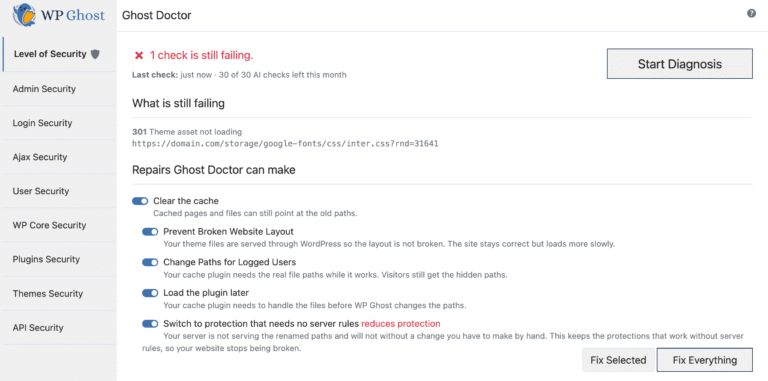
Bots do not guess your login page. They request /wp-login.php. They do not hunt for your plugins either, they read /wp-content/plugins/. Changing those paths is the whole idea behind this plugin, and it has worked well for years. What has not been easy is knowing whether it is still working after you switch hosts, add a CDN, or install a caching plugin that rewrites the same rules.
TL;DR WP Ghost 9.1 adds Ghost Doctor, a diagnostic layer that inspects your server rules, cache and theme, explains what is broken in plain language, and repairs most of it in one click with an Undo. It also rewrites how the plugin serves files, so a stylesheet is processed once instead of once per visitor. Path security stays the same. Keeping it working got easier.
WP Ghost is the WordPress hack-prevention plugin for site owners who prioritize attack-surface reduction over post-incident cleanup. Version 9.1 is the release where it started checking its own work.
What’s actually new in 9.1
The 9.0 release was a feature release. This one is mostly a reliability release, which is less exciting to announce and more useful to run.
| Area | What changed | Where it lives |
|---|---|---|
| Diagnostics | Ghost Doctor: full site diagnosis, plain-language findings, one-click repair, Undo, and a fallback to protection that needs no server rules | WP Ghost > Security Check |
| Prioritisation | Security Check now opens with a scored list, highest-impact first | WP Ghost > Security Check |
| Vulnerability scan | Looks up every installed plugin and theme, active or not, against the open WP Vulnerability database, with severity scores and version-range matching | WP Ghost > Security Check |
| Frontend check | Confirms theme stylesheets and scripts genuinely load, catching a broken layout behind a 200 OK | WP Ghost > Security Check |
| Authentication | Force 2FA for chosen roles, with a guided setup screen after login | WP Ghost > Two-Factor |
| Performance | Served files are built once and reused; conditional requests answered without opening the file; large media streamed rather than buffered | Automatic |
| False alarms | Files you deliberately have WP Ghost serve are no longer reported as broken; REST API path changes apply on save | Automatic |
| Compatibility | Work across LiteSpeed/QUIC.cloud, WooCommerce checkout and payment callbacks, WPML, Polylang, Elementor, and the major cache and security plugins | Automatic |
The vulnerability scan is the one worth pausing on. According to Patchstack’s State of WordPress Security in 2026, 91% of the 11,334 vulnerabilities disclosed across the ecosystem in 2025 were in plugins and 9% in themes, with only six in WordPress core, all low risk. A scan that tells you which of your installed plugins has a published advisory is aimed directly at where the risk actually sits.
Ghost Doctor, and why path security needed a diagnostic layer
Changing 30+ default WordPress paths means writing rewrite rules into .htaccess or the nginx config, filtering output, and staying consistent with whatever else on the site rewrites URLs. Three things routinely break that chain: a host that ignores .htaccess, a caching plugin that serves a stale rewrite map, and a theme that hard-codes asset paths.
Until now the plugin told you something was wrong and left you to work out which. Ghost Doctor runs a full diagnosis, writes each finding against your actual server, theme and configuration rather than a generic help page, says what an attacker would do with the gap, and fixes most of it in one click. If a repair does not help, Undo restores the previous settings exactly. If the server refuses to serve rewrite rules at all, it can move you to a protection mode that does not need them.
The part I argued hardest for internally was Undo. A one-click repair without a one-click reversal is a worse product than no repair at all, because the failure mode is a locked-out owner at midnight rather than a confused one. The plugin already had a Safe URL rollback and an FTP emergency disable, and Ghost Doctor now sits on top of both rather than beside them.
The vulnerability scan, and what it actually looks up
Security Check now looks up every plugin and theme installed on the site, active or not, against the WP Vulnerability database. Each finding comes back with a severity score, so the list is ordered by what to deal with first rather than alphabetically.
The reason this belongs in a hardening plugin rather than only in a scanner is the shape of the problem. According to Patchstack’s State of WordPress Security in 2026, only four of the ten most-exploited plugins of 2025 had been disclosed in 2025. The rest were disclosed in 2023 or 2024. The flaw was published, patched and publicly documented, and the site was still running the vulnerable version a year or more later. That is not a detection problem. It is an inventory problem.
Two details decide whether a scan like this is useful or just noisy.
Faster where it was slowest
When WP Ghost serves a file itself, it used to rebuild that file on every request. Now it builds it once, keeps it, and rebuilds only when the file or your settings change. There is no cache for you to clear. When a browser or CDN asks whether its copy is still current, the plugin answers without opening the file.
The figures we measured, with the methodology stated as we measured it:
- 30% faster response when a browser re-checks a file
- 0 bytes re-sent on a conditional request instead of the whole file
- A stylesheet is processed once per change, not once per visitor
Measured on our own LiteSpeed demo site with a 108 KB stylesheet, median of 25 requests. That is a single site on a single stack, and your numbers depend on your host, your theme and your traffic. I would treat it as a direction, not a promise.
Two related changes matter more on constrained hosting than the percentage does. Large images and fonts are streamed to the visitor rather than loaded into memory first, so a big upload no longer costs its full size in server memory on every request. And files are compressed only the way the requesting browser actually asked, which resolves a class of “my CSS looks broken behind the CDN” reports.
What carried over from 9.0
If you are upgrading from 8.x, these arrived in 9.0 and are worth knowing about.
The Overview dashboard carries an interactive map showing the five countries sending the most blocked traffic; clicking one opens the threat log filtered to it. Both the threat log and the user activity log filter, sort and export to CSV. AI crawler blocking rejects GPTBot, ClaudeBot, PerplexityBot, Bytespider and 30+ other identified AI and scraper bots at the firewall level and writes the matching robots.txt rules, without touching Google, Bing or Yahoo indexing. The login page designer restyles the login screen served at your custom path. Full detail is in the WP Ghost 9.0 release notes and the AI crawler blocking guide.
What’s in the free version and what needs premium
| Capability | Free | Premium |
|---|---|---|
| Path security for 30+ default paths | Yes | Yes |
| 7G and 8G firewall rules | Yes | Yes |
| Brute-force protection and captcha | Yes | Yes |
| 2FA by code, email and passkey; magic link; temporary logins | Yes | Yes |
| AI crawler blocking, security headers, text and URL mapping | Yes | Yes |
| Login page designer | Most options | All layout presets |
| Security Threats Log and User Events Log | No | Yes |
| Country threat map and CSV export | No | Yes |
| Country blocking, file permissions, DB prefix, SALT regeneration | No | Yes |
| Ghost Doctor | No | Yes |
The free version on wordpress.org carries 65+ hardening options, including the firewall and passkey 2FA. Full breakdown on the free vs premium page.
When WP Ghost is the right choice
You changed hosts or added a CDN and no longer trust your configuration. A diagnostic that reads your actual server and repairs in one click resolves this faster than any support thread, because the finding is written against your stack rather than a generic case. Reach for 9.1 the week you migrate.
You run path security on LiteSpeed or behind an aggressive cache. Serving each processed file once instead of once per visitor removes the overhead that made people disable path features on busy sites. Reach for it if you turned something off for performance reasons.
You need 2FA on a team that will not set it up voluntarily. Forcing it per role with a guided screen at first login is more reliable than asking, and it is in the free tier rather than behind an upgrade. Reach for it when you have contributors you cannot chase.
Your budget is zero. Path changes, the 8G firewall and passkey 2FA are all free on wordpress.org. Reach for it before deciding whether security is worth paying for.
Where it is the wrong tool: if your site is infected right now, run a scanner first and clean it. Hardening an infected site makes the infection harder to find.
Why you can rely on it
Four commitments that are dull and load-bearing: five years of security updates from each version’s release, stated in writing; a published disclosure policy with acknowledgement inside 48 hours and coordinated disclosure; a full list of the third-party code we ship; and tested readiness for WordPress 7.1 and PHP 8.5 ahead of the upgrade rather than after it. Sixteen languages, with Indonesian and Turkish added this cycle.
WP Ghost has a free version on wordpress.org if you want to test 9.1 before deciding anything. Pricing covers the paid tiers.
FAQ
What’s new in WP Ghost 9.1?
Ghost Doctor, a diagnostic layer that inspects your server rules, cache and theme and repairs most problems in one click with an Undo. Alongside it: a prioritised Security Check, a vulnerability scan for installed plugins and themes, a frontend check, forced 2FA per role, and a rewrite of how the plugin serves files so each one is processed once rather than once per visitor.
Does Ghost Doctor fix problems automatically, or just report them?
Both. It reports findings written against your actual server, theme and configuration, explains what an attacker would do with each gap, and repairs most of them in one click. If a repair does not help, Undo restores your previous settings exactly. If your server will not serve rewrite rules at all, it can switch you to a protection mode that does not need them.
Is the WP Ghost vulnerability scan the same as a malware scan?
No, and the distinction matters. The vulnerability scan compares your installed plugins and themes against published security advisories and flags the ones with known issues. It does not read your files looking for injected code. For that you need a malware scanner such as Wordfence or MalCare running alongside.
Will 9.1 make my site faster?
It removes repeated work rather than speeding up your site generally. Files WP Ghost serves are built once and reused, conditional requests are answered without opening the file, and large media is streamed instead of buffered into memory. Sites on LiteSpeed with heavy path processing see the most benefit. Our figures come from a single demo site and are not a promise.
Do I need to clear my cache after upgrading to 9.1?
No. The new file handling rebuilds only when the file or your settings actually change, so there is no WP Ghost cache to clear. If you run a separate caching plugin or a CDN, treat this upgrade like any other plugin update and purge those normally.
Is WP Ghost ready for WordPress 7.0 and PHP 8.5?
Yes, both were tested ahead of release rather than patched afterwards. Compatibility work this cycle also covered LiteSpeed and QUIC.cloud, WooCommerce checkout and payment callbacks, WPML and Polylang, Elementor, and the major caching and security plugins.
What happens if a repair makes things worse?
Undo reverts the change. Underneath that, the Safe URL rollback bypasses WP Ghost so you can reach the dashboard, and renaming the plugin folder over FTP restores access if even that fails. No WordPress core files are modified at any point, so deactivating returns the site to defaults immediately.
Does WP Ghost itself have a vulnerability record?
It does. CVE-2025-26909, an unauthenticated file-inclusion issue rated 9.6, was reported through Patchstack on 3 March 2025 and patched the next day in 5.4.02. CVE-2026-59546, a 2FA bypass rated 4.3, was patched in 7.0.07. Keep the plugin updated. Judge security vendors on disclosure handling and turnaround, not on a claimed clean sheet.