
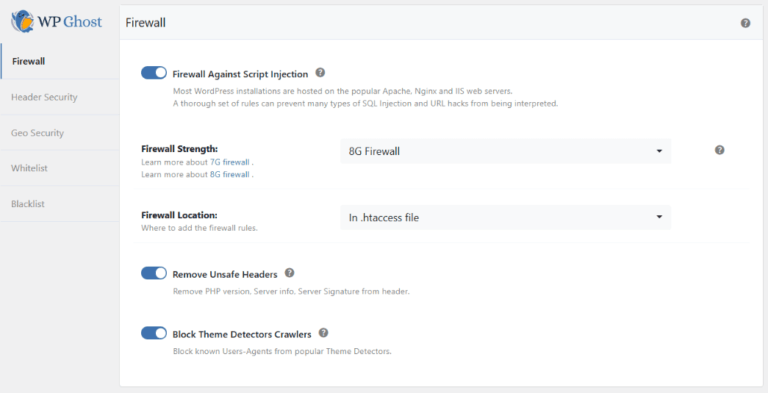
Enable the 8G Firewall in WP Ghost, the most advanced server-level ruleset available, to block SQL injection, script injection, directory traversal, and exploit attempts before they reach WordPress. Developed by security expert Jeff Starr, the 8G Firewall operates through server rewrite rules that intercept malicious requests at the web server level. No PHP processing, no WordPress loading, no plugin execution. The request is rejected before any of your code runs. WP Ghost integrates the 8G ruleset directly into your site’s configuration.
What Is the 8G Firewall?

The 8G Firewall is a set of server-level security rules created and maintained by Jeff Starr of Perishable Press. It’s the latest generation in a line of open-source firewall rulesets (5G, 6G, 7G, 8G) that have protected millions of websites. WP Ghost integrates these rules natively, so you don’t need to manually edit configuration files.
The “G” stands for “generation.” Each generation adds updated patterns to block modern attack techniques while removing false positives from older rules. The 8G ruleset is the most refined version – broader coverage, fewer compatibility issues, and updated patterns for attack vectors seen in recent years.
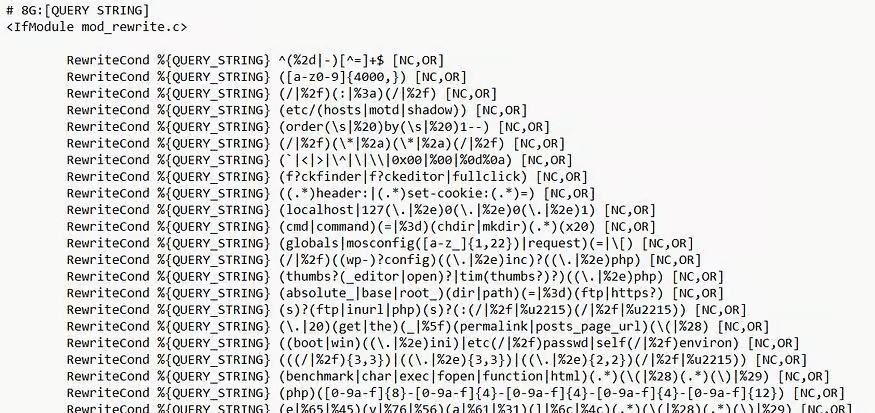
The critical difference between the 8G Firewall and PHP-level security plugins: 8G rules execute at the web server level. On Apache servers, they’re placed in .htaccess. On Nginx/LiteSpeed, they load during WordPress initialization. Either way, malicious requests are blocked before your WordPress installation, plugins, or database are touched.
What the 8G Firewall Blocks
The 8G ruleset filters HTTP requests across multiple vectors. Here’s what it catches for your hack prevention strategy:
SQL injection attempts. Malicious queries that try to read, modify, or delete your database content. SQL injection is the most dangerous common attack – a successful one gives the attacker direct database access. The 8G ruleset blocks SQL injection patterns in URL parameters, POST data, and query strings.
Script injection and XSS. Attempts to inject JavaScript, PHP, or other executable code through URL parameters, form fields, or headers. These attacks try to execute code in visitors’ browsers (XSS) or on your server (RCE). The 8G firewall blocks common injection patterns including encoded payloads.
Directory traversal. Requests that use ../ sequences to navigate outside the web root and access sensitive server files like /etc/passwd or wp-config.php. The 8G ruleset blocks these path manipulation attempts.
File inclusion exploits. Attempts to include remote or local files through URL parameters, which can lead to code execution or information disclosure. The 8G firewall blocks common inclusion patterns.
Bad bots and automated scanners. Requests from known malicious user agents, vulnerability scanners, and automated attack tools. The 8G ruleset maintains a list of suspicious user agent strings and blocks them outright.
Malicious query strings and request methods. Unusual HTTP methods, excessively long query strings, and request patterns that match known exploit toolkits. These catch-all rules block attack tools that don’t match specific injection patterns but still exhibit malicious behavior.
Why Choose 8G Over Other Levels
WP Ghost offers four firewall levels: Minimal, Medium, 7G, and 8G. Here’s why 8G is the recommended choice:
Most comprehensive pattern coverage. The 8G ruleset includes all the protections of previous generations plus updated patterns for modern attack techniques. New exploit methods that emerged after the 7G release are covered in 8G. It blocks more attack vectors than any other level.
Fewer false positives than 7G. Each generation refines the rules to reduce false positives – legitimate requests that match attack patterns. The 8G ruleset has been tested extensively to minimize blocking legitimate functionality while maintaining strong protection.
Server-level efficiency. Like 7G, the 8G rules execute at the web server level. When placed in .htaccess (Apache), malicious requests are rejected before PHP starts. This makes the firewall extremely lightweight – blocked requests consume almost no server resources.
Compatible with other security plugins. The 8G Firewall operates at a different layer than application-level security plugins like Wordfence, Solid Security, and Sucuri. They can run simultaneously without conflict. WP Ghost blocks at the server level; those plugins monitor at the application level.
Automatic search engine whitelisting. WP Ghost automatically whitelists major search engine crawlers (Googlebot, Bingbot, Yandex, and others) when the 8G Firewall is active. Your SEO and indexing are unaffected.
How to Enable the 8G Firewall
- Go to WP Ghost > Change Paths > Level of Security. Select Safe Mode or Ghost Mode and save.
- Go to WP Ghost > Firewall. Switch on Firewall Against Script Injection.
- Select 8G Firewall from the firewall level options.
- On Apache servers: choose whether to place rules in .htaccess (fastest – blocks before PHP) or load during WordPress initialization (more compatible).
- Click Save to apply.
- Test your site: browse key pages, submit forms, test checkout (if WooCommerce), and verify admin functions work correctly.
For the complete firewall configuration including automated IP blocking, unsafe header removal, theme detector blocking, and AI crawler blocking, see the Firewall Security tutorial.
Troubleshooting
A plugin feature or form stopped working after enabling 8G
The most common issue with 8G is a false positive – a legitimate request that matches an attack pattern. This can happen with plugins that use complex query strings or unusual URL parameters. First, try switching to 7G Firewall to see if the issue resolves (indicating the 8G-specific rule is triggering). If it does, add the affected path to Firewall > Whitelist Paths and switch back to 8G.
The firewall doesn’t seem to be blocking anything
The firewall works silently – it blocks requests before they reach WordPress, so there’s no visible indication on the frontend. Check the Security Logs (Premium) to see blocked requests. If logs show no blocks, your site simply hasn’t received malicious traffic since enabling. This is normal for low-traffic sites or sites already protected by hosting-level firewalls.
If you’ve lost access or something broke, check the emergency disable guide, use the rollback settings, or add a constant in wp-config.php to disable WP Ghost temporarily.
Frequently Asked Questions
Should I use .htaccess or WordPress initialization?
On Apache servers, .htaccess is faster because rules execute at the web server level before PHP loads. Use WordPress initialization if you’re on Nginx or LiteSpeed (which don’t use .htaccess), or if the .htaccess option causes compatibility issues. Both provide the same protection – the difference is only where in the request lifecycle the filtering happens.
What’s the difference between 7G and 8G?
The 8G ruleset is the evolution of 7G. It adds updated patterns for attack techniques that emerged after the 7G release, removes rules that caused false positives, and refines existing patterns for better accuracy. If 7G works for your site, 8G will provide strictly better protection. If 8G causes a false positive, you can fall back to 7G while the issue is resolved.
Can I use 8G alongside Wordfence?
Yes. The 8G Firewall operates at the server/configuration level. Wordfence operates at the PHP/application level. They protect at different layers and complement each other without conflict. WP Ghost blocks malicious requests before WordPress loads; Wordfence provides application-level scanning, monitoring, and rate limiting after WordPress loads.
Does this work with WooCommerce?
Yes. WooCommerce checkout, cart, AJAX, payment processing, and REST API endpoints work normally with the 8G Firewall. If a specific WooCommerce feature is unexpectedly blocked, whitelist the affected path. WP Ghost is fully compatible with WooCommerce.
Does WP Ghost modify WordPress core files?
No. The 8G Firewall rules are placed in the server configuration (.htaccess) or loaded through WordPress hooks. No WordPress core files, plugin files, or theme files are modified. Disabling the firewall or deactivating WP Ghost removes all rules instantly.
Related Tutorials
Build your complete firewall and security stack:
- Firewall Security – The complete firewall guide including IP blocking, headers, and theme detector blocking.
- Header Security – Add Content-Security-Policy and other protective HTTP headers.
- Brute Force Protection – Block login attacks with attempt limits and reCAPTCHA.
- Disable XML-RPC Access – Block the legacy protocol used for amplification attacks.
- Hide from WordPress Theme Detectors – Complement firewall blocking with source code hiding.