
If you get errors accessing the REST API after changing the wp-json path in WP Ghost (404 errors, “rest_no_route” responses, or plugins that depend on the API stop working), the custom path isn’t resolving correctly on your server.
Clear all caches
Cached pages and API responses may still reference the old wp-json path. Clear your WordPress cache plugin, CDN cache, and browser cache. Test the new API path directly in your browser: yourdomain.com/your-custom-api-path/. You should see a JSON response, not a 404.
Run the Frontend Test
Go to WP Ghost > Change Paths and click the Frontend Test button. This checks whether your server’s rewrite rules are correctly handling all custom paths, including the REST API path. If the test fails, follow the configuration instructions shown.

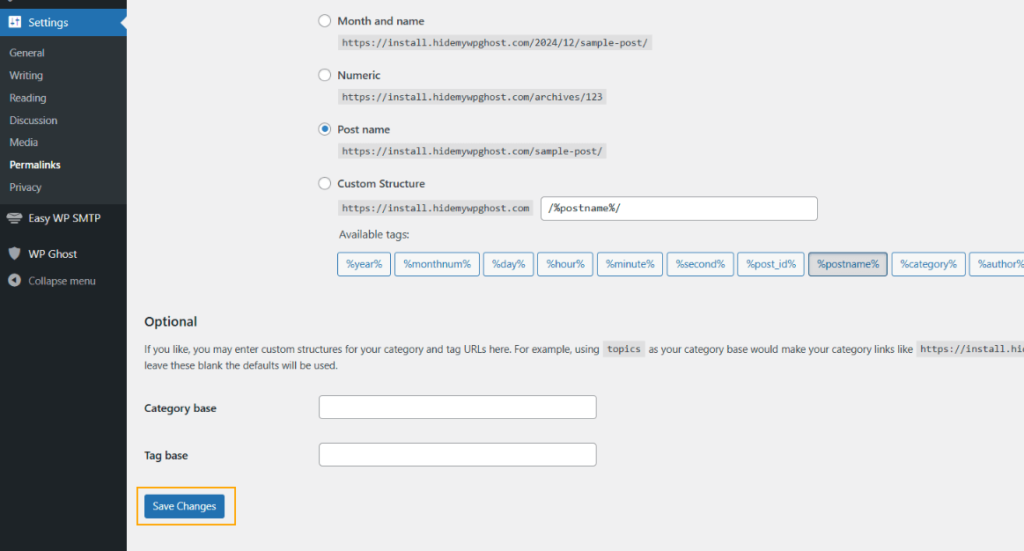
Flush permalink settings
Go to Settings > Permalinks and click Save Changes without modifying anything. This regenerates WordPress’s rewrite rules, which often fixes REST API routing issues after a path change.
Log out and log back in
After changing core paths, your session cookies are tied to the old paths. Log out of WordPress and log back in so WP Ghost creates fresh session cookies on the new paths. This is especially important if the REST API works for logged-out visitors but fails in the admin dashboard.
Revert to the default wp-json path
Some hosting providers restrict JSON requests to the default /wp-json/ path only, blocking custom API paths at the server level. Go to WP Ghost > Change Paths > API Security and set the path back to wp-json. If the REST API works with the default path, your host doesn’t allow custom API paths. Contact your hosting provider or keep the default path and use WP Ghost’s other security features to protect the API (Disable REST API access for non-authenticated users, firewall rules).

If you’ve lost access to the admin dashboard, see the emergency disable guide.