
You can disable WP Ghost’s path changes for specific user roles or whitelisted IP addresses. This is useful when certain logged-in users (administrators, editors, or custom roles) need to see original WordPress paths for development or debugging, or when you want to grant unrestricted access to trusted IP addresses while keeping path security active for everyone else.
When to Disable WP Ghost by User Role

WP Ghost applies path changes to all visitors by default, including logged-in users. In some cases, you may want specific roles to see original paths: developers debugging plugin or theme issues need to see real file paths, content editors using page builders that reference WordPress paths directly, or agency teams who need unrestricted backend access while clients see the secured paths. WP Ghost provides two approaches: IP whitelisting (built-in setting) and role-based filtering (custom code).
Whitelist IP Addresses
WP Ghost includes a built-in IP whitelist feature. Whitelisted IP addresses bypass WP Ghost’s security restrictions, allowing full access to original paths and features.
- Go to WP Ghost > Change Paths > Whitelist Options.
- Enter the IP addresses you want to whitelist, one per line.
- Click Save.
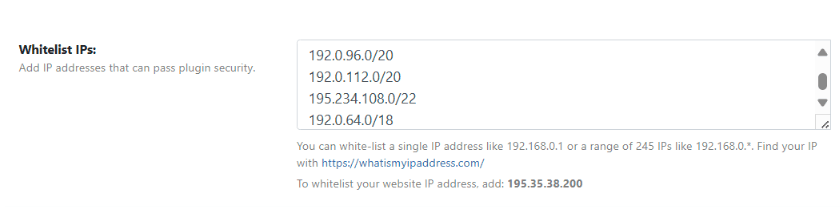
IP whitelisting is best for static IPs. If you or your team have a fixed office IP address, this is the simplest approach. For users with dynamic IPs (which change frequently), the role-based filter below is more reliable since it works regardless of IP address.
Disable Path Changes by User Role
To disable WP Ghost’s path processing for specific user roles, add the following code to your child theme’s functions.php file or a code snippets plugin:
add_action('template_redirect', function() {
    if (function_exists('wp_get_current_user')) {
        $user = wp_get_current_user();
        $allowed_roles = array(
            'administrator',
            'editor',
            'author',
        );

        if (isset($user->roles) && is_array($user->roles)
            && array_intersect($allowed_roles, $user->roles)) {
            add_filter('hmwp_process_paths', '__return_false');
            add_filter('hmwp_process_buffer', '__return_false');
            add_filter('hmwp_process_hide_disable', '__return_false');
            add_filter('hmwp_process_find_replace', '__return_false');
        }
    }
});
This disables WP Ghost’s path changes, output buffering, hide/disable features, and text mapping for administrators, editors, and authors. Other visitors and lower-privilege roles (subscribers, customers) still see the secured paths.
Customize the $allowed_roles array to match your needs. Remove roles you don’t want excluded, or add custom roles (for example, 'shop_manager' for WooCommerce). The four filters control different aspects of WP Ghost’s processing:
hmwp_process_paths– Path rewriting (wp-content, plugins, themes paths).hmwp_process_buffer– Output buffer processing (HTML source changes).hmwp_process_hide_disable– Hide and disable features (right-click, view source, etc.).hmwp_process_find_replace– Text and URL mapping replacements.
You can selectively disable only some filters if you want partial WP Ghost processing for certain roles.
Use a child theme or code snippets plugin. Adding code to functions.php in the parent theme means your changes are lost when the theme updates. Use a child theme or a code snippets plugin to keep the filter persistent.
Frequently Asked Questions
Which method should I use?
Use IP whitelisting if you have a fixed office IP and want a no-code solution. Use the role-based filter if you need to exclude by user role regardless of IP address, or if your team uses dynamic IPs. You can use both methods together.
Does this work with WooCommerce roles?
Yes. Add WooCommerce roles to the $allowed_roles array. Common WooCommerce roles include 'customer' and 'shop_manager'. For example, to exclude shop managers, add 'shop_manager' to the array.
Does this reduce security?
Only for the excluded roles or IP addresses. Those users see original WordPress paths, which means path security doesn’t apply to their sessions. However, all other WP Ghost features (firewall, brute force, 2FA) still apply. Keep exclusions to the minimum needed and don’t exclude roles that don’t need to see original paths.
Does WP Ghost modify WordPress core files?
No. Both IP whitelisting and the role-based filter work through WordPress hooks. No core files are modified.
Related Tutorials
Per-page and per-user WP Ghost customization:
- Disable WP Ghost on Specific Pages – Exclude pages instead of user roles.
- Customize Right-Click Disable – Per-page exclusion for disable features.
- Change WordPress Paths – Main path security configuration.
- WP Ghost Constants Reference – All wp-config.php constants.