
Replace the default wp_ database prefix with a random one in a single click to protect against SQL injection attacks that target WordPress table names. WordPress installs with the default prefix wp_ for every database table (wp_posts, wp_users, wp_options, etc.). SQL injection attacks often hardcode these table names. Changing the prefix means those queries fail even if an injection vulnerability exists. WP Ghost changes the prefix through the Security Check tool with a one-click “Fix it” button and supports Multisite installations. This is a Premium feature.
Why Change the Database Prefix?

Every WordPress database uses the same table names: wp_posts, wp_users, wp_options, wp_usermeta, and more. SQL injection attacks exploit vulnerable plugins to run queries against these known table names, for example SELECT * FROM wp_users to extract credentials. If your prefix is abc123_ instead of wp_, the table is abc123_users and the hardcoded query fails. Changing the prefix is one more layer that prevents automated exploits from succeeding.
Important: Back up your database before changing the prefix. WP Ghost modifies actual database table names and the wp-config.php file. While the process is reliable and includes an undo option, a backup ensures you can recover if anything goes wrong.
How to Change the Database Prefix
- Go to WP Ghost > Security Check.
- Click Start Scan to run a security test.
- If the database uses the default
wp_prefix, WP Ghost flags it as a security task.
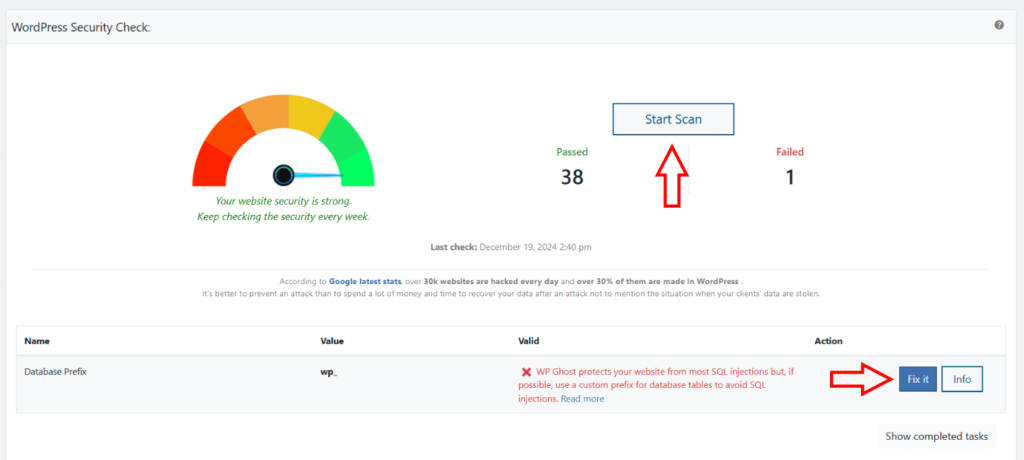
Multisite compatible. WP Ghost automatically detects WordPress Multisite installations and renames all network tables with the new prefix, including per-site tables (e.g., wp_2_posts, wp_3_options).
Undo Database Prefix to Default
After changing the prefix, WP Ghost shows an option to undo the change and restore the default wp_ prefix. Use this only if you experience errors after the prefix change.
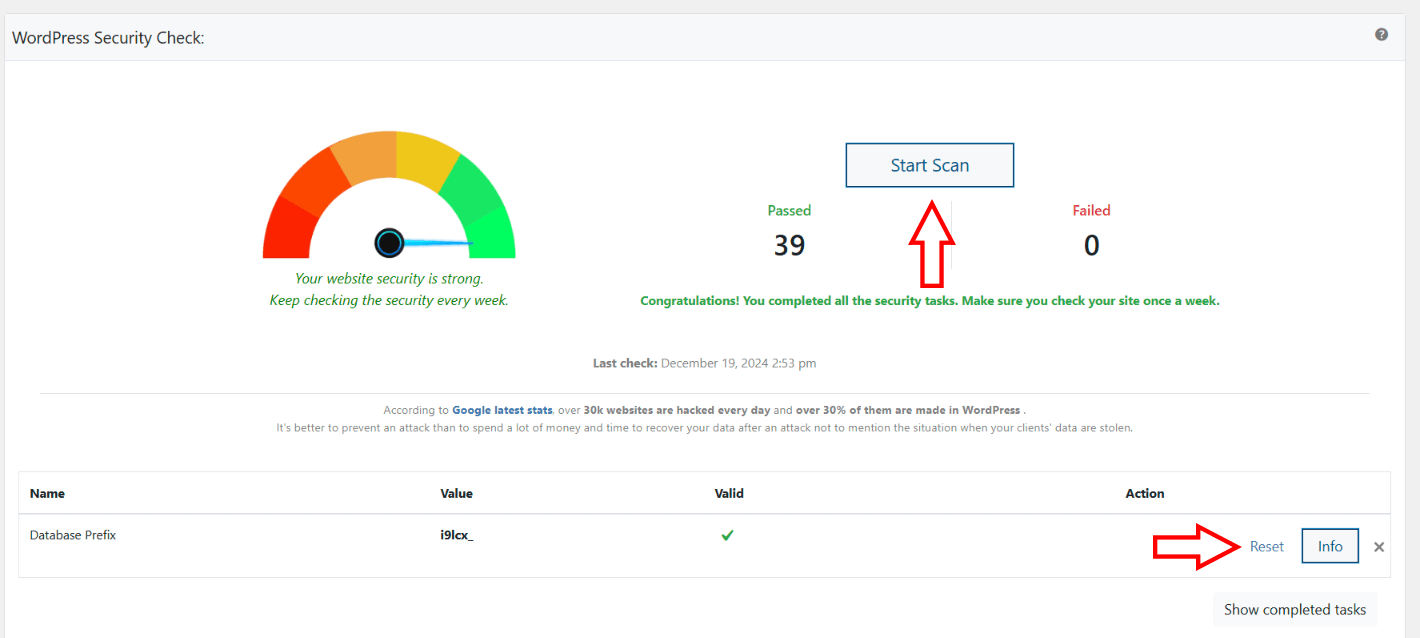
The undo button appears in the same Security Check task where you originally changed the prefix. Click it to rename all tables back to wp_ and update wp-config.php.
Troubleshooting
Site shows a database connection error after changing the prefix
The $table_prefix value in wp-config.php may not match the actual table names. If you can access the dashboard, use the undo button in Security Check. If you can’t access the site, open wp-config.php via FTP and change $table_prefix back to 'wp_'. Then check your database tables using phpMyAdmin to see what prefix they currently have, and make wp-config.php match.
Some plugins stopped working after the prefix change
A few plugins store the table prefix in their own configuration or create custom tables with hardcoded prefixes. After changing the prefix, deactivate and reactivate the affected plugin so it picks up the new prefix. If the issue persists, check if the plugin created custom tables that weren’t renamed and contact the plugin author.
Security Check doesn’t show the prefix task
Your database prefix is already changed from the default wp_. The task only appears when the prefix is still the WordPress default. No action needed.
Frequently Asked Questions
Is it safe to change the database prefix on a live site?
Yes, but always back up your database first. WP Ghost handles the renaming process reliably, including updating wp-config.php and all internal references. The undo option provides a rollback path if anything goes wrong. For extra safety, test on a staging site first if one is available.
Does this actually rename the tables in the database?
Yes. Unlike path changes (which use rewrite rules and don’t modify files), the database prefix change physically renames your database tables and updates the $table_prefix value in wp-config.php. This is a real database modification, which is why backing up first is important.
Does this work with WooCommerce?
Yes. WooCommerce tables (like wp_wc_orders, wp_woocommerce_sessions) are renamed along with all other WordPress tables. WooCommerce reads the prefix from wp-config.php and adapts automatically. Cart, checkout, and order management continue working normally.
Does WP Ghost modify WordPress core files?
For this specific feature, WP Ghost modifies wp-config.php (to update the $table_prefix value) and renames database tables. This is different from WP Ghost’s path security features, which never modify any files. The database prefix change is a permanent modification with an undo option.
Related Tutorials
Database and server-level security:
- Website Security Check – The tool that identifies and fixes the database prefix along with 38 other security tasks.
- Prevent Hack Attacks – The complete WP Ghost security overview.
- Firewall Security – Block SQL injection and script injection at the request level.
- Backup and Restore – Save your WP Ghost settings before making changes.