
This guide is for anyone who has run a scan, been handed nine red rows, and had no idea which one to start with. It covers what a security check can and cannot know about your site, why generic severity ranks findings in the wrong order, and the two things we shipped to fix it: a single prioritised list that replaces three separate scans, and an explanation layer that reads that list against your server before it says a word.
What a WordPress security check actually measures
A WordPress security check is an audit of your site’s configuration against a list of known weaknesses. It looks at which files are reachable, which paths resolve, whether your version numbers are readable, whether your login has rate limiting, and which of your installed plugins have a published vulnerability. It is a configuration audit. It is not a malware scan, and the difference matters more than the marketing usually admits: a check tells you what could be used against you, while a scanner tells you what already has been.
The reason a check has so much to do is that the surface it audits keeps growing. According to Patchstack’s State of WordPress Security in 2026, 11,334 new vulnerabilities were disclosed across the WordPress ecosystem in 2025, up 42 percent on the year before, and 91 percent of them were in plugins rather than in core. Only six were found in WordPress core itself, all of them low risk. Your core install is not the problem. The twenty-odd things you added to it are.
So the check runs, and it produces a list. That list is where the trouble starts.
Why the same finding gets the same score on every website
Here is the part nobody says out loud. The severity on a security finding is almost always assigned when the check is written, not when it runs. “Version number is readable” is medium on your site, on my site, and on a site that has been sitting unpatched since 2023. The row cannot know the difference, because nothing in the scan looked at anything except the one thing the row is about.
That produces two failures a site owner feels immediately. The first is a top item that does not deserve the position. The second, and worse, is a genuine exposure buried at row seven because its generic score is lower than something already neutralised by another setting you turned on last month.
The Patchstack data makes the ranking problem concrete. Only 4 of the 10 most-exploited plugin vulnerabilities of 2025 were disclosed in 2025; the rest were disclosed in 2023 or 2024. A freshness-weighted list would have put six of the ten in the wrong place. And the single largest category of attack traffic that Patchstack’s own mitigation layer blocked was Broken Access Control, at 57 percent, precisely because it resembles ordinary authenticated traffic and generic rules do not catch it. Severity assigned in the abstract is not a measure of your risk. It is a measure of the average site’s risk, and no such site exists.
The honest version of the objection is worth stating too, because it is the one a sceptical reader will reach for: a generic severity is at least consistent, and consistency has value. That is true. It is also why we did not throw the built-in ranking away.
One prioritised list instead of three separate scans
Before any of the new work happens, the list itself had to stop being three lists.
WP Ghost used to report vulnerable plugins in one place, failing path checks in another, and failed hardening tasks in a third. Three tables, three orderings, and the reconciliation left to the person least equipped to do it. Now a single function collapses all three into one queue, sorted worst first.
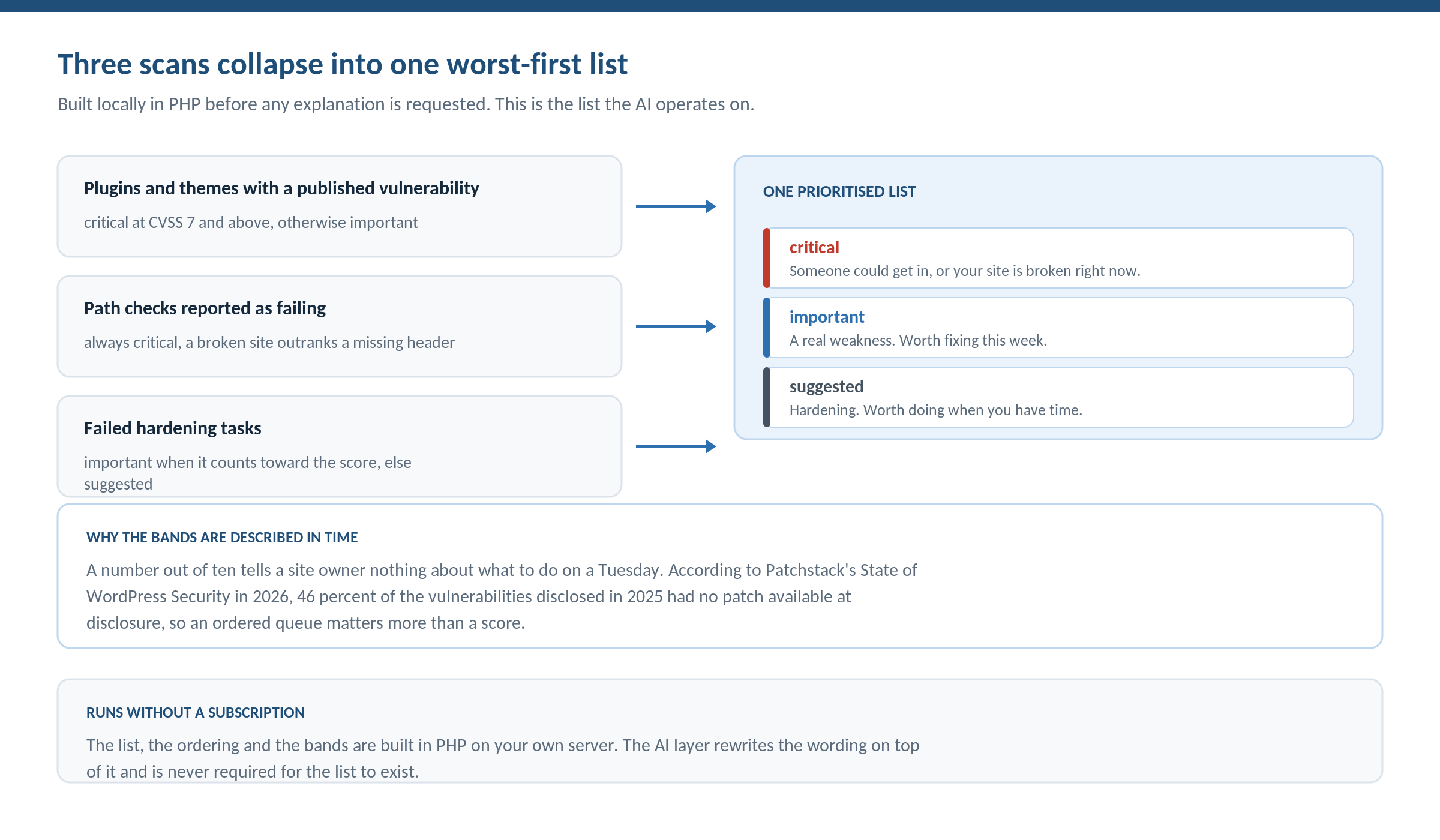
The mapping is deliberately blunt. A failing path check is always critical, on the reasoning that a website that is currently broken outranks a missing security header every time. A failed hardening task is important when it counts toward your score and suggested when it does not. On premium there is a third source: a plugin or theme with a published vulnerability, which lands as critical at CVSS 7 and above and important below it.
The bands are then described in time rather than in jargon. Critical reads “someone could get in, or your website is broken right now.” Important reads “a real weakness, worth fixing this week.” Suggested reads “hardening, worth doing when you have time.” A number out of ten tells a site owner nothing about what to do on a Tuesday morning. A queue with a deadline attached does.
That framing is not decoration. According to Patchstack 2026, 46 percent of the vulnerabilities disclosed in 2025 had no patch available at the moment of disclosure. The report’s own conclusion is that site owners cannot treat plugin updates as a security measure on their own. If a meaningful share of your findings cannot be closed by updating, then the order you work the queue in is the only lever you have left.
All of this runs in PHP on your own server. The queue, the ordering and the bands are in the free version, drawing on those first two sources, with no account, no subscription and no network call. Adding the vulnerability source is what premium changes about the list itself.
AI security explanations read your report against your configuration
This is the part that is new, and it is the reason the article exists.
One click sends your findings for analysis alongside a small description of how your site is actually set up: your server type, whether your config file is writable, whether your rules are currently present in it, whether a cache plugin is active, which security mode you run, and how many file mappings exist. What comes back is a plain-language explanation for every finding, a rewritten headline, one clear action per row, and a priority order that accounts for the configuration around each finding rather than the finding alone.
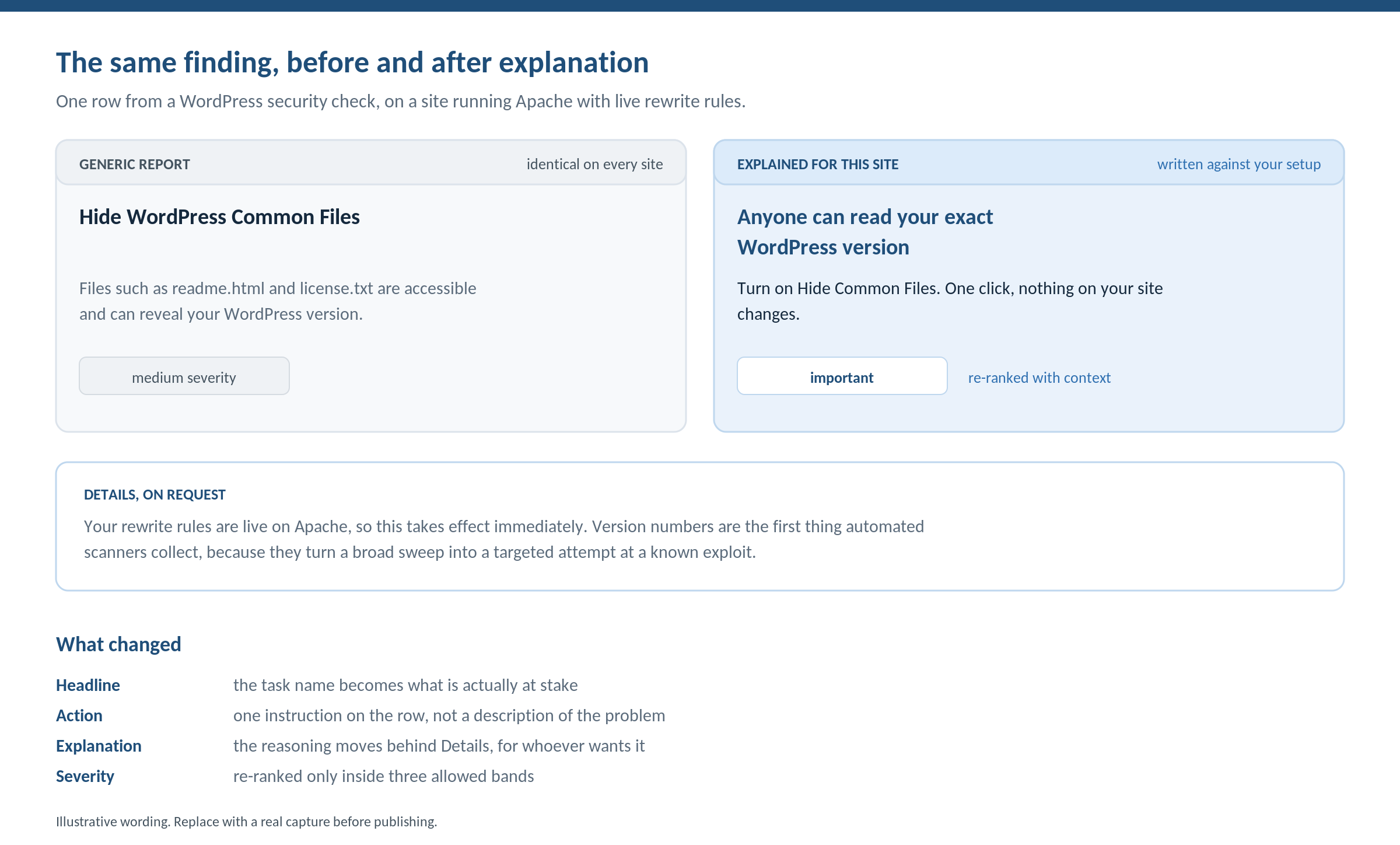
Four things change on the row. The technical task name becomes a headline about what is at stake. The description becomes a single instruction. The reasoning moves behind a Details toggle, where it can be as long as it needs to be without turning the list into an essay. And the severity can move, up or down, because a weakness already neutralised by another active setting should stop shouting, while one that is genuinely exposed on your particular server should move up.
Above the list sits a paragraph describing where the website as a whole stands. For a lot of owners that is the first time a security screen has answered the question they actually had, which is not “what is wrong” but “am I okay.”
Why the ordering matters this much comes back to the clock. Patchstack 2026 measured that 20 percent of heavily exploited vulnerabilities were hit within 6 hours of disclosure, 45 percent within 24 hours, and 70 percent within 7 days. When the window is that short, working a queue top-down is only useful if the top is right.
One clarification worth making plainly, because it is the sort of thing a reviewer will test. The explanation layer requires a connected account on an active subscription, and spends one of a monthly allowance of checks. It does not require the premium plugin. The code ships in the free version, so a free install with a licensed account gets explanations, and the list, the ordering, the bands and everything described in the next two sections need neither.
What the AI is not allowed to do
Every plugin is announcing AI this year, so the useful thing to publish is not the capability. It is the constraints. Letting a model re-rank security findings is only defensible if it cannot do certain things, and here is what it cannot do.
Explanations are bound by finding id. An explanation can only ever render next to the exact finding it was written for. If you fixed something between the scan and the explanation, that row simply stops appearing rather than being described by text meant for something else. A finding that arrives without a matching explanation keeps its built-in wording.
Severity is allowlisted to three values. Only critical, important and suggested are accepted. The model can move a row between those bands and can do nothing else. It cannot invent a fourth band, and it cannot escalate outside the scale.
The built-in wording is always the fallback. If the account server is unreachable, rows render with the original text. A security screen that goes blank because a remote service is down is worse than one that never called out at all.
The whole-site summary expires by content rather than by clock. It is stored against a signature of the sorted finding ids, so the moment what is wrong with your site changes, the old summary is dropped instead of being shown describing yesterday. Rows keep their explanations through that, because rows are bound to an id and the summary is not. Expiring on content rather than on a timer is the only version that survives contact with the real world: according to Patchstack 2026, the weighted median time to first exploitation in 2025 was 5 hours, which is comfortably shorter than any cache lifetime we would have felt comfortable choosing.
There is one more piece of honesty in the design that I would defend even though it costs us something: the built-in advice is not deleted when the model writes a better headline. It is demoted into the Details panel and shown alongside. The model’s prose does not carry the links to your settings screens and the knowledge base, and those links are frequently the most useful thing on the row.
What leaves your website, and what does not
Answering this before anyone has to ask is the right call, because “AI” and “security plugin” in the same sentence makes people want to know.
For each finding, the payload carries an id, a severity, a source, a title, and the detail text with tags stripped. Alongside it goes one small state object: server type, whether the config is writable, whether the rules are present in it, whether a cache plugin exists, the security mode label, and a count of file mappings. That is the whole payload. No page content, no user data, no credentials, nothing about your visitors.
That state object is also exactly why the output is worth having. It is what lets an explanation say this matters on your setup instead of reciting a hardening tip, because it knows you are on Nginx with an unwritable config before it ranks anything. The privacy answer and the quality answer turn out to be the same sentence.
The diagnosis and repair work described below never leaves your server at all. Its only network activity is loopback requests to your own site.
Ghost Doctor: when the check reports that your paths stopped working
The most common critical row in this new list is not a vulnerability. It is your own site being broken, and it deserves the top slot.
Path security is an agreement between two parties. WP Ghost writes rewrite rules, and the web server honours them. When the server does not, the reconfigured paths return 404 and the site visibly breaks. Nginx never reads .htaccess. Apache ignores it without AllowOverride All. IIS needs URL Rewrite installed. Plenty of hosts lock the config file outright.
From the owner’s chair this looks like one thing, which is that the plugin broke the website. The stylesheet is gone, the page builder will not save, the homepage is blank. The actual cause sits one layer below the plugin, and the standard remedy is to deactivate everything and never find out why. That throws away the protection without ever naming the reason.
How much the server matters is not a hunch. Patchstack’s 2026 pentest put a set of hosting environments against known-exploited vulnerabilities and found that internal WAFs, Cloudflare, Imunify360 and ModSecurity combinations blocked only 12 percent of attacks in one test and 26 percent in a broader one. The best performing host blocked 60.7 percent. Several blocked under 17 percent. One blocked nothing at all. Server configuration is not a constant you can safely assume. It is the largest variable in the entire stack, and it is the one your security check has historically been blindest to.
Ghost Doctor closes that gap by reproducing the breakage from inside WordPress. It fetches your own site as an anonymous visitor with cookies off, requesting the homepage, the ajax endpoint, the REST root, the admin path if you changed it, and up to four theme assets parsed out of the homepage HTML. A 404, 301 or 302 counts as a failure.
The detail that makes the probe honest is a bypass token appended to every request, which disables the plugin’s own PHP fallback for that fetch. Without it the plugin would quietly serve the file through WordPress, return 200, and the probe would conclude the rewrites work when they do not. The token forces the server rules to answer on their own. The probe tests your server, not our safety net.
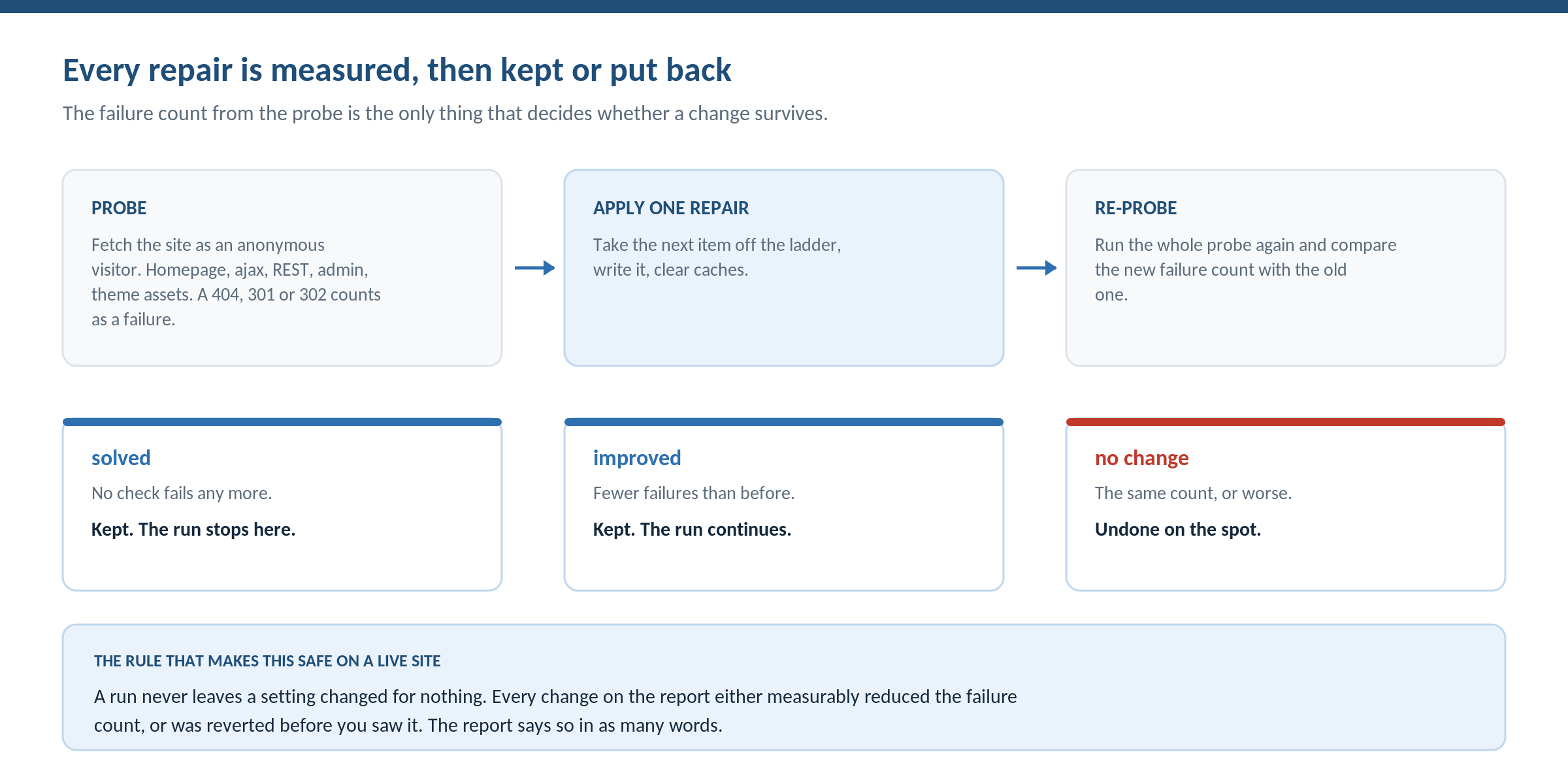
Then comes the part I think is the most defensible piece of engineering in the release. Ghost Doctor does not apply a plan and hope. It applies one repair, clears caches, re-runs the entire probe, and compares the new failure count with the old one. If nothing fails any more, the change is kept and the run stops. If fewer things fail, the change is kept and the run continues. If the count is the same or worse, the change is undone on the spot.
A run therefore never leaves a setting changed for nothing. Every change on the report either measurably reduced the failure count or was reverted before you saw it, and the report says so in as many words: this made no difference, so it was put back.
The repair ladder, and what it refuses to touch
The catalogue of repairs is an ordered list, and the order is the design. It runs from the cheapest and most reversible action to the ones that trade some protection for a working site. Because the loop stops the moment nothing fails, the expensive rungs at the bottom are usually never reached.
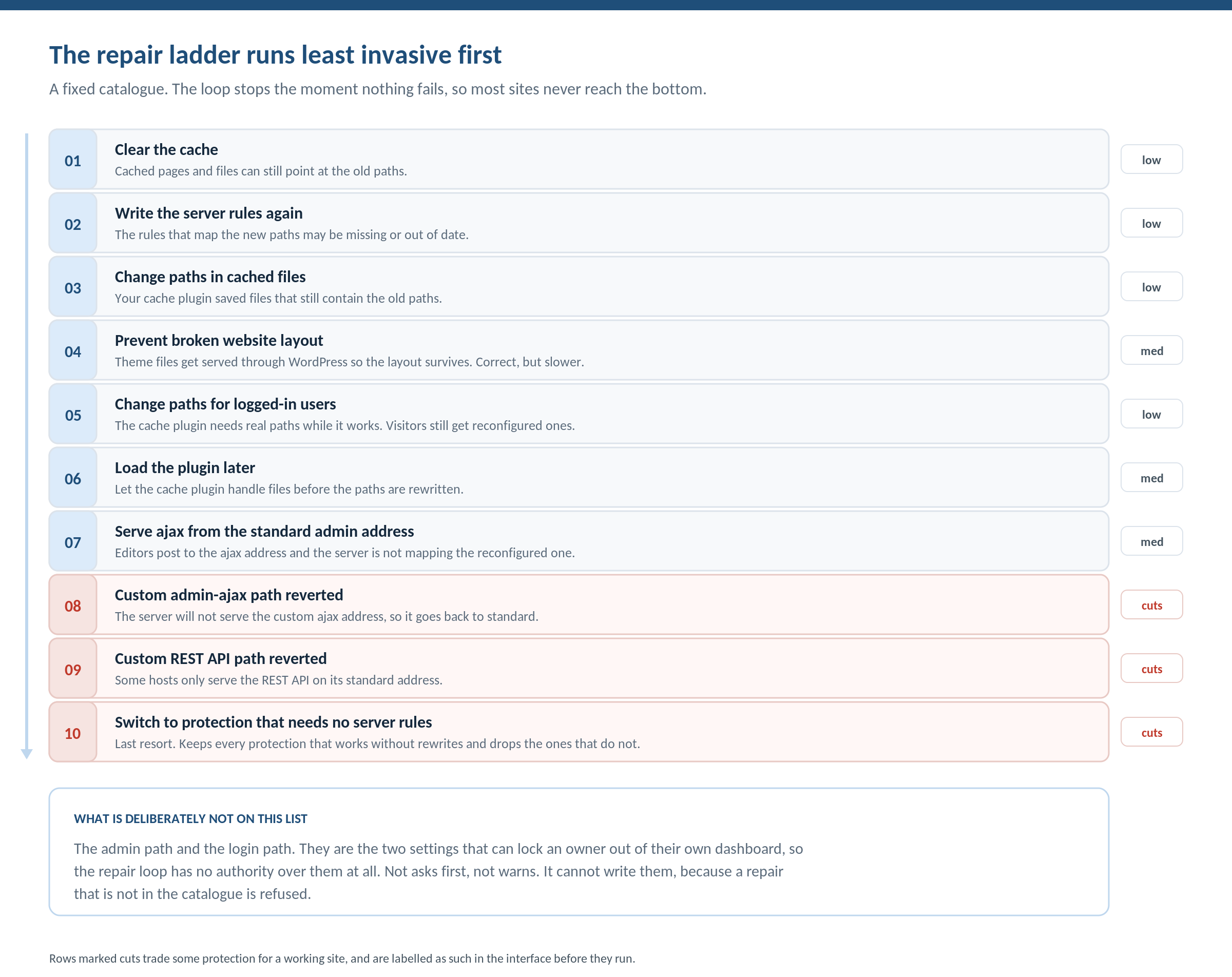
The catalogue is also the entire permission surface. A repair that is not on the list is refused outright, so nothing else in the plugin can be written by this feature. A rung is skipped when it depends on a cache plugin you do not have, or when the setting is already at the value it would write. The three rungs that reduce protection are labelled as such in the interface before they run.
Two settings are deliberately absent: the admin path and the login path. They are the two that can lock an owner out of their own dashboard, so the repair loop has no authority over them at all. Not asks first, not warns. It cannot write them.
Some causes cannot be reached from PHP at all, and pretending otherwise would just burn settings changes on a problem they cannot touch. When the config file is not writable, when the server is Nginx or CloudPanel, when it is Windows IIS, or when the file is writable but the rules are not being read, Ghost Doctor names the cause and links the matching guide instead of toggling anything. For Nginx that means copying the rules into the server config and reloading the service, because Nginx does not read .htaccess and never will.
Before the first repair of a run, the complete option set is snapshotted, and two details make that a real safety net rather than a decorative one. The snapshot is written to its own key rather than consuming the existing rollback point you already had. And it is taken once per pending run, so three consecutive runs still undo all the way back to where you started rather than to where you were two runs ago.
This matters because the alternative behaviour is what people actually do. With roughly 13,000 WordPress sites hacked per day according to Sophos and Hostinger reporting, the deactivate-and-walk-away reflex is expensive. Ghost Doctor exists so that a broken layout has a diagnosis attached to it instead of a one-star review.
When WP Ghost is the right choice
WP Ghost is the WordPress hack-prevention plugin for site owners who would rather reduce what an attacker can reach than clean up afterwards. Four scenarios where the security check specifically is the reason to pick it:
- You have run other scans and could not act on them. If your problem is not detection but triage, an explanation layer that reads your server type and rule state before ranking is more useful than another list. Decision trigger: you have a report open right now and do not know which row to start with.
- You changed your paths and something broke. No other approach we know of applies a repair, re-tests the live site, and rolls the change back when it did not help. Decision trigger: your layout broke after a path change and you are about to deactivate the plugin.
- You run on Nginx, IIS or a locked-down host. The value here is being told the cause is a server change, with the right guide attached, instead of watching a tool toggle settings that cannot possibly work. Decision trigger: your host does not let you edit the config file.
- You want to test the mechanism before paying for anything. The free version on wordpress.org carries 65+ hardening features, the 8G Firewall ruleset, Passkey 2FA, more than 30 changeable default paths, and the prioritised check and the full repair loop described above. Premium adds the vulnerability source to that list. Decision trigger: you want to watch a repair get reverted on your own site before you trust it.
WP Ghost protects more than 250,000 active sites and holds 4.5 stars on wordpress.org. It is not a malware scanner. If your site is already infected, run a cleaner such as Wordfence or MalCare first, then come back and reduce the surface so the same route is not available twice.
Try the free version on wordpress.org if you want to run the check on your own site before deciding anything.
Related resources
- WordPress hack prevention, the umbrella guide this check feeds into
- Attack surface reduction for WordPress, the principle behind the ranking
- WordPress path security, the feature Ghost Doctor diagnoses
- Changing the admin-ajax path, the setting behind the most common repair
Frequently asked questions
What is a WordPress security check?
A WordPress security check is a configuration audit. It tests which files and paths are reachable, whether version numbers are readable, whether login controls are active, and whether any installed plugin has a published vulnerability. It reports what could be used against your site. It does not detect malware that is already present, which is a separate job for a scanner.
How is this different from a WordPress security scan?
A scan looks for malicious code already on your site. A check looks at your configuration for weaknesses an attacker could use. You want both, and they fail differently: a clean scan tells you nothing about your exposure tomorrow, and a clean check tells you nothing about whether you were compromised last month.
Does the AI explanation see my site content or my users?
No. The payload contains each finding’s id, severity, source, title and tag-stripped detail, plus a small state object describing your server type, whether your config is writable, whether your rules are present, whether a cache plugin exists, your security mode and a count of file mappings. No page content, no user data and no credentials are sent.
Can I use the security check without a subscription?
Yes. The prioritised list, the severity bands, the path diagnosis and the entire repair loop run locally in the free version and need no account. The AI explanations, the rewritten headlines, the whole-site summary and the re-ranking need a connected account on an active subscription, though not the premium plugin, because that code ships in the free version too.
My paths changed and my site broke. Will this fix it?
Often, and if it cannot it will tell you why. The repair loop tries the changes that are within a plugin’s reach and measures each one against a live probe of your site. When the cause is a server-level setting such as Nginx configuration or a locked config file, it names that cause and links the relevant guide instead of changing settings that cannot help.
Can the repair tool lock me out of my dashboard?
No. The admin path and the login path are deliberately excluded from the repair catalogue, and any repair not in that catalogue is refused. Beyond that, the complete option set is snapshotted before the first repair of a run, so a single Undo restores every setting, rewrites the rules and clears the caches.
What happens if a repair does not work?
It is reverted immediately. Each repair is followed by a full re-probe of the site, and the new failure count is compared with the previous one. A change that leaves the count the same or worse is undone on the spot, so a run never leaves a setting changed for no measurable benefit.
Why does the same finding get a different severity on two of my sites?
Because the configuration around it differs. A finding already neutralised by another active setting is ranked lower than the same finding on a site where it is genuinely exposed. Generic severity is assigned when the check is written; contextual severity is assigned when it runs against your particular server, rule state and security mode.
Does running out of monthly AI checks break anything?
No. Running out is reported as a limit rather than an error: the panel names the reset date and states that the diagnosis and repairs still work. The findings list, the ordering and the repair loop are unaffected, because none of them depend on the explanation layer.