
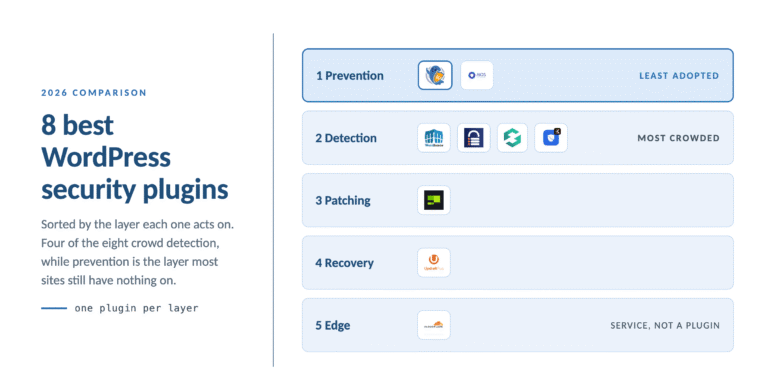
This comparison is for anyone who has typed “best WordPress security plugin” into a search box and come back with eight lists that disagree with each other. Most of those lists rank plugins against each other as if they all did the same job. They do not. The useful question is not which plugin is best. It is which of the five security layers your site is currently missing, and which plugin covers that layer well.
TL;DR: WordPress security splits into five layers: prevention (reduce what an attacker can reach), detection (find infections that got in), patching (close known vulnerabilities you cannot wait on), recovery (restore from backup), and edge (filter traffic before your server). Wordfence and MalCare lead detection. Patchstack leads virtual patching. UpdraftPlus leads recovery. Cloudflare and Sucuri Cloud lead edge. Prevention is the least crowded layer and the one most sites have nothing on, which is where WP Ghost sits. Run one plugin per layer. Two plugins covering the same layer cause conflicts without adding protection.
WP Ghost is the WordPress hack-prevention plugin for site owners who want the attack surface reduced at the rewrite layer rather than scanned after the fact. That is a different job from the scanners on this list, and this article is written so you can tell which job you actually need doing.
One definition before the comparison, and it holds throughout. A security layer is a point in the request path where a control can act. The five layers below are ordered by when they act, not by importance, and a plugin that is excellent at one layer is usually irrelevant at another.
How this comparison was made
Stating the method matters more than the verdict, because you can check the method.
Where the numbers come from. Every install count and star rating in the table below was read directly from that plugin’s own wordpress.org listing page on 10 August 2026, including WP Ghost’s. Not from another comparison article, and not from a vendor’s marketing page. They are dated because they move.
Where the capability claims come from. Each plugin’s documented feature set, its public changelog, and its wordpress.org description. Where a plugin’s own marketing makes a claim its documentation does not support, the claim is not repeated here.
Where the security statistics come from. Patchstack’s State of WordPress Security in 2026, published in March 2026 in partnership with malware intelligence firm Monarx, and the Verizon 2025 Data Breach Investigations Report. Both are named in text at the point of use so you can check them.
What this comparison does not do. It does not run malware samples against each scanner and score detection rates. Nobody publishing a list like this does that credibly at scale, and a vendor claiming to have benchmarked its own competitors’ detection engines should be read sceptically. What is offered instead is a structural comparison: which layer each tool acts on, when in the request it acts, and what it is architecturally unable to do.
Disclosure. I founded WP Ghost, which is one of the eight plugins below. That is why every rival here has a genuine strength named, three of them win their layers outright, and WP Ghost’s install base, the smallest in the table, is printed rather than omitted.
Takeaway: check the method before the verdict, on this article and on every other list you read.
Why “which plugin is best” is the wrong question
Ask ten WordPress developers for the best security plugin and you get four answers and an argument. That is not because the field is unsettled. It is because they are answering different questions.
According to Patchstack’s State of WordPress Security in 2026, 11,334 new WordPress-ecosystem vulnerabilities were disclosed in 2025, a 42% rise year over year, and 91% of them were in plugins rather than core. The same report puts the weighted median time from disclosure to first exploitation at five hours, with 20% of heavily-exploited vulnerabilities under attack within six hours, 45% within twenty-four hours, and 70% within seven days.
Five hours is shorter than most patch cycles. It gets worse: Patchstack records that 46% of 2025 vulnerabilities had no patch available at the time of disclosure. The report’s own conclusion is blunter than anything a vendor would write about itself. “This again shows why website owners can’t rely on plugin updates as a security measure.”
Read those two findings together and the shape of the problem changes. For nearly half of disclosed vulnerabilities there is no update to install on the day you learn about it. Against that, a malware scanner tells you what already happened and a firewall running inside WordPress has already loaded your stack before deciding to block. Both are useful. Neither changes whether the vulnerable endpoint was reachable in the first place.
That is the reasoning behind sorting by layer instead of ranking by score. A plugin cannot be better or worse than another plugin doing a different job.
Takeaway: rank plugins within a layer, never across layers, and start by finding the layer you have nothing on.
The five layers of WordPress security
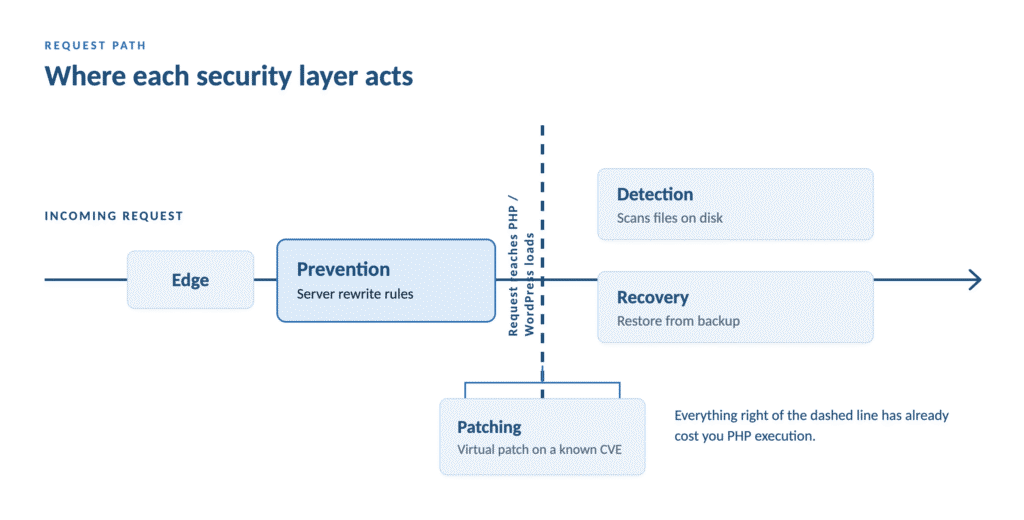
Layer 1. Prevention and attack surface. Acts before WordPress loads. Changes default paths so /wp-login.php and /wp-admin return 404 to a probe, rejects known-bad request patterns as server-level rewrite rules, and removes the version and generator signals that let a scanner identify your software. The attack chain stops at reconnaissance.
Layer 2. Detection and cleanup. Acts after code is on disk. Scans files and the database for injected code, compares WordPress core against official checksums, alerts you, and cleans an infection.
Layer 3. Patching. Acts on known vulnerabilities in software you already run. Tracks disclosures against your installed versions and, in the virtual-patching model, applies a mitigating rule before the vendor ships a fix. This layer exists because of the 46% figure above.
Layer 4. Recovery. Acts after something has broken. Off-site, versioned backups, and a restore you have tested at least once.
Layer 5. Network and edge. Acts in front of your server. DDoS absorption, bot filtering, generic WAF rule sets, rate limiting.
Layers 2, 4 and 5 all activate after something has already gone wrong. Layer 1 is the only one that changes whether it goes wrong. It is also, on every site audit I have seen, the layer most likely to be empty.
Takeaway: five layers, five different moments in the request path. Your stack needs coverage in each, not five tools crowded into one.
The comparison table
Install counts and star ratings are from each plugin’s wordpress.org listing page, read on 10 August 2026. They move; check them rather than trusting any comparison article, this one included.
| Plugin | Primary layer | wordpress.org installs | Rating | Strongest at | Does not do |
|---|---|---|---|---|---|
| Wordfence Security | 2 Detection | 5+ million | 4.7 | Malware scanning, threat feed, live traffic | Block before PHP loads |
| UpdraftPlus | 4 Recovery | 3+ million | 4.8 | Scheduled off-site backup and restore | Prevent or detect anything |
| All-In-One Security (AIOS) | 1 and 2, free | 1+ million | 4.7 | Free baseline hardening, login rename | Plugin, theme and output fingerprints |
| Kadence Security (was Solid, was iThemes) | 2 with some 1 and 3 | 700,000+ | 4.6 | 2FA, password policy, file change detection | Change WordPress paths beyond login |
| Sucuri Security | 2, plus a paid 5 service | 600,000+ | 4.2 | Integrity monitoring, human-led hack cleanup | Prevention inside the application |
| MalCare | 2 Detection | 200,000+ | 4.4 | Off-server scanning, one-click cleanup | Reduce the attack surface |
| Patchstack | 3 Patching | 50,000+ | 4.9 | Virtual patching ahead of vendor fixes | Scan files, or provide a firewall on free |
| WP Ghost | 1 Prevention | 100,000+ | 4.5 | Path changes, rewrite-layer firewall, free passkey 2FA | Scan files for malware |
Two rows deserve a note rather than a bare cell.
Kadence Security was renamed twice. It began as iThemes Security, became Solid Security, and as of version 10.0.0 the changelog records the branding change from SolidWP to Kadence. If you are searching for reviews of “Solid Security” or “iThemes Security” in 2026, this is the plugin you are reading about. The feature set did not change with the name.
WP Ghost has the smallest install base in this table. That is worth stating plainly rather than hiding, and it is close to the point: prevention is the least adopted layer, not because it works less well but because scanners got there first and most site owners have never been told the layers are different.
Takeaway: the install counts track how long each category has existed, not how well each plugin performs.
Layer 2, detection: Wordfence, MalCare, Sucuri
If your site has ever been infected, or you inherited it in unknown condition, this is the layer to solve first. Hardening an already-compromised site locks the attacker in alongside you.

Wordfence is the default for good reason. Real-time malware scanning, file integrity monitoring against official WordPress checksums, a live traffic view that is genuinely useful during an incident, and a threat intelligence feed that pushes new firewall rules quickly after a CVE is disclosed. Its firewall runs as PHP inside WordPress, so a blocked request has already loaded the stack. That is a design tradeoff rather than a fault, and the scanning justifies the plugin on its own.
MalCare runs the scan off your server, so a deep scan does not tax the site. On constrained shared hosting, where the scan itself is the load you were trying to avoid, it is the better pick. One-click cleanup and responsive support.
Sucuri is two products people conflate. The free plugin does integrity monitoring, activity auditing and hardening. Sucuri Cloud is the paid layer 5 service, a real WAF in front of your DNS, and their post-hack cleanup including blacklist removal is handled by people rather than software. If you have been hacked and want someone else to fix it, this is the one to call.
Worth knowing what this layer cannot do, and 2025 made the limit sharper than it used to be. The Monarx section of Patchstack’s 2026 report, drawn from nearly nine trillion file signals, found attackers increasingly injecting code into legitimate core, plugin and theme files rather than dropping standalone malicious files. You cannot simply delete an injected file; it is a real WordPress file with a malicious snippet inside it. The Lock360 family goes further and runs in server memory, rewriting cleaned files the moment they are restored. Monarx’s conclusion is worth quoting directly: “signature-based ‘delete-only’ security is no longer sufficient.”
There is a detail in the same section that anyone working on AI visibility should sit with. Parrot TDS, which accounted for 64% of all injected sequences in 2025, cloaks by audience: search crawlers get keyword spam, human visitors get redirected to phishing pages, and security scanners see nothing. Newer variants have learned to detect AI training crawlers such as ChatGPT and Google Gemini, and serve them clean content too. A compromised site can now look healthy to an answer engine while actively harming its human visitors.
Detection remains necessary. It is not sufficient, and no vendor on this list claims otherwise if you read their documentation rather than their homepage.
Takeaway: solve detection first on any site with unknown history, pick between Wordfence and MalCare on where you can afford to spend the scan, and understand that cleanup alone no longer reliably ends an infection.
Layer 3, patching: Patchstack
This layer exists because of one number. If 46% of vulnerabilities have no patch on the day they are disclosed, then “keep everything updated” is advice with a hole in it roughly half the size of the problem.
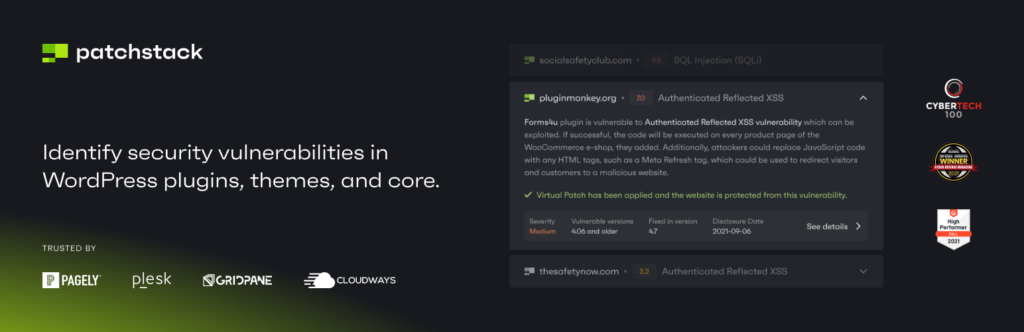
Patchstack fills that hole with virtual patching. The free tier is detection only: it matches your installed plugins, themes and core against its vulnerability database and alerts you, with up to 48 hours’ early warning from its researcher community. The free tier explicitly does not include a firewall. The paid tier deploys targeted mitigating rules per site when a specific vulnerability is detected on it, without modifying your code, from a library the company puts at 12,000+ individual vPatches.
The honest framing is that this is a different product shape from everything else in this comparison. It is a vulnerability intelligence service with an enforcement arm, not a scanner and not a hardening plugin. It is also the only tool here that acts on the gap between disclosure and vendor fix.
Their own documentation gives the best argument for this article’s central point, which is why it is quoted rather than paraphrased. Asked whether Patchstack conflicts with other security plugins, the FAQ answers: “we recommend using as few security plugins as possible and avoiding overlapping features to prevent potential issues.”
That is a competitor saying the thing this comparison is built around.
Takeaway: if your risk is running dozens of third-party plugins you cannot audit, patching is a real layer and updates alone do not cover it.
Layer 4, recovery: UpdraftPlus
The highest-rated plugin in this comparison at 4.8 stars, and the one most likely to be missing.
Scheduled backups to off-site storage, and a restore that works. There is not much to compare here because the category is well solved. What there is to say is that a backup you have never restored is a hypothesis, not a backup, and that every argument in this article about prevention mattering most assumes recovery is already handled.
According to Sophos and Hostinger reporting, roughly 13,000 WordPress sites are compromised per day, and industry compilations put average recovery cost around $14,500. A tested restore is the difference between an afternoon and that number.
Takeaway: if you have no off-site backup, install this before anything else in this article, then test one restore on staging.
Layer 1, prevention: what to look for, and where WP Ghost fits
This is the layer with the fewest options, so the buying criteria matter more than the brand.
Three things separate a real prevention layer from a login-URL rename:
- Does the firewall run as server-level rewrite rules, or as PHP? Rewrite-level rules reject the request before WordPress loads, which removes the CPU and bandwidth cost and takes PHP-level race conditions out of the threat model entirely. PHP-level firewalls cannot do that by construction.
- Does it change paths beyond the login URL? Renaming
wp-login.phpstops the loudest bot traffic. It does nothing aboutwp-content, plugin directories, theme directories,wp-json, or author archives, which is where fingerprinting actually happens. - Does it remove identity signals from page output? The generator meta tag, the RSD header,
ver=query strings on scripts and styles, and WordPress-specific class names all tell a scanner what you run and which version.

All-In-One Security (AIOS) covers criterion 2 partially and is free and well maintained. It renames the login and applies .htaccess and 6G firewall rules. It does less with plugin paths, theme paths and output fingerprints.
WP Ghost was built for all three. It changes 30+ default WordPress paths so probes return 404, runs the 7G and 8G firewall rulesets as server-level rewrite directives that execute before PHP starts, and strips the generator comment, RSD header and version tags so theme and CMS detectors lose the signals they match on. It does not move or rename your actual files; the rewrite rules change what is visible, which is why deactivating restores every default instantly and why core updates are unaffected.
Feature to outcome, plainly. Changing the login and admin paths means the brute-force phase never starts, because there is no form at the address the bot has. The 8G firewall running at the rewrite layer means an SQL injection or traversal pattern is rejected without WordPress loading, which is measurable server-resource savings on bot-heavy days. Passkey 2FA in the free tier means a phished administrator password does not produce a session, on sites that could never justify a subscription for it.
And the limit, stated where you will actually read it: WP Ghost is not a malware scanner. It does not look at files on disk. If something is already there, this plugin will not find it. Pair it with Wordfence or MalCare, which do that job properly.
Takeaway: judge a prevention plugin on where its firewall executes, how many paths it changes, and whether it cleans your output, not on the length of the feature list.
When WP Ghost is the right choice
Four situations where the prevention layer specifically is the reason to pick it. Where it is not the right tool is stated above and not walked back here.
You need phishing-resistant login on a zero-budget site. Passkey 2FA sits in the free tier alongside authenticator and email codes. Most WordPress 2FA implementations gate the WebAuthn factor behind a paid plan or skip it. The trigger: you have decided administrators need a non-replayable factor and the site cannot justify a subscription.
Your server is being consumed by bot traffic that a scanner keeps successfully blocking. A PHP-level firewall blocking 200,000 requests a day still loaded WordPress 200,000 times. Rewrite-layer rejection is the most direct fix available for that specific bill, because the request never reaches PHP. The trigger: your host has emailed you about resource usage and your security plugin’s log shows it is winning.
You want the credential layer and the path layer configured in one place. Running modern 2FA and Paths Security from the same plugin is more reliable than stitching a 2FA plugin to a hardening plugin and hoping the login-path change does not break the 2FA form. The trigger: you have changed the login path, or are about to, and 2FA is going on the same form.
You manage sites for clients and want one baseline everywhere. A single configuration covering paths, firewall, brute-force limits and 2FA replicates across a portfolio more cheaply than per-site tool combinations. The trigger: you are writing a security baseline document for more than five sites.
If you want to test this before committing anything, WP Ghost has a free version on wordpress.org with the passkey factor and the 8G firewall included.
The combinations that actually work
Pick by site type rather than by budget.
Brochure site or personal blog, tight hosting. Prevention plus backups. Two plugins. Add a scanner when the site starts holding customer data or taking payments.
Business site or small store. One prevention plugin configured properly, one scanner on a weekly schedule with email alerts, UpdraftPlus writing off-site nightly with one tested restore, Cloudflare free in front. Four tools, four layers, no overlap. Add Patchstack as a fifth if your plugin count is high enough that you cannot personally track disclosures.
Site with a known infection history. Scanner first, get it clean, then prevention to keep it clean, then backups, then edge. Order matters here more than anywhere else.
Agency portfolio. Standardise. The same four tools with the same configuration on every site beats a per-site optimum, because you can audit a fleet against one baseline document and notice when a site drifts.
What surprised me most across the audits behind this article is how often the fix is subtraction rather than addition. Sites running two overlapping scanners and no backup are common. Removing one plugin and adding a backup tool makes them measurably safer, and usually a little faster.
The one thing not to do is install three plugins from layer 2 and call it defence in depth. Depth means different layers, not more of the same one. That is covered in detail in do you need two WordPress security plugins.
Takeaway: two to four tools, one per layer, chosen for the layer your site is weakest on.
Frequently asked questions
What is the best WordPress security plugin in 2026?
There is no single best one, because the leading plugins do different jobs. Wordfence and MalCare lead malware detection and cleanup. Patchstack leads virtual patching. UpdraftPlus leads backups. Cloudflare and Sucuri Cloud lead edge filtering. WP Ghost leads prevention and attack-surface reduction. Identify which of those five layers your site has no coverage on, then pick the strongest plugin in that layer.
How many security plugins should I install on WordPress?
Two to four, with one per layer. Most sites need a prevention plugin and a scanner, plus a backup tool and a CDN that are not usually counted as security plugins. Installing two plugins that both provide a firewall causes conflicting .htaccess rules, duplicate lockouts and two full rule evaluations on every request, without adding protection.
Can I run Wordfence and WP Ghost together?
Yes, and it is the most common working combination. They act at different points in the request. WP Ghost rejects known-bad patterns at the rewrite layer before PHP loads and changes the paths a bot probes; Wordfence scans files on disk and monitors traffic inside WordPress. Compatibility is tested per release and the two are not competing for the same job.
Is a free WordPress security plugin good enough?
For prevention, usually yes. Path changes, server-level firewall rules, brute-force limits, security headers and 2FA including passkeys are all available free. Paid tiers mostly buy logging, alerting, geo-blocking, automated IP blocking and support, which matter more as the number of sites you manage grows. For detection, free scanning tiers typically delay new threat signatures.
What happened to Solid Security and iThemes Security?
Same plugin, renamed twice. iThemes Security became Solid Security, and version 10.0.0 renamed it again to Kadence Security. The wordpress.org slug is still better-wp-security, so reviews of all three names describe the same product. Check the version you are running rather than the name you remember.
Is changing the WordPress login URL just security through obscurity?
No, and the distinction is mechanical. Obscurity means the resource still exists and has been covered up. A rewrite rule returning 404 means the request never reaches the login handler, so the form does not execute and no attempt is recorded. The endpoint has been removed from the reachable surface rather than hidden.
Do I need a security plugin if I already use Cloudflare?
Yes. Cloudflare filters volumetric and generic threats well, and it does not know what WordPress is. It treats /wp-login.php as an ordinary URL and has no view of your plugin versions. Patchstack’s 2026 testing found edge and hosting WAFs blocked only 12% to 26% of attacks against known-exploited vulnerabilities, so treat a CDN as one layer rather than the whole answer.
Will a security plugin slow my WordPress site down?
It depends on where its rules execute. A plugin applying server-level rewrite rules can make a bot-heavy site faster, because rejected requests never load PHP. Scanners cost the most while a scan runs, which is why off-peak scheduling or off-server scanning matters. The configuration that genuinely hurts is two PHP-level firewalls evaluating every request.
Which security plugin should I install on a brand-new site?
Backups first, then prevention. A new site has no infection history to find, so a scanner is the least urgent of the three. Set up off-site backups, change the default paths, turn on 2FA for the administrator account, then add a scanner once the site is live and taking real traffic.
How do I choose between two plugins in the same layer?
Compare where the work happens rather than the feature count. For detection, ask whether the scan runs on your server or theirs. For prevention, ask whether the firewall runs as rewrite rules or as PHP, and how many paths beyond the login URL it changes. For backups, ask where the archive is stored and whether you have tested a restore.
Where to go next
If you are starting from first principles, the prevention-first argument this comparison sits inside is laid out in WordPress hack prevention. For the mechanics of the prevention layer specifically, attack surface reduction covers the audit method and WordPress path security covers what changing paths does and does not achieve. If your immediate problem is login traffic rather than plugin choice, stop brute force attacks on WordPress is the more direct read.
The one thing worth doing before you install anything: open your own site in a private window and request /readme.html, /?author=1 and /wp-login.php. What comes back tells you which layer you are missing faster than any comparison table can.