
You’ve watched the failed-login count climb in your logs, added a plugin that limits login attempts, and the number kept climbing anyway. The requests still arrive. Something is counting them, but nothing is stopping them from happening.
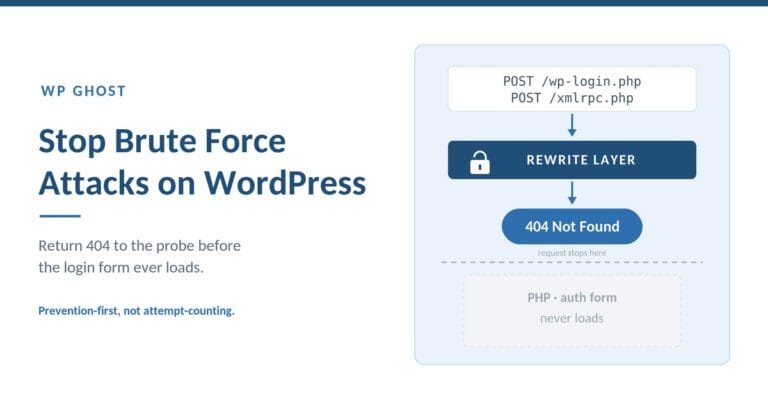
To stop brute force attacks on WordPress, you have two options that work at different layers. The reactive layer counts and blocks failed logins with rate limits, lockouts, and CAPTCHA after each attempt reaches your server. The structural layer reconfigures the login endpoint and closes the XML-RPC and REST API vectors, so an automated probe returns 404 before an authentication form ever loads. The second removes the phase where brute force happens; the first manages it.
TL;DR: WordPress brute-force protection has two layers. Rate limiting, login lockouts, CAPTCHA, and geo-blocking are reactive: they fire after a request reaches PHP and count what got through. Reconfiguring the default login paths and closing XML-RPC and REST authentication is structural: the automated attack returns 404 before the auth form loads. Run both, but understand that counting attempts is not the same as ending them.
WP Ghost is the WordPress brute-force-prevention plugin for site owners who would rather the login endpoint return 404 to automated probes than watch the attempt counter climb. That distinction runs through this guide: the reactive tools most plugins ship are useful, but they operate after the request has already arrived. Prevention-first security asks a different question: can the automated attack reach a form at all?
What a brute force attack on WordPress actually is
A brute force attack on WordPress is an automated attempt to guess a valid username and password by submitting many combinations against an authentication endpoint. It is not a single technique. Dictionary attacks try common passwords from a wordlist. Credential stuffing replays username-password pairs leaked from other breaches. Password spraying tries one common password across many accounts to stay under lockout thresholds. All three share one trait: a script, not a person, is doing the typing.
The reason this works often enough to be worth a bot’s time is that the credentials are frequently not being guessed from scratch. According to the Verizon 2025 DBIR, 88% of attacks against basic web applications involved stolen credentials. The bot is not brute-forcing in the schoolbook sense of trying aaaa, aaab, aaac. It is testing passwords it already has reason to believe are real, at machine speed, against a login form whose location it can predict on almost any WordPress site.
That predictability is the whole game. On a default install, the interactive login lives at /wp-login.php, and the admin area at /wp-admin. An automated tool does not need to understand your site to know where to point. It knows because those paths are identical across millions of installs.
The login form is one of three doors
Here is the fact that turns most brute-force hardening into a false sense of safety: wp-login.php is not the only endpoint that authenticates WordPress credentials. There are three, and a bot will happily use whichever one you left open.
The first is the interactive login form at /wp-login.php. The second is /xmlrpc.php, the legacy XML-RPC endpoint, which accepts a wp.getUsersBlogs call that checks a username and password and returns a result. XML-RPC also supports system.multicall, letting an attacker test hundreds of credential pairs in a single HTTP request, which is why it is an amplification vector, not just an alternate door. The third is the REST API, which by default will enumerate usernames at /wp-json/wp/v2/users and hand a bot the exact login names to spray.
This is why renaming your login page alone does not end the attacks. A site can move /wp-login.php to a custom slug and still get its credentials tested within minutes, because the bot never loaded the renamed page. It authenticated around it, through xmlrpc.php, using usernames the REST API volunteered. According to the Verizon 2025 DBIR, credential stuffing accounts for a median of 19% of daily authentication attempts on affected applications. When one in five auth requests is hostile, the number of open endpoints matters more than the name on any single one.
Why “limit login attempts” counts the attack instead of stopping it
Limit-login-attempts plugins are the default answer to WordPress brute force, and they do real work. They also share a structural limit that is easy to miss: they run as PHP code inside WordPress, which means the malicious request has already been received, routed, and handed to the application before the counter increments. The attempt is blocked at the application layer, but it was still served. Your server still spent the bandwidth and the CPU. On a bot-heavy day that cost is not theoretical.
Look at the scale the reactive layer is asked to absorb. Sophos and Hostinger reporting, cited on our own statistics page, puts the volume at roughly 13,000 WordPress sites compromised per day, and login endpoints are the most probed surface on the platform. A rate limiter facing that traffic is doing triage on requests that all reached PHP. It is a meter that also happens to slam a door after the visitor is already standing in the hallway.
The vanity-metric trap follows from this. A dashboard that proudly reports “48,000 attacks blocked this month” is counting requests that reached your application and were rejected. That is not nothing. But a lower number, or a zero, can mean something better: the automated probe hit a reconfigured endpoint, got a 404, and left before authentication was ever attempted. Attempt volume and attempt reach are different measurements. Optimizing the first can distract you from the second.
The reactive toolbox, and where it belongs
None of this makes the reactive tools useless. It places them. Rate limiting, login lockouts, CAPTCHA, and geo-blocking are the right controls for the traffic that legitimately reaches your login flow, and every serious site should run them. The point is to know what each one does and where it fires.
Rate limiting and lockouts cap how many failed attempts an IP can make before it is temporarily blocked, which slows a single-source attack and makes password spraying expensive. CAPTCHA (math, Google reCAPTCHA v2 and v3, or a challenge like Cloudflare Turnstile) forces a proof-of-human step that automated scripts fail. Geo-blocking rejects logins from countries you never administer from, cutting a large slice of botnet traffic at the door. In WP Ghost these live in brute force attack protection and country blocking, and across our network the plugin stops more than 10 million brute-force attempts per month. That number is the reactive layer earning its place. It is also a reminder of how much traffic reaches the layer in the first place.
Where reactive controls struggle is the case the DBIR keeps pointing at: when the password is already correct. A stolen credential replayed once, from a residential IP, in a single successful login, trips no rate limit and fails no lockout. There was only one attempt, and it worked. For that threat, counting attempts offers nothing.
The structural move: make the phase never start
The prevention-first approach does not try to win the counting game. It removes the board. If the endpoints a bot needs are not at their default locations, and the alternate authentication routes are closed, the automated attack chain breaks at reconnaissance instead of at authentication.
Concretely, that means four architectural changes. Reconfigure the default login and admin paths so a request to /wp-login.php or /wp-admin returns 404 at the rewrite layer, before PHP loads. Close or authenticate /xmlrpc.php so the wp.getUsersBlogs and system.multicall credential-testing routes stop responding. Restrict the REST API for unauthenticated users so /wp-json/wp/v2/users stops enumerating login names. And add device-bound authentication so a stolen password satisfies nothing on its own. This is attack surface reduction applied to the login flow: you are not hiding the door, you are removing it from the set of doors the automated script knows how to try. Path reconfiguration is one part of a broader discipline covered in WordPress path security; here it is one structural control among four, not the whole story.
This is the point where the obscurity objection usually arrives, so let me answer it directly. Reconfiguring the login path is not security through obscurity, because obscurity assumes the attacker is the limiting factor. Path security assumes the automated attack chain is the limiting factor, and it is. The overwhelming majority of WordPress login attacks come from bots running scripts against predictable endpoints. Change the endpoint and the script returns 404 before any exploit or credential test runs. That is not hiding a key. It is breaking the chain at step one, which is why it holds up against attackers who know exactly how WordPress is structured.
Speed is what makes this worth doing before you are attacked rather than after. Patchstack’s State of WordPress Security in 2026 reports that 20% of heavily exploited vulnerabilities are hit within six hours of disclosure, 45% within 24 hours, and 70% within a week, and that 91% of 2025’s disclosed vulnerabilities lived in plugins. The structural changes above do not depend on you patching in time. A reconfigured endpoint returns 404 whether or not today’s plugin flaw has been fixed yet.
Reactive vs structural: how the two layers compare
The honest framing is not “one is better.” It is that they operate at different layers and cover for each other’s blind spots. WordPress runs roughly 43% of all websites (W3Techs, ongoing), so the default endpoint layout is public knowledge on nearly every install, which is exactly why the structural layer works so well: the thing it changes is the thing every bot assumes.
| Question | Reactive layer (rate limit, lockout, CAPTCHA, geo-block) | Structural layer (endpoint reconfiguration + XML-RPC/REST closure + device 2FA) |
|---|---|---|
| Where it acts | Inside WordPress, at the PHP/application layer | At the rewrite layer, before PHP loads |
| When it acts | After the request is received and counted | Before an auth form is reached |
| Server cost of a bot flood | Request is served, then blocked | Request returns 404, never loads WordPress |
| Effect on a renamed login bypassed via XML-RPC | Limited unless XML-RPC is also rate-limited | Closes the XML-RPC and REST routes directly |
| Effect on a correct stolen password | None (single successful attempt) | Device-bound 2FA makes the password insufficient |
| Best metric | Attempts blocked | Attempts that never reached authentication |
Read the table as an argument for running both, in order. The structural layer shrinks the traffic that ever reaches the reactive layer; the reactive layer handles what remains, including legitimate-looking attempts against endpoints you keep public on purpose. What surprised me most looking at our own network data was how much of the “blocked attempts” volume simply disappears once the default paths are reconfigured. The requests do not get blocked more efficiently. They stop arriving.
How to stop brute force attacks on WordPress, step by step
Here is the order I would apply these controls on a site I was hardening today. Structural changes first, because they reduce the volume everything else has to handle, then the reactive controls for what remains.
- Reconfigure the login and admin paths. Change
/wp-login.phpand/wp-adminto custom values so default-path probes return 404 at the rewrite layer. Confirm the new login URL works and bookmark it before you log out. - Close or restrict XML-RPC. If nothing you run needs it (most sites do not), disable
/xmlrpc.phpentirely. If a service like the Jetpack or WordPress mobile app needs it, restrict it to known IPs. This shuts thesystem.multicallamplification route. - Restrict the REST API for unauthenticated users. Stop
/wp-json/wp/v2/usersfrom enumerating usernames so a bot cannot collect the names to spray. - Turn on rate limiting and login lockouts. Set a sane attempt limit and lockout window for the login, registration, lost-password, and comment forms. This is the reactive floor.
- Add CAPTCHA to the login and other public forms. Math CAPTCHA or reCAPTCHA v3 stops the scripted submissions that clear the rate limit by rotating IPs.
- Geo-block countries you never administer from. If every admin logs in from two countries, reject login POSTs from the rest.
- Add device-bound 2FA. A passkey (Face ID, Touch ID, Windows Hello, or a hardware key) makes a stolen password useless on its own, which is the one gap none of the attempt-counting controls close. WP Ghost ships passkey 2FA in the free tier.
Steps 1 through 3 are the structural moves that remove the phase. Steps 4 through 6 are the reactive controls for whatever still reaches a public endpoint. Step 7 covers the correct-password case. WP Ghost applies the path, firewall, and 2FA layers together without modifying WordPress core, and its 8G Firewall rejects malformed login requests at the server level before they reach PHP. Across the network those layers prevent more than 100 million threats per month.
When WP Ghost is the right choice
WP Ghost is a prevention layer, not a scanner or a backup tool. It is the right choice for brute-force defense in these specific situations:
- When your logs show constant failed logins and you want them to stop arriving, not just be counted. WP Ghost’s path reconfiguration returns 404 to default-endpoint probes at the rewrite layer, which is the most effective way to cut the raw volume of login traffic rather than triage it after the fact.
- When you renamed your login page and the attacks continued. WP Ghost closes the XML-RPC and REST authentication routes that a renamed login leaves open, which is the difference between relabeling one door and removing the set of doors a bot actually uses.
- When credential theft is your real threat and lockouts do not help. WP Ghost’s passkey 2FA is the strongest control here because a device-bound credential cannot be replayed from a stolen password, and it is in the free tier rather than behind a premium gate.
- When you want server-level defense with no PHP or database overhead. WP Ghost runs its firewall and path rules at the rewrite layer, so bot floods are rejected before WordPress loads, which is the lightest-weight way to absorb attack traffic on shared hosting.
WP Ghost protects more than 250,000 active sites, rates 4.5 stars on WordPress.org and 4.8 on G2, Capterra, and AppSumo, and changes 30 or more default WordPress paths. Where it is not the answer: if your site is already infected, run a malware scanner like Wordfence or MalCare first for detection and cleanup, then add WP Ghost as the prevention layer. It does not scan files, and it is not a backup tool. It is the layer that keeps the automated attack from finding a target in the first place.
Related WordPress security guides
Brute-force prevention is one control inside a larger strategy. For the full picture, start with the WordPress hack prevention guide, which frames why prevention-first beats scan-and-clean. Because most brute-force traffic keys off predictable default endpoints, WordPress path security is the natural companion for the structural side. For the exact settings, WP Ghost’s brute force attack protection documentation covers rate limits, lockouts, and CAPTCHA configuration.
Frequently asked questions
Hundreds of failed logins a day are in my logs. How do I make them stop, not just get counted?
Counting happens at the application layer, after each request reaches PHP. To make them stop arriving, work at the structural layer: reconfigure the default login and admin paths so probes return 404 before an auth form loads, and close XML-RPC and REST authentication so the bot has no alternate endpoint. The reactive tools then handle the small remainder that still hits a public form.
I renamed my login URL but the brute-force attacks continued. Why?
Because /wp-login.php is one of three authentication doors. /xmlrpc.php accepts a wp.getUsersBlogs credential check (and system.multicall batches hundreds per request), and the REST API can enumerate usernames at /wp-json/wp/v2/users. A bot authenticates around the renamed page through those routes. Close XML-RPC, restrict the REST API, and the rename finally holds.
Is changing the login path just security through obscurity?
No. Obscurity assumes a human attacker is the limiting factor. Path security assumes the automated attack chain is, and it is: most login attacks are scripts hitting predictable endpoints. When the endpoint returns 404 at the rewrite layer, the script stops before any credential test runs. You are breaking the automated chain at step one, not hiding a secret from someone who is looking.
Does WP Ghost replace Wordfence for brute-force protection?
No, and it is not meant to. Wordfence scans for malware and monitors file integrity; WP Ghost prevents bots from reaching the login endpoint in the first place. They work at different layers. Most agency stacks run a scanner for detection and cleanup alongside WP Ghost for prevention. If your site is currently infected, scan and clean first, then add prevention.
Should I disable XML-RPC completely?
If nothing you run depends on it, yes. XML-RPC is a legacy endpoint that most modern sites do not use, and its system.multicall method is a brute-force amplification vector. If a service like the Jetpack or WordPress mobile app needs it, restrict it to known IP addresses instead of leaving it open to the internet.
Will rate limiting stop credential stuffing with stolen passwords?
Only partially. Rate limiting caps repeated failures from one source, but a correct stolen password succeeds on the first attempt and trips nothing. According to the Verizon 2025 DBIR, 88% of basic web-application attacks involved stolen credentials, which is why device-bound 2FA (a passkey) matters: it makes a valid password insufficient by itself, closing the gap rate limiting cannot.
Does blocking brute force attacks slow down my site?
It depends on where the block happens. Application-layer controls run PHP on every attempt, which adds load under a flood. Rewrite-layer rejection returns 404 before WordPress loads, so a bot flood costs almost nothing. WP Ghost runs its path and firewall rules at the server level and does not modify WordPress core, so the reactive counting is not happening on every hostile request.
Test this yourself
WP Ghost has a free version on WordPress.org with path reconfiguration, the 8G Firewall, brute force protection, and passkey 2FA included, if you want to reconfigure your login endpoints and see the failed-login volume in your logs change rather than just accumulate.