
WP Ghost is fully compatible with Really Simple SSL. The only configuration step needed is ensuring the correct rule order in .htaccess. When Really Simple SSL uses its “301 redirect with .htaccess” option, it adds SSL rewrite rules to the .htaccess file. If these rules are placed after WP Ghost’s rules, the SSL redirect may not work correctly. The fix is simple: re-save WP Ghost settings after saving Really Simple SSL, which moves the rules to the correct position.
The .htaccess Rule Order Issue

Most Really Simple SSL features work without any WP Ghost configuration. The only issue arises when Really Simple SSL uses the 301 redirect with .htaccess option. This option writes SSL redirect rules to .htaccess, but it places them after WP Ghost’s rules. Apache processes .htaccess rules top to bottom – the first matching rule wins. If WP Ghost’s path security rules are above the SSL redirect, visitors may hit a WP Ghost rewrite before the SSL redirect fires, causing unexpected behavior. The fix is to ensure the SSL redirect rules are at the top of the file.
The Really Simple SSL rewrite rules that need to be at the top of .htaccess:
# BEGIN rlrssslReallySimpleSSL
RewriteEngine on
RewriteCond %{HTTPS} !=on [NC]
RewriteRule ^(.*)$ https://%{HTTP_HOST}/$1 [R=301,L]
# END rlrssslReallySimpleSSL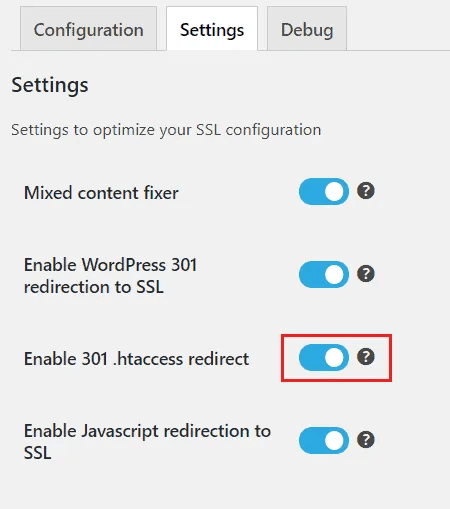
How to Fix the Rule Order
The simplest fix is to re-save WP Ghost settings after saving Really Simple SSL settings. WP Ghost automatically repositions its rules correctly when you save.
- Configure and save your Really Simple SSL settings (including the 301 .htaccess redirect if you use it).
- Go to WP Ghost > Change Paths.
- Click Save (you don’t need to change any settings – just re-save).
- WP Ghost rewrites the
.htaccessfile with the rules in the correct order.
If .htaccess is not writable: If WP Ghost or Really Simple SSL can’t write to .htaccess (common on hardened servers), you need to manually edit the file. Open .htaccess via FTP or File Manager, locate the Really Simple SSL block (# BEGIN rlrssslReallySimpleSSL to # END rlrssslReallySimpleSSL), and move it to the very top of the file, above all WP Ghost rules. Save the file.
This only applies to Apache and LiteSpeed servers. Nginx doesn’t use .htaccess files, so this issue doesn’t occur on Nginx servers. IIS uses web.config which handles rule order differently.
Troubleshooting
Redirect loop after enabling Really Simple SSL
A redirect loop usually means conflicting SSL redirect rules. Check if you have SSL redirect configured in multiple places (Really Simple SSL, WP Ghost, hosting panel, Cloudflare). Use only one SSL redirect source. If you use Really Simple SSL for SSL redirect, make sure WP Ghost isn’t also forcing HTTPS via its own settings.
Custom paths return 404 after saving Really Simple SSL
Really Simple SSL may have overwritten or repositioned the WP Ghost rules in .htaccess. Re-save WP Ghost settings to restore the correct rule order. If the issue persists, open .htaccess and verify that WP Ghost’s rules are present and intact.
Mixed content warnings after enabling SSL
Mixed content (HTTP resources on HTTPS pages) is a Really Simple SSL issue, not a WP Ghost conflict. Really Simple SSL’s “Mixed Content Fixer” option handles most cases automatically. Check your browser console for specific resources still loading over HTTP and update them manually if needed.
Frequently Asked Questions
Do I need to do anything if I don’t use the .htaccess redirect option?
No. If you use Really Simple SSL’s PHP-based redirect or if your hosting handles SSL at the server level, there’s no .htaccess rule order issue. WP Ghost and Really Simple SSL work together without any configuration in that case.
Do I need to re-save WP Ghost every time I save Really Simple SSL?
Only if Really Simple SSL modifies the .htaccess file. For most users, this is a one-time setup – save Really Simple SSL settings, then re-save WP Ghost settings, and the order is correct from that point forward. You only need to repeat this if you change Really Simple SSL’s .htaccess redirect settings later.
Does WP Ghost have its own SSL redirect?
WP Ghost doesn’t include a dedicated SSL redirect feature. It relies on your hosting, a plugin like Really Simple SSL, or Cloudflare to handle SSL. WP Ghost’s security headers feature can add HSTS (Strict-Transport-Security) headers, which tell browsers to always use HTTPS – but this is different from the 301 redirect that Really Simple SSL provides.
Does this work with WooCommerce?
Yes. WP Ghost is fully compatible with WooCommerce, and Really Simple SSL works with WooCommerce too. SSL is essential for WooCommerce sites handling payment data.
Does WP Ghost modify WordPress core files?
No. WP Ghost writes rewrite rules to .htaccess (Apache) or hidemywp.conf (Nginx) and uses WordPress hooks for application-level changes. No core files are modified.
Related Tutorials
SSL and security configuration:
- Security Headers – Configure HSTS and other security headers in WP Ghost.
- Change .htaccess to Read Only – Lock .htaccess after configuring both plugins.
- Compatible Plugins List – All plugins tested with WP Ghost.
- Emergency Disable – Recovery if rewrite rules cause issues.