
Released: March 30, 2026
- Security Optimization Score
- Login Page Designer
- AI Crawler Blocking (Copyright Protection from AI Crawlers)
- Interactive GEO Threat Map
- Country Filtering in Security Logs
- CSV Export for Security Logs
- Enhanced Overview Dashboard
- Security Check: IP Block Automation Verification
- Key Features from WP Ghost 8.3
- Frequently Asked Questions
- What is the Security Optimization Score in WP Ghost?
- How do I customize my WordPress login page with WP Ghost?
- Does WP Ghost block AI bots from using my content for training?
- Can I export my WP Ghost security logs?
- What changed in the WP Ghost firewall in 2026?
- Is the login page designer available in the free version?
- How does the GEO threat map work?
WP Ghost 9.0 is the most significant release since the plugin was renamed from Hide My WP Ghost. This update introduces a redesigned security dashboard with a real-time Security Optimization Score, a customizable login page designer, AI crawler blocking (copyright protection from AI Crawlers), interactive threat geography mapping, and CSV export for all security logs.
Combined with the WP Ghost 8.3 series (which introduced the Security Threats Log, IP Block Automation, and expanded firewall rules), these updates transform WP Ghost from a path-security tool into a full hack-prevention command center.
Security Optimization Score
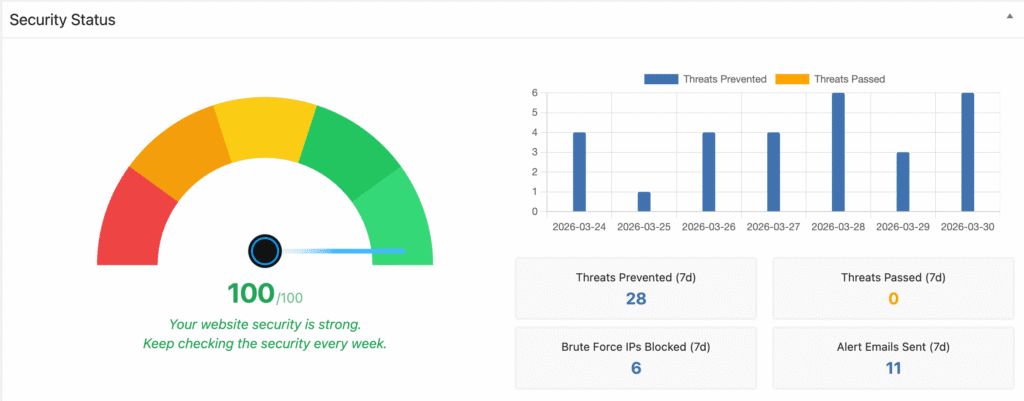
WP Ghost 9.0 replaces the static speedometer images with a dynamic, real-time security gauge that calculates a precise score from 0 to 100.
The score is based on how many security tasks you have completed. Every time you enable a feature, fix a vulnerability, or harden a path, your score increases. The gauge updates automatically and displays both a visual indicator and a numeric value so you always know exactly where your site stands.
This makes it easy to track your progress over time and identify which security tasks still need attention. Users with WP Ghost Premium can reach higher scores by enabling advanced features like IP Block Automation, Country Blocking, and extended file hardening.
Where to find it: WP Ghost Overview dashboard and the WordPress Security Check page.
Login Page Designer

WP Ghost 9.0 lets you customize the appearance of your secured login page directly from the plugin settings. You no longer need a separate login-styling plugin.
Available customization options include custom logo upload with live preview, logo link URL, background image with blur and overlay controls, page background color, form background color, button color, text and link colors, 13 layout presets (including split-screen, frosted panel, and media layouts), and 10 color scheme presets.


The login page designer works with your custom login URL set in Change Paths, so your branded login page is served at your hidden path rather than the default wp-login.php.
Where to find it: WP Ghost > Tweaks > Login Page Design.
AI Crawler Blocking (Copyright Protection from AI Crawlers)
The plugin gives you control over whether AI companies can use your content to train their models. Many AI crawlers visit websites to collect text, images, and data for training large language models, often without the site owner’s knowledge or consent.
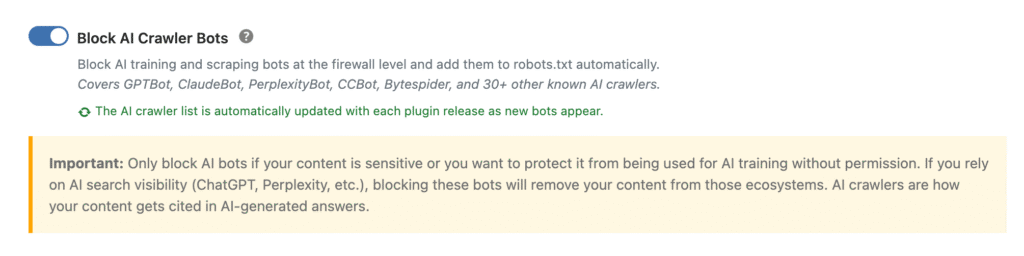
WP Ghost now includes a dedicated feature that blocks these crawlers at the firewall level and automatically adds the corresponding Disallow rules to your robots.txt file. The list covers GPTBot, ClaudeBot, PerplexityBot, CCBot, Bytespider, and over 30 other known AI training crawlers. It is automatically updated with each plugin release as new bots appear, so you don’t need to manually track new user agents.

This feature is specifically designed to protect your intellectual property and copyrighted content. It targets AI training crawlers only, it does not affect regular search engine indexing (Google, Bing, Yahoo), social media crawlers, or any other standard web traffic. Your SEO and search visibility remain completely unaffected.
If you choose to also appear in AI-powered search answers (such as ChatGPT search or Perplexity), you can leave this feature disabled or selectively allow specific AI crawlers through the Whitelist User Agents option.
Where to find it: WP Ghost > Firewall > Block AI Crawler Bots.
Interactive GEO Threat Map
The Overview dashboard now includes an interactive world map that visualizes where your blocked threats originate. The map displays the top 5 threat countries with proportional markers showing attack volume.

In WP Ghost 9.0, clicking on any country circle on the map opens the Security Threats Log pre-filtered to show attacks from that specific country over the last 7 days. This makes it easy to investigate regional attack patterns and decide whether to enable Country Blocking for specific regions.
Where to find it: WP Ghost Overview dashboard (requires Security Threats Log to be enabled).
Country Filtering in Security Logs

Both the Security Threats Log and the User Events Log now support country-based filtering. You can filter log entries by country to analyze attack patterns from specific regions, identify which countries generate the most malicious traffic, and export filtered results to CSV for reporting.
Country codes are now stored directly in the threats log table for faster lookups, and any missing country codes are resolved automatically in the background without slowing down threat logging.
CSV Export for Security Logs
You can now export your Security Threats Log and User Events Log to CSV files. This is useful for compliance reporting, sharing threat data with hosting providers or security consultants, and keeping offline records of security events.
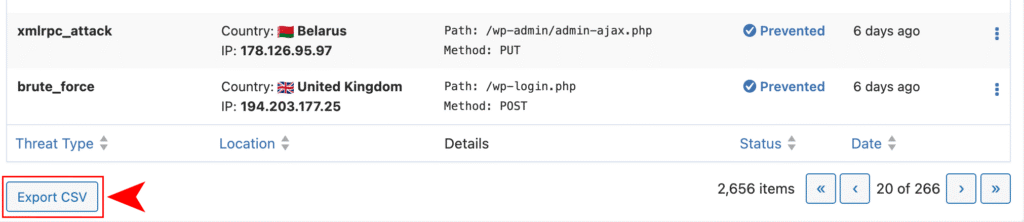
The export button has been placed below the log table to prevent accidental clicks.
Where to find it: Below the log table in WP Ghost > Logs > Security Threats and WP Ghost > Logs > User Events.
Enhanced Overview Dashboard
The Overview widget has been updated with several improvements in WP Ghost 9.0. The threats count now shows the full 7-day period totals instead of partial counts, with timezone-aligned day buckets ensuring the chart and stat boxes always match the log data.
When WP Ghost detects unblocked threats that could have been stopped, it now shows a notification prompting you to activate the 7G or 8G Firewall. This helps new users discover firewall features they may not have enabled yet.
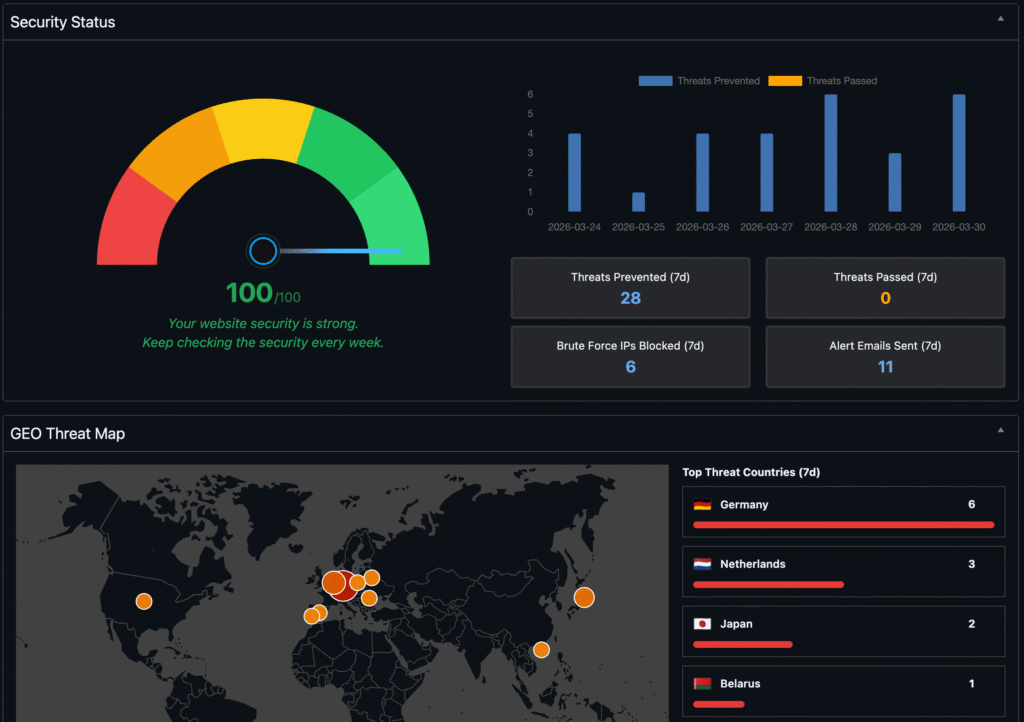
Dark mode is now fully supported with proper color handling for users who have browser-based dark mode enabled.
Security Check: IP Block Automation Verification
A new task has been added to the WordPress Security Check page that verifies whether IP Block Automation is configured correctly. This ensures that repeat offenders are being automatically blocked at the firewall level and helps users who may have enabled the feature but misconfigured the thresholds.
Key Features from WP Ghost 8.3
The WP Ghost 8.3 series laid the foundation for many of the features refined in 9.0. If you upgraded directly from 8.2 or earlier, these are the major additions you received.
Security Threats Log
WP Ghost 8.3.00 introduced a dedicated Security Threats Log that tracks every blocked attack and malicious request in real time. The Events Log was reorganized into two separate views: User Events (login activity, role changes, settings modifications) and Security Threats (blocked attacks, firewall triggers, brute force attempts).
This log provides the first real visibility into what WP Ghost is actually blocking on your site every day.
Expanded Firewall Rules
The 7G and 8G Firewall rules were significantly expanded in WP Ghost 8.3.00 to block advanced brute-force attempts, SQL injection payloads, XSS attacks, file inclusion exploits, directory traversal probes, and automated vulnerability scans. The firewall execution path was optimized to reduce overhead under high attack traffic, and threat detection was improved to stop malicious requests before they reach WordPress core.
IP Block Automation
WP Ghost 8.3.03 added automated IP address blocking in the Firewall section. When an IP address repeatedly triggers security rules or probes secured paths, WP Ghost can now automatically block it based on configurable thresholds (number of attacks, time window, and block duration).
2FA and Magic Login in Core
Two-Factor Authentication (by code, email, and passkey) and Magic Login links were moved from the separate Advanced Pack into WP Ghost core in version 8.3.03. All users now have access to these authentication features without needing an additional plugin.
Frequently Asked Questions
What is the Security Optimization Score in WP Ghost?
The Security Optimization Score is a number from 0 to 100 that reflects how many security tasks you have completed in WP Ghost. It appears on the Overview dashboard and the Security Check page as both a visual gauge and a numeric value. A higher score means fewer security vulnerabilities are exposed on your site.
How do I customize my WordPress login page with WP Ghost?
Go to WP Ghost > Login Page Design, toggle the feature on, and choose your custom logo, background image, colors, and layout preset. Changes apply to the custom login URL you have configured in Change Paths.
Does WP Ghost block AI bots from using my content for training?
Yes. WP Ghost 9.0 includes an AI Crawler Blocking feature that prevents AI training bots from scraping your content. It blocks GPTBot, ClaudeBot, PerplexityBot, CCBot, Bytespider, and over 30 other known AI crawlers at the firewall level. This protects your copyrighted content from being used for AI model training without your permission. It does not affect regular search engine indexing, your Google, Bing, and Yahoo visibility stays the same.
Can I export my WP Ghost security logs?
Yes. Both the Security Threats Log and User Events Log can be exported to CSV from the log pages in WP Ghost > Logs.
What changed in the WP Ghost firewall in 2026?
WP Ghost 8.3 expanded the 7G and 8G Firewall rules to cover SQL injection, XSS, file inclusion, directory traversal, and automated vulnerability scans. WP Ghost 9.0 added AI crawler blocking and IP Block Automation verification to the firewall stack.
Is the login page designer available in the free version?
The login page designer includes layout and color presets. Most customization options are available in the free version, with some advanced layout presets available in WP Ghost Premium.
How does the GEO threat map work?
The map on the Overview dashboard shows the geographic origin of blocked threats over the last 7 days. The top 5 countries are displayed with proportional markers. Clicking a country opens the Security Threats Log filtered to that country. Country Blocking (the ability to block traffic from specific countries) requires WP Ghost Premium.