
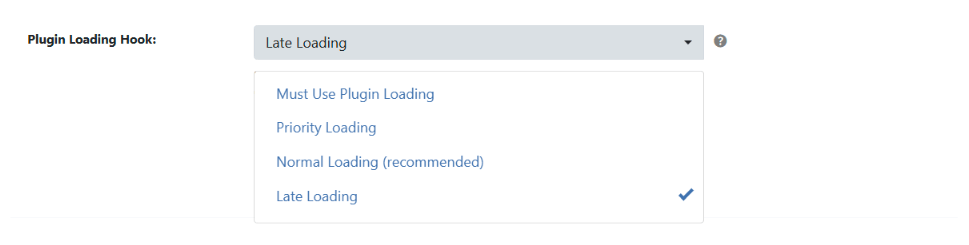
WP Ghost is compatible with CDN Enabler. CDN Enabler is a lightweight plugin that rewrites asset URLs to serve them from a CDN (commonly used with BunnyCDN). WP Ghost automatically detects the CDN domain configured in CDN Enabler and adds it to its CDN URLs list. The only configuration needed is setting WP Ghost’s Plugin Loading Hook to Late Loading so WP Ghost processes paths after CDN Enabler has rewritten the asset URLs.
Why CDN Enabler Needs WP Ghost Configuration

CDN Enabler rewrites local asset URLs (CSS, JS, images) to point to your CDN domain. WP Ghost rewrites WordPress paths (wp-content, plugins, themes) to custom paths. Both plugins modify the HTML output, and the order matters. If WP Ghost runs before CDN Enabler, WP Ghost’s custom paths may not be applied to CDN-served URLs. Setting WP Ghost to Late Loading ensures it processes the HTML last, after CDN Enabler has already rewritten the asset URLs. WP Ghost then applies its path changes to the final output, including CDN URLs.
Set WP Ghost to Late Loading
- Go to WP Ghost > Advanced > Compatibility > Plugin Loading Hook.
- Select Late Loading.
- Click Save.
- Clear any page cache and test your site’s frontend.
Automatic CDN detection: WP Ghost automatically detects the CDN domain configured in CDN Enabler and adds it to the CDN URLs list at WP Ghost > Mapping > CDN URLs. You don’t need to add the CDN domain manually. If you change CDN providers later, re-save WP Ghost settings to trigger detection of the new domain.
Verify the Setup
- Visit your site in an incognito/private browser window.
- Right-click and select View Page Source.
- Check that asset URLs point to your CDN domain (confirming CDN Enabler is working).
- Check that those CDN URLs use your custom WP Ghost paths (not
wp-content/pluginsorwp-content/themes). - Search the page source for
wp-content/pluginsandwp-content/themes. They should NOT appear anywhere, including in CDN URLs.
Troubleshooting
CDN URLs still show wp-content/plugins paths
WP Ghost isn’t loading late enough to process the CDN-rewritten URLs. Confirm the Plugin Loading Hook is set to Late Loading at WP Ghost > Advanced > Compatibility. Clear your cache after changing the setting. If the issue persists, check that WP Ghost has detected the CDN domain at WP Ghost > Mapping > CDN URLs.
CDN domain not detected by WP Ghost
Re-save WP Ghost settings to trigger automatic CDN detection. If the CDN domain still doesn’t appear in WP Ghost > Mapping > CDN URLs, add it manually. Enter your CDN domain (for example, cdn.yoursite.com) in the CDN URLs field.
Assets not loading or broken styling
If assets fail to load after enabling Late Loading, the loading order may be conflicting with another plugin. Try switching to Priority Loading instead of Late Loading to test whether the issue is loading-order related. If Priority Loading works but Late Loading doesn’t, check for other plugins that also modify HTML output late in the process.
Frequently Asked Questions
Does this work with BunnyCDN specifically?
Yes. CDN Enabler is commonly used with BunnyCDN, and WP Ghost works well with this combination. The same Late Loading configuration applies regardless of which CDN provider you use (BunnyCDN, KeyCDN, StackPath, or any other CDN).
What if I use a CDN through another plugin like WP Rocket or LiteSpeed Cache?
If your CDN is managed by a different cache plugin, follow that plugin’s specific compatibility guide instead. See WP Ghost and WP Rocket or WP Ghost and LiteSpeed Cache. CDN Enabler is a standalone CDN rewrite plugin and needs the Late Loading approach specifically because it modifies HTML output independently.
Do I need to purge the CDN cache after changing WP Ghost paths?
Yes. After changing any path in WP Ghost, purge your CDN cache so edge servers fetch fresh copies with the updated paths. CDN edge caches hold stale versions until explicitly purged. Purge from your CDN provider’s dashboard (BunnyCDN, KeyCDN, etc.).
Does WP Ghost modify WordPress core files?
No. WP Ghost writes rewrite rules to .htaccess (Apache) or hidemywp.conf (Nginx) and uses WordPress hooks for application-level changes. No core files are modified.
Related Tutorials
WP Ghost with CDN and performance plugins:
- Plugin Loading Hook – Full documentation of all Plugin Loading Hook options.
- WP Ghost and LiteSpeed Cache – Cache and CDN compatibility with QUIC.cloud.
- WP Ghost and WP Rocket – Cache and CDN compatibility with WP Rocket.
- Compatible Plugins List – All plugins tested with WP Ghost.