
This guide is for anyone whose login form is being submitted by something that is not a person. You added reCAPTCHA after the first flood of failed logins, your users started complaining about traffic lights, and the attempts kept arriving anyway. Both of those can be true at once.
TL;DR: A WordPress login captcha is a bot-verification challenge attached to the login, registration, lost-password and comment forms. It stops unsophisticated form-submission floods and spam registrations, which is a real and common problem. Setup takes about five minutes: pick the type, add the site keys, attach it to every form that authenticates, then test a failed challenge yourself. The type you pick decides whether your users ever notice it.
WP Ghost is the WordPress hack-prevention plugin for site owners who want the captcha, the attempt limit and the lockout policy on one screen rather than assembled from three plugins. This page covers the captcha. Rate limits, lockouts and the endpoints bots reach without a browser belong to the guide this page hangs off, how to stop brute force attacks on WordPress.
What a WordPress login captcha actually verifies
A captcha makes one assertion, at one moment: the client submitting this form behaved like a human while filling it in. It says nothing about the credentials in the fields. A valid stolen password sails through a solved challenge, because the challenge was never asked to judge the password.
That sets the scope of everything below. According to the Verizon 2025 Data Breach Investigations Report, 88% of Basic Web Application attacks involved stolen credentials. A captcha’s job is to make automated submission expensive enough that scripted guessing stops being worth running against your site. Credential validity is a different control.
Which WordPress forms need one, and it is not only wp-login.php
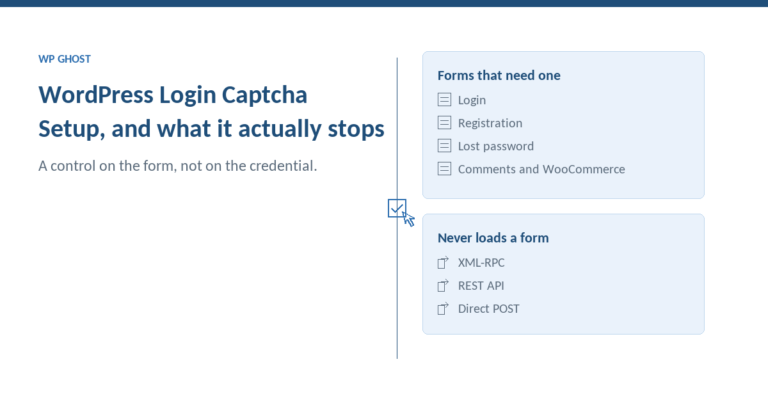
Scope this before you touch a setting. WordPress ships four public forms that accept anonymous POSTs, and a WooCommerce store ships a fifth: login, registration, lost password, comments, and the WooCommerce account page. Each is a separate integration, and enabling the captcha on one does nothing for the others.
The registration form is the one people forget, and it is often the one actually being abused. Spam accounts arrive there, not at wp-login.php. Lost password is the quiet one: it accepts an email address from anyone and makes your server send mail, which is useful for confirming which addresses have accounts. WP Ghost’s network stops 10M+ brute-force attempts per month, and that volume does not politely restrict itself to the login page. Attach the captcha to every form on that list, then read the brute-force protection documentation for the attempt limits behind it.
Which captcha type to pick before you install anything
Four options ship in the plugin. They differ in what they cost your users rather than in how much bot traffic they stop, so pick on that basis.
| Type | What the user does | What it costs you | Pick it when |
|---|---|---|---|
| Math reCAPTCHA | Solves a small sum in a text field | No third-party service, no keys, no data leaves your site. Excludes some users with cognitive or motor difficulty | You want zero external dependencies, on a low-traffic site or a client portal |
| Google reCAPTCHA V2 | Ticks a checkbox, sometimes picks images | Site keys, a Google dependency, and the image challenge your users will complain about | You need a visible deterrent and accept the friction |
| Google reCAPTCHA V3 | Nothing visible | Scores every visitor in the background. You choose a threshold and own the false positives it produces | Friction is the complaint you are trying to solve |
| reCAPTCHA Enterprise | Nothing visible | Google Cloud billing and setup overhead | You already run Enterprise elsewhere and want consistent scoring |
One note on the invisible options: V3 is not free of cost just because nothing is displayed. The user who scores badly is rejected without ever learning why.
Credential stuffing runs at a median 19% of daily authentication attempts on affected applications, per the Verizon 2025 DBIR. Against volume like that, the version I would ship on a customer-facing store is V3 with a deliberately generous threshold plus a strict attempt limit. A threshold is a dial you can move once you have data. An image challenge in front of a paying customer is a decision you hear about forever.
How to set up a WordPress login captcha, step by step
- Install and activate the free plugin, which ships with 65+ hardening features and the 8G firewall at no cost, then open WP Ghost > Brute Force.
- Turn on brute-force protection and choose your captcha type from the four above.
- For any Google option, register the site keys for your domain and paste them in. The steps stay current in the reCAPTCHA V2 registration guide; V3 and Enterprise take their keys from the same console with a different key type.
- Attach the captcha to every form: login, registration, lost password, comments, and the WooCommerce login if you run a store.
- Set the attempt limit and the lockout duration, and add your own IP to the allowlist before you save. This is the step that prevents a support ticket from you to yourself.
- Save, then clear every cache layer you run, including the CDN.
Verify the captcha actually fires
Open a private window, log out, and submit the login form with a wrong password without solving the challenge. A working setup rejects the submission before the credential check and records the failed attempt. Repeat that on the registration and lost-password forms separately, because they are separate integrations and one of them is usually still open.
Testing a control sounds like a formality. It is not. Patchstack’s 2025 pentest of common defences, covering internal WAFs, Cloudflare, Imunify360 and ModSecurity, found they blocked only 12% of attacks against known-exploited vulnerabilities, and 26% on a broader test. Every one of those was a product someone had installed and assumed was working.
What a WordPress login captcha does not stop
A captcha is a control on a form. Three populations of request never meet it, and being precise about them is what stops you over-trusting what you just enabled.
Requests that never load a form. XML-RPC and the REST API authenticate the same credentials without rendering HTML, and a scripted POST to the login endpoint is not a browser session at all. No challenge is served, so there is nothing to solve. That layer belongs to rate limiting and to path changes, which is what stopping brute force attacks on WordPress covers.
Solvers. Captcha farms and headless browsers with solver plugins price around V2 and V3. That does not make a captcha pointless. It makes it a cost imposed on the attacker, which is enough against opportunistic scripted traffic and not enough against anyone targeting you specifically.
Everything that is not a login. According to Patchstack’s State of WordPress Security in 2026, 91% of the 11,334 WordPress vulnerabilities disclosed in 2025 were in plugins rather than core, 46% had no patch available at disclosure, and the weighted median time to first exploitation was five hours. None of that traffic goes near a login form. For what happens after a valid credential is presented, the options are compared in WordPress passwordless login and Modern 2FA.
What breaks in production
Full-page caching. A cached login page serves a stale captcha token, and users get “invalid captcha” on a challenge they solved correctly. Exclude the login, registration and account pages from full-page caching, at the plugin layer and at the CDN.
Page-builder login forms. An Elementor or custom login widget is its own form and does not inherit the captcha. The Elementor login form integration guide covers the wiring; membership plugins that render their own login behave the same way.
Comment forms. These interact with whatever anti-spam plugin you already run. If spam still lands after you enable the captcha, the comment-form troubleshooting page covers the usual causes.
Accessibility. Audio challenges are poor, image grids are hostile to screen-reader users, and a math captcha excludes people with dyscalculia. Keep a support route a locked-out human can reach without solving anything.
V3 thresholds. Set one too strict and real customers are rejected silently. Watch your failed-login and failed-registration counts for a week after enabling it, then move the threshold.
When WP Ghost is the right choice
You want the captcha and the throttle configured together rather than negotiated between two plugins. The challenge, the attempt limit, the lockout timeout and the IP allowlist sit on one screen, so the control that rejects the bot and the control that counts it never fall out of sync. Trigger: you cannot say which of your plugins produced the last lockout.
You run a store or a membership site where registration is the abuse vector. One setting group covers the login, registration, lost-password, comment and WooCommerce login forms, which is the shortest path to closing the form people leave open. Trigger: your user list is filling with accounts that never bought anything.
You want this in the free tier rather than behind an upgrade. Math reCAPTCHA, reCAPTCHA V2, V3 and Enterprise, the 8G firewall and Passkey 2FA are all in the free version. Trigger: you are protecting a site whose budget is zero. WP Ghost runs on 250,000+ active sites and rates 4.5 on wordpress.org, 4.8 on G2 and Capterra.
Where it is not the answer. WP Ghost is not a malware scanner and does not clean an infected site. If you are dealing with an active compromise, pair it with Wordfence or MalCare, which do that job properly. If your organisation has standardised on Cloudflare Turnstile, keep the challenge at the edge.
WP Ghost has a free version on wordpress.org if you want to test the captcha flow on staging first.
Where to go next
For the layer underneath the form, covering attempt limits, lockouts and the endpoints that never render a login page, read how to stop brute force attacks on WordPress. For what happens after a valid credential is submitted, WordPress passwordless login and Modern 2FA compares passkeys, magic links and authenticator codes.
Frequently asked questions
My users say reCAPTCHA is unusable. Can I make it invisible?
Yes, that is what reCAPTCHA V3 is for: it scores visitors in the background with no challenge to solve. The trade is that you now own a threshold. Set it too strict and legitimate users are rejected with no way to appeal, so start generous, watch your failed-attempt counts for a week, and tighten from there.
Do I need a captcha if I already have two-factor authentication?
They answer different questions. A captcha filters who may submit the form; a second factor decides whether a correct password is enough to create a session. A site with 2FA and no captcha still gets its login endpoint hammered, and those attempts still cost CPU and fill logs.
Why do I get “invalid captcha” errors after enabling caching?
The login page is being served from cache with an expired challenge token, so what the user returns no longer matches what the server expects. Exclude the login, registration and account URLs from full-page caching at both the plugin and CDN layers, then purge everything and retest in a private window.
Can I put a captcha on the WooCommerce login and registration forms?
Yes, the WooCommerce account forms are covered alongside the default WordPress ones. Test one real customer signup end to end on staging afterwards, including the redirect back to the my-account page, because a broken registration on a store is a revenue problem rather than a support problem.
Does a captcha still work if I have changed my login URL?
Yes. The two controls are independent: the path change decides whether the form is reachable at the address bots probe, and the captcha decides whether a submission to the real form is accepted. Sites running both see the captcha fire far less often, because most automated traffic never finds the form to submit.
Is Cloudflare Turnstile supported?
Not inside the plugin. Turnstile runs at Cloudflare’s edge, which is a different layer of the stack, and WP Ghost implements Google’s reCAPTCHA family (Math, V2, V3 and Enterprise). If you already run Turnstile, leave it in front and use the plugin for attempt limits, lockouts and the IP allowlist.