

Remove plugin, theme, and WordPress library identifiers from your HTML <link>, <style>, and <script> tags with WP Ghost. WordPress assigns an id attribute to every enqueued stylesheet and script tag. These IDs contain the registered handle name – which is almost always the plugin slug, theme slug, or WordPress library name. A single View Source reveals your entire plugin stack through ID attributes, even if you’ve already changed paths and hidden version numbers. One toggle strips them all.
What Are IDs in META Tags?

When WordPress enqueues a CSS stylesheet or JavaScript file, it adds an id attribute to the HTML tag. These IDs are derived from the handle name registered in the plugin or theme’s code – and they almost always match the plugin or theme slug.
For example, a default WordPress page source might contain tags like these:
<link id="woocommerce-layout-css" href="/custom-path/style.css" />
<link id="flavor-starter-theme-css" href="/custom-path/theme.css" />
<script id="contact-form-7-js" src="/custom-path/scripts.js"></script>
<script id="elementor-frontend-js" src="/custom-path/frontend.js"></script>
Notice what happened: even though the file paths are custom (WP Ghost has already changed them), the id attributes still say woocommerce, flavor-starter-theme, contact-form-7, and elementor. The path is hidden. The plugin name is not.
Why You Should Hide META Tag IDs
META tag IDs are one of the last places where plugin and theme names can leak after you’ve done everything else right. Here’s why removing them matters for your hack prevention strategy:
They reveal your exact plugin stack. Each id attribute contains the plugin or theme handle, which is usually the slug. A scanner doesn’t need to see the file path – the ID alone identifies the plugin. From id="woocommerce-layout-css", an attacker knows you use WooCommerce. From id="elementor-frontend-js", they know Elementor. From id="yoast-seo-premium-js", they know your SEO plugin and that it’s the premium version. Each ID is a data point.
They undermine your path-security work. You’ve changed your plugin paths, hidden your theme names, and removed version numbers. But if the ID attributes still contain the original plugin and theme slugs, scanners can reconstruct your stack without looking at paths at all. IDs are the secondary signal that theme detectors fall back on when paths are secured.
Automated tools specifically read them. Wappalyzer, BuiltWith, and WhatCMS.org all parse id attributes in addition to file paths. These tools maintain databases of known WordPress handle names mapped to plugins. If your IDs match their database, your plugins are identified – regardless of what the paths look like.
How to Hide IDs from META Tags
One toggle removes all id attributes from <link>, <style>, and <script> tags in your frontend HTML output.
- Go to WP Ghost > Tweaks > Hide Options.
- Click Save to apply.

After saving, your page source changes from tagged IDs to clean anonymous tags:
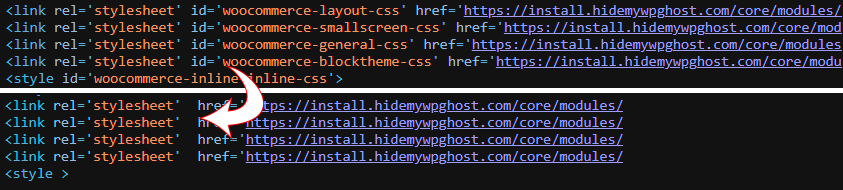
To verify, open your site in a private browser window, right-click, and select View Source. Search for plugin or theme names that previously appeared in id attributes. They should be gone.
Troubleshooting
IDs still appear in page source after enabling
Clear all caches: WordPress caching plugin, CDN, and server cache. If you use a caching plugin, make sure Change Paths in Cached Files is enabled so WP Ghost can process cached HTML. Then test in a private browser window.
A plugin or theme stopped working after enabling
Some plugins and themes use JavaScript that references elements by their id attribute. If removing IDs breaks a specific feature, the plugin’s JavaScript likely depends on the ID selector. Disable this option and test whether the issue resolves. If it does, you’ll need to choose between hiding the IDs (for security) or keeping them (for that plugin’s functionality). This is rare – most modern plugins use class selectors rather than IDs.
If you’ve lost access or something broke, check the emergency disable guide, use the rollback settings, or add a constant in wp-config.php to disable WP Ghost temporarily.
Frequently Asked Questions
What exactly gets removed?
The id attribute on <link>, <style>, and <script> tags in your frontend HTML output. For example, <link id="woocommerce-layout-css" ...> becomes <link ...> – the tag stays, the stylesheet loads normally, but the identifying ID is gone.
Is hiding IDs enough to hide my plugins?
It’s one layer. For complete plugin security, you also need to change plugin paths, hide version numbers, and remove source map references. Each addresses a different place where plugin names leak. IDs are the secondary signal that scanners fall back on when paths are already hidden.
Will this break my caching plugin?
Some caching plugins use element IDs for cache identification or optimization. Test after enabling. If you notice cache-related issues, disable the option and check if the issue resolves. Most modern caching plugins (WP Rocket, LiteSpeed, Autoptimize) work fine without element IDs.
Does this affect SEO?
No. Search engines don’t use element IDs on <link>, <style>, or <script> tags for indexing or ranking. The stylesheets and scripts continue loading and executing normally. Only the identifying id attribute is removed.
Does WP Ghost modify WordPress core files?
No. WP Ghost removes IDs from the HTML output at runtime through WordPress filters. The actual files, enqueue registrations, and WordPress core remain untouched. Disabling the feature restores all original IDs instantly.
Related Tutorials
Remove every fingerprint from your page source:
- Hide the WordPress Version – Strip version parameters from CSS and JS files.
- Hide Source Map References – Remove debugging metadata that reveals file names.
- Change the Plugins Path – Hide plugin directory names alongside their IDs.
- Change the Themes Path – Hide theme names from paths and source code.
- Hide from WordPress Theme Detectors – Remove all CMS detection signals.
- Change Paths in Cached Files – Ensure ID removal works in cached pages.