
Yes. You can change the default /wp-admin URL to any custom name with WP Ghost, no code editing or .htaccess modifications required. Go to WP Ghost > Change Paths > Admin Security, enter your chosen name in the Custom Admin Path field (for example, mysecretpanel), and click Save. Your new admin URL becomes yourdomain.com/mysecretpanel. No files or directories are physically altered, the change is applied through server rewrite rules, so there’s no impact on SEO or loading speed. Deactivating WP Ghost restores the default /wp-admin path instantly.
Why Rename wp-admin
The /wp-admin path is the default URL that leads to the WordPress dashboard, it’s where you manage posts, install plugins, update themes, and configure your entire website. Every WordPress site uses the same address by default: https://yourdomain.com/wp-admin.
That predictability is the problem. Automated bots are programmed to target /wp-admin and /wp-login.php on every WordPress site they find. They run 24/7, testing common username and password combinations. Changing the path means exploit scripts that target the default URL fail before they reach a login form, if they can’t find the door, they move on to the next target.
How to Change wp-admin to Something Else
- Go to WP Ghost > Change Paths > Level of Security. Select Safe Mode or Ghost Mode and click Save. This activates the path-changing features.
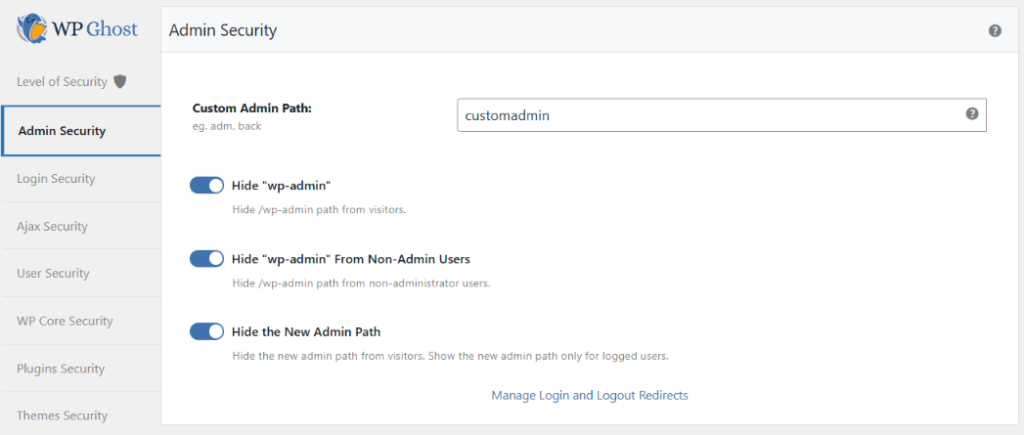
- Go to WP Ghost > Change Paths > Admin Security.
- Enter a custom name for the wp-admin path in the Custom Admin Path field. Choose something unique that isn’t easy to guess.
- Click Save to apply the change.
- Bookmark the new admin URL immediately.
- Run a Security Check at WP Ghost > Security Check to confirm the change is working.
Full walkthrough in the Change and Hide wp-admin Path guide.
Choosing a Good Custom Name
Avoid common words like login, admin, backend, or dashboard. Bots are programmed to try these variations too. Use something truly unique, a combination of random words or characters works well.
| Avoid | Better Alternatives |
|---|---|
login, admin, backend, dashboard, wp-admin2 | Random word combinations or character strings |
| Your domain name or brand name | Something unrelated to your site |
| Easy-to-guess variations of default paths | Unique, memorable but non-obvious strings |
Extra Protection: Hide wp-admin Too
Changing the path alone gives you a new URL, but the original /wp-admin path may still be accessible and redirect to the login page. WP Ghost offers two additional options under WP Ghost > Change Paths > Admin Security that complete the protection:
Hide “wp-admin”. When enabled, anyone who isn’t logged in and tries to access /wp-admin gets a 404 error page. The path simply doesn’t exist for them. Bots hit a dead end.
Hide “wp-admin” from Non-Admin Users. By default, every logged-in WordPress user (editors, authors, subscribers) can access the /wp-admin dashboard. This option restricts access to administrators only, other user roles get redirected away. Especially useful for WooCommerce stores, membership sites, or any site with multiple user roles.
What Happens After You Save
Your new admin URL takes effect right away. If you chose mysecretpanel as your custom path, your new admin URL is yourdomain.com/mysecretpanel. The old /wp-admin URL will either return a 404 (if you enabled the Hide option) or redirect logged-in users to the new path.
WordPress continues to work normally behind the scenes. WP Ghost uses rewrite rules, not file changes. Your plugins, themes, and WordPress core are completely unaffected. Admin AJAX, REST API, and cron jobs continue functioning as expected. Internal links in the admin bar, dashboard menus, and internal redirects all point to the new path automatically.
Hosting Notes
Not all hosting environments handle custom admin paths in exactly the same way. Managed hosts that use Nginx (like WP Engine) handle custom wp-admin paths differently using path redirection instead of mapping, which can cause WP Ghost to be unable to identify calls to the custom wp-admin path. If you’re on WP Engine, Kinsta, or a similar Nginx-based managed host and experience issues, use the default wp-admin path and enable Hide “wp-admin” from Non-Admin Users instead.
Frequently Asked Questions
Can I change wp-admin to something else?
Yes. With WP Ghost, go to WP Ghost > Change Paths > Admin Security, enter your chosen custom name in the Custom Admin Path field, and click Save. Your new admin URL replaces /wp-admin immediately. No code editing, no file changes, no .htaccess modifications.
What names should I avoid?
Avoid common words like login, admin, backend, or dashboard. Bots try these variations. Also avoid obvious derivatives like admin2, wp-admin2, or your domain name. Use something truly unique, a combination of random words or characters that isn’t easy to guess.
Will changing wp-admin break my site or plugins?
In most cases, no. WP Ghost uses rewrite rules that route requests transparently. Some plugins that hardcode the default wp-admin path may not work correctly. If you see compatibility issues, revert to the default path and enable Hide “wp-admin” from Non-Admin Users instead, which keeps the default path but restricts access to administrators only.
What if I forget my custom admin URL?
Bookmark the URL immediately after setting it. If you forget, see the emergency disable guide for recovery via FTP. Renaming the plugin folder deactivates WP Ghost and restores the default /wp-admin path.
Will this affect my SEO?
No. Search engine crawlers don’t need access to /wp-admin. The admin area isn’t indexed and has no impact on rankings. Changing or hiding admin paths only affects admin-side URLs. Public content, sitemaps, and front-end URLs remain exactly the same.
Does this work with WooCommerce?
Yes. WP Ghost is fully compatible with WooCommerce. Customer-facing pages like shop, cart, checkout, and my-account are not affected by admin path changes. WooCommerce AJAX calls continue to function normally.
Does WP Ghost work on WordPress multisite?
Yes. WP Ghost supports WordPress multisite installations. The wp-admin path change can be applied network-wide, and each subsite’s admin path uses the same custom path you configure.
Does WP Ghost modify WordPress core files?
No. WP Ghost never modifies, moves, or renames any WordPress core file. All path changes are handled through URL rewrite rules and WordPress filters. Deactivating WP Ghost restores all default paths instantly.